

Telerik is a Bulgarian company offering software tools for web, mobile, desktop application development, tools, and subscription services for cross-platform application development. Here, in this article, I will explain how to use Telerik Grid in ASP. NET MVC.

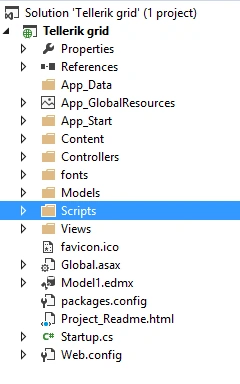
To use the Telerik UI, here, I have created a new MVC project. Look at my Solution Explorer.
I have added an entity data model to connect with the database as follows.
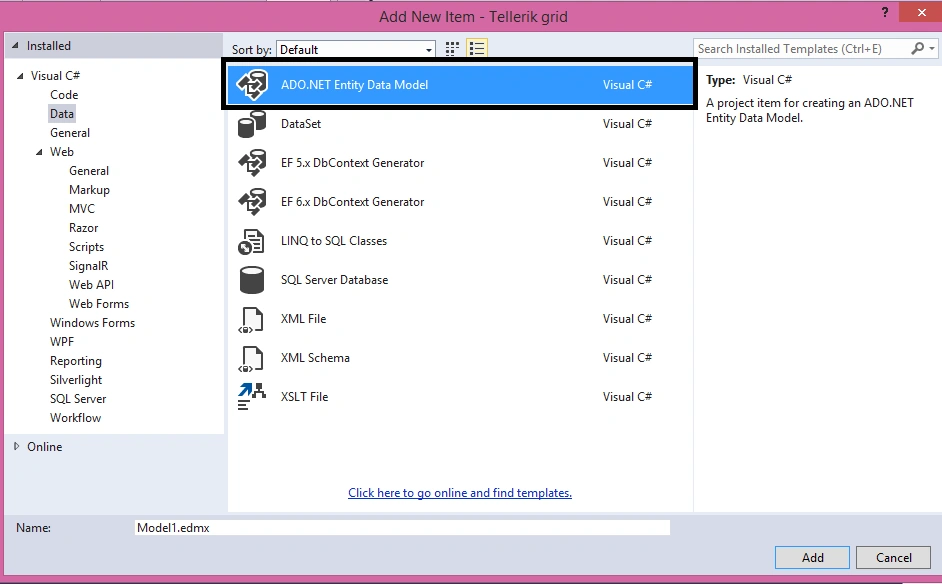
Here is my connection string and context.
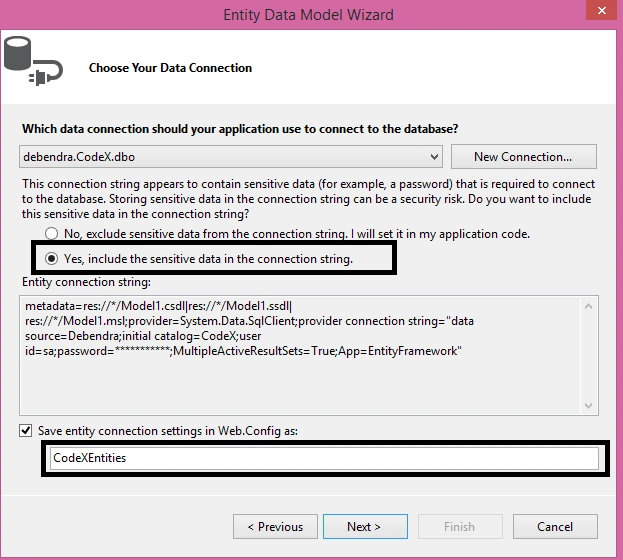
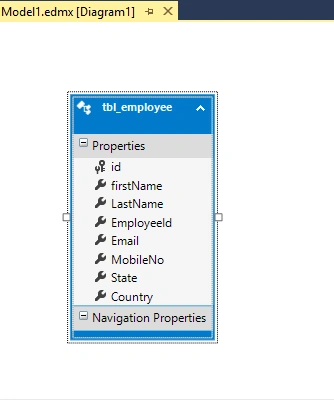
Here is my table in ORM window.
To use the Telerik UI, here, I have created a new MVC project. Look at my Solution Explorer.
I have added an entity data model to connect with the database as follows.
Here is my connection string and context.
Here is my table in ORM window.
In case anyone needs the table structure and data, here is my table script:
- USE [CodeX]
- GO
- /****** Object: Table [dbo].[tbl_employee] Script Date: 23/07/2016 1:29:43 AM ******/
- SET ANSI_NULLS ON
- GO
- SET QUOTED_IDENTIFIER ON
- GO
- CREATE TABLE [dbo].[tbl_employee](
- [id] [int] NOT NULL,
- [firstName] [nvarchar](50) NULL,
- [LastName] [nvarchar](50) NULL,
- [EmployeeId] [int] NULL,
- [Email] [nvarchar](50) NULL,
- [MobileNo] [nvarchar](10) NULL,
- [State] [nvarchar](30) NULL,
- [Country] [nvarchar](50) NULL,
- CONSTRAINT [PK_tbl_employee] PRIMARY KEY CLUSTERED
- (
- [id] ASC
- )WITH (PAD_INDEX = OFF, STATISTICS_NORECOMPUTE = OFF, IGNORE_DUP_KEY = OFF, ALLOW_ROW_LOCKS = ON, ALLOW_PAGE_LOCKS = ON) ON [PRIMARY]
- ) ON [PRIMARY]
- GO
- INSERT [dbo].[tbl_employee] ([id], [firstName], [LastName], [EmployeeId], [Email], [MobileNo], [State], [Country]) VALUES (1, N'Debendra', N'Dash', 10090, N'[email protected]', N'8123371257', N'Odisha', N'India')
- INSERT [dbo].[tbl_employee] ([id], [firstName], [LastName], [EmployeeId], [Email], [MobileNo], [State], [Country]) VALUES (2, N'Sridhar', N'Dash', 10090, N'[email protected]', N'808900099', N'karnataka', N'India')
- INSERT [dbo].[tbl_employee] ([id], [firstName], [LastName], [EmployeeId], [Email], [MobileNo], [State], [Country]) VALUES (11, N'Manas', N'sing', 56, N'[email protected]', N'8090705545', N'UP', N'India')
- INSERT [dbo].[tbl_employee] ([id], [firstName], [LastName], [EmployeeId], [Email], [MobileNo], [State], [Country]) VALUES (40, N'Tushar', N'Jena', 78, N'[email protected]', N'676789990', N'MP', N'India')
- INSERT [dbo].[tbl_employee] ([id], [firstName], [LastName], [EmployeeId], [Email], [MobileNo], [State], [Country]) VALUES (67, N'Rubi', N'singh', 90, N'[email protected]', N'8018070999', N'Ap', N'India')
- INSERT [dbo].[tbl_employee] ([id], [firstName], [LastName], [EmployeeId], [Email], [MobileNo], [State], [Country]) VALUES (99, N'Sujit', N'Tiwari', 80, N'[email protected]', N'7894290976', N'UP', N'India')
- INSERT [dbo].[tbl_employee] ([id], [firstName], [LastName], [EmployeeId], [Email], [MobileNo], [State], [Country]) VALUES (120, N'Kabita', N'Kumari', 129, N'[email protected]', N'7894290765', N'MP', N'India')
- INSERT [dbo].[tbl_employee] ([id], [firstName], [LastName], [EmployeeId], [Email], [MobileNo], [State], [Country]) VALUES (123, N'Dinesh', N'Kumar', 234, N'[email protected]', N'8012345678', N'Bihar', N'India')
- INSERT [dbo].[tbl_employee] ([id], [firstName], [LastName], [EmployeeId], [Email], [MobileNo], [State], [Country]) VALUES (150, N'Sachin', N'Tendulkar', 2345, N'[email protected]', N'8909900008', N'Assam', N'India')
- INSERT [dbo].[tbl_employee] ([id], [firstName], [LastName], [EmployeeId], [Email], [MobileNo], [State], [Country]) VALUES (190, N'Sourav', N'Ganguli', 234, N'[email protected]', N'7894270987', N'WB', N'India')
- INSERT [dbo].[tbl_employee] ([id], [firstName], [LastName], [EmployeeId], [Email], [MobileNo], [State], [Country]) VALUES (191, N'Pankaj', N'sahu', 188, N'[email protected]', N'7894270987', N'WB', N'India')
- INSERT [dbo].[tbl_employee] ([id], [firstName], [LastName], [EmployeeId], [Email], [MobileNo], [State], [Country]) VALUES (192, N'Kisan', N'agrawal', 177, N'[email protected]', N'7894270989', N'AP', N'India')
- INSERT [dbo].[tbl_employee] ([id], [firstName], [LastName], [EmployeeId], [Email], [MobileNo], [State], [Country]) VALUES (193, N'Ravi', N'kumar', 199, N'[email protected]', N'7894270989', N'ODISHA', N'India')
- INSERT [dbo].[tbl_employee] ([id], [firstName], [LastName], [EmployeeId], [Email], [MobileNo], [State], [Country]) VALUES (194, N'Kumar', N'dora', 100, N'[email protected]', N'3494270987', N'JHARKHAND', N'India')
- INSERT [dbo].[tbl_employee] ([id], [firstName], [LastName], [EmployeeId], [Email], [MobileNo], [State], [Country]) VALUES (195, N'Prakash', N'jha', 30, N'[email protected]', N'7894270987', N'BIHAR', N'India')
- INSERT [dbo].[tbl_employee] ([id], [firstName], [LastName], [EmployeeId], [Email], [MobileNo], [State], [Country]) VALUES (196, N'Jeetu', N'nayak', 34, N'[email protected]', N'7894270987', N'PUNJAB', N'India')
- INSERT [dbo].[tbl_employee] ([id], [firstName], [LastName], [EmployeeId], [Email], [MobileNo], [State], [Country]) VALUES (197, N'Rani', N'sahu', 35, N'[email protected]', N'7894270987', N'GOA', N'India')
- INSERT [dbo].[tbl_employee] ([id], [firstName], [LastName], [EmployeeId], [Email], [MobileNo], [State], [Country]) VALUES (198, N'Bharat', N'das', 67, N'[email protected]', N'7894279900', N'GOA', N'India')
- INSERT [dbo].[tbl_employee] ([id], [firstName], [LastName], [EmployeeId], [Email], [MobileNo], [State], [Country]) VALUES (199, N'OM', N'prakash', 68, N'[email protected]', N'8090907090', N'AP', N'India')
- INSERT [dbo].[tbl_employee] ([id], [firstName], [LastName], [EmployeeId], [Email], [MobileNo], [State], [Country]) VALUES (200, N'Sujata', N'sahu', 29, N'[email protected]', N'709087690', N'KARNATAKA', N'India')
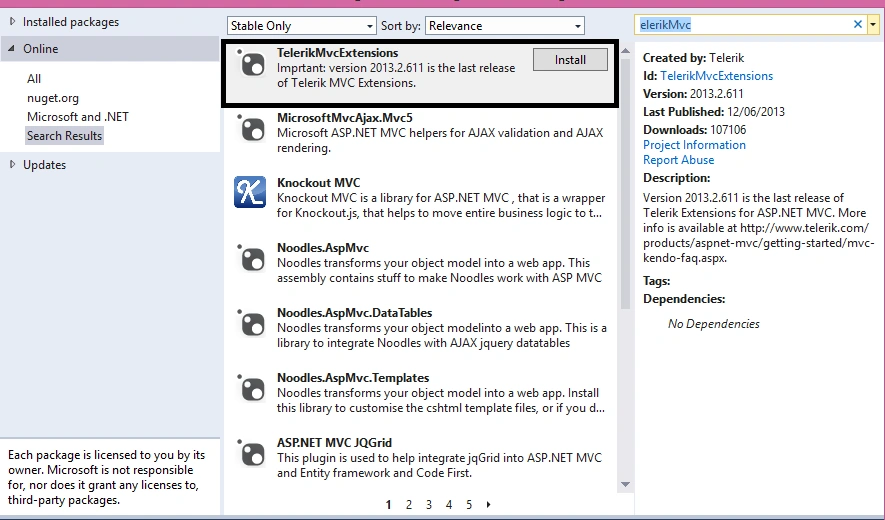
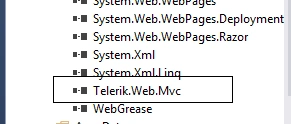
It will add the following dll and scripts into my project, as follow.
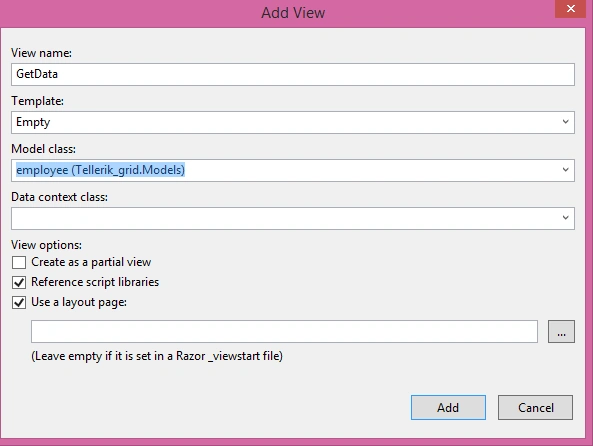
Now, I will add an Employee model, as shown below.
Piyush MahurkarPosted Aug 2, 2016, 2:07 AM
Nice and simple
Vignesh ManiPosted Aug 1, 2016, 7:04 AM
NIce one
Ravi KandelPosted Aug 1, 2016, 7:04 AM
Nice
kalu singh raoPosted Aug 1, 2016, 1:32 AM
Nice share
Bhavik PatelPosted Jul 31, 2016, 11:27 PM
Nice