
I have just completed my Graduation in IT and at the very beginning of my career I am facing the projects or problems related to 3D Graphics, Rendering of 3D objects in computer screen and perform some basic operation over 3D object. The result of this was I have done some R&D related to this topics and I found that WPF will help me in Rendering of 3D object and Transformation of 3D objects.
INDEX
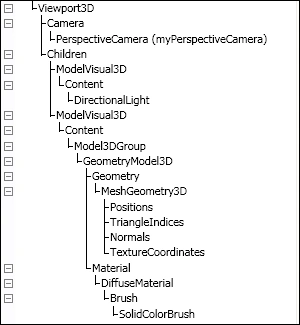
The following image shows the hierarchy which we have to follow to render 3D object.
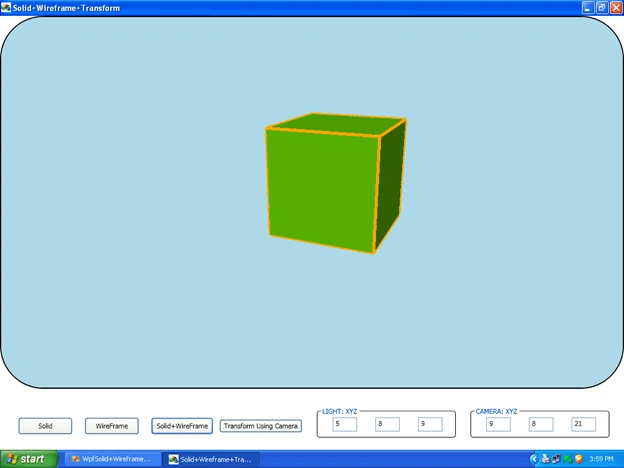
In the very beginning I decided to make a project that (1) renders 3D objects (2) Wireframe object and (3) does basic operations for 3D objects. And this article is the result of this process.
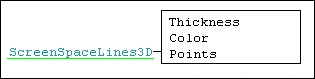
One thing that shocked me was that WPF does not render wireframe objects but thank God that the 3DTool provides the ScreenSpaceLine3D class that allows us to render wireframe objects.
Requirements
- VS 2008 or onwards version.
- 3DTool DLL.
- Basic Mathematical and WPF knowledge.
INDEX
- Read Important Definitions
- Set Camera and Light
- Draw solid cube
- Draw Wireframe cube
- Transform above cube's that is Solid and Wire frame cube.
This section contains the important definitions. You should have to come back here another time also when you will draw the solid and wireframe cube.
The following image shows the hierarchy which we have to follow to render 3D object.
- VIEWPORT3D:
- CAMERA:
- MODELVISUAL3D:
- LIGHT:
- MODEL3DGROUP:
- GeometryModel3D:
Two very basic properties of this class will help us in creating 3D objects. And both properties are as below. You can also see the hierarchy in the preceding image
1. Geometry and
2. Material.
1. Geometry
MeshGeometry3D:
Geometry property of GeometryModel3D class contains the instance of the MeshGeometry3D class.
MeshGeometry3D is used to create a mesh.
Now what is the mesh and what is the use of it?
You can compare the mesh with the skeleton of our body.
Mesh is skeleton of 3D models.
It is used to create the surface of the 3D models.
And to create a surface it uses a very basic geometry shape and as we all know it is a TRIANGLE.
So MESH will use TRIANGLE as the basic building blocks to represent Surface.
The Reason for using a TRIANGLE is that it can represent more information than any other geometrical shape such as square, pentagon, hexagon or any polygon.
Mesh is consisting of Points and Lines.
Points represent the positions in 3d world space and line connects those positions to establish the surface area. The MeshGeometry3D class contains three very basic properties that are frequently used in creating 3D objects and these are as below
1. Geometry
MeshGeometry3D:
Geometry property of GeometryModel3D class contains the instance of the MeshGeometry3D class.
MeshGeometry3D is used to create a mesh.
Now what is the mesh and what is the use of it?
You can compare the mesh with the skeleton of our body.
Mesh is skeleton of 3D models.
It is used to create the surface of the 3D models.
And to create a surface it uses a very basic geometry shape and as we all know it is a TRIANGLE.
So MESH will use TRIANGLE as the basic building blocks to represent Surface.
The Reason for using a TRIANGLE is that it can represent more information than any other geometrical shape such as square, pentagon, hexagon or any polygon.
Mesh is consisting of Points and Lines.
Points represent the positions in 3d world space and line connects those positions to establish the surface area. The MeshGeometry3D class contains three very basic properties that are frequently used in creating 3D objects and these are as below
1.Position
2.TriangleIndices
3.Normal
1. Position
Position represents the location of a single point in 3D world space.
2. TriangleIndices
The mesh position only describes the three points of the triangle (very basic shape to create mesh) in mesh.
1. Position
Position represents the location of a single point in 3D world space.
2. TriangleIndices
The mesh position only describes the three points of the triangle (very basic shape to create mesh) in mesh.
In order to create the mesh, after adding the position we need to define the points of the triangles and that can be done through TriangleIndices.
In WPF, the order in which you add triangle indices is very important.
Because it affects the visibility of triangle represent by triangleindices.
Let's say,
Suppose, we are looking at the triangular surface.
If we define the triangle's indices in a clock-wise direction then the side we are looking at will be invisible or we can say that what we see are the back side of that triangular surface.
If we define triangle indices in a counter-clockwise direction, then the side we are looking at will be visible or what we are seeing is the front face of that triangular surface.
NOTE: in the above case though you give the triangle indices in a clock-wise direction so you can see the surface if you have provided background material.
3. NORMAL:
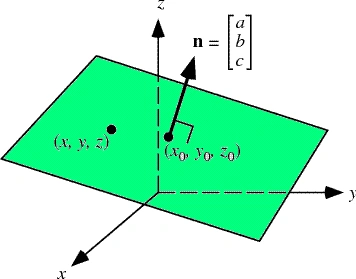
Mathematically, a vector is normally perpendicular to the surface.
To clarify the idea.
See the image below.
See the image below.
In order to get the best edge discrimination of a 3D-Object we have to add Normals for each position in the mesh.
Triangleindices decides visibility and invisibility (Front or Back side of Triangle)
Whereas Normals are used by the light sources to decide how much light will take each triangle (in mesh).
I have added 24 normals for 8 positions of the cube because each point of position will be used by 3 triangles. So, each position has 3 normals in our case.
2. Material
Material represents the texture of the 3D Geometries. Combined with a light source.
There are four basic materials used in WPF as below.
Diffuse,Specular,emissive,Combined
For more detailed explanation on material go here
2. Set Camera and Light
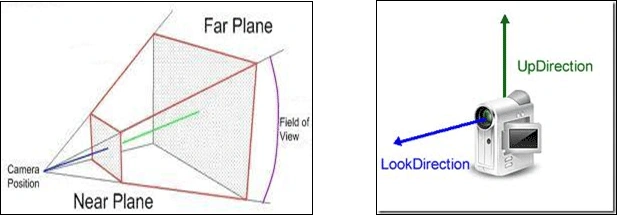
To set camera and light see the code below and image I think I don't need to write any thing for explaining definitions.
You can also see the same code in demo projects .xaml file
2. Material
Material represents the texture of the 3D Geometries. Combined with a light source.
There are four basic materials used in WPF as below.
Diffuse,Specular,emissive,Combined
For more detailed explanation on material go here
2. Set Camera and Light
To set camera and light see the code below and image I think I don't need to write any thing for explaining definitions.
You can also see the same code in demo projects .xaml file
<PerspectiveCamera x:Name="camera" FarPlaneDistance="100" LookDirection="-9,-8,-21" UpDirection="0,1,0" NearPlaneDistance="1" Position="9,8,21" FieldOfView="70" /> </Viewport3D.Camera> <ModelVisual3D> <ModelVisual3D.Content> <DirectionalLight x:Name="directionLightOfMainViewPort" Color="White" Direction="-5,-8,-9" /> </ModelVisual3D.Content> </ModelVisual3D> </Viewport3D> |
See the image below to make the definition clear.
|
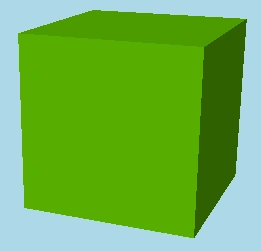
3. Draw Solid Cube
In order to draw solid cube follow the steps below.
EXPLANATION:
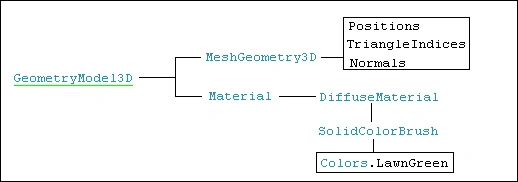
I will explain from bottom to top, which means from GeometryModel3D to Viewport3D
FIRST: At very first create MeshGeometry3D(meshGeo) with its three basic properties.
After creating the mesh (meshGeo), add MeshGeometry3D(meshGeo) and Material(material) in the GeometryModel3D(geoModel).
See the code below.
MeshGeometry3D meshGeo;
Material material;
//Create MESH
meshGeo = new MeshGeometry3D();
// Add Position in MESH
meshGeo.Positions.Add(p0);
meshGeo.Positions.Add(p1);
meshGeo.Positions.Add(p2);
// Add triangleIndices in MESH
meshGeo.TriangleIndices.Add(0);
meshGeo.TriangleIndices.Add(1);
meshGeo.TriangleIndices.Add(2);
// Add normal in MESH
Vector3D normal = CalculateNormal(p0, p1, p2);
meshGeo.Normals.Add(normal);
meshGeo.Normals.Add(normal);
meshGeo.Normals.Add(normal);
// Create MATERIAL
material = new DiffuseMaterial(new SolidColorBrush(Colors.LawnGreen));
// Create GEOMETRYMODEL3D wich tackes MESH adn MATERIAL as arguments
geoModel = new GeometryModel3D(meshGeo, material);
|
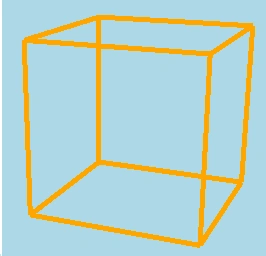
See the image below.





Здравко БояновPosted Oct 21, 2019, 7:35 AM
Hello If I try to put the wireframe code in method and run it I get no wireframe. I only get when is connected to event. Is it possible without event ?
hossein hajilouPosted Aug 3, 2014, 3:50 PM
hi , Thank you for the work nice, in may code , The "" and "" is not defined!! what is problem ??? please get more help. I apologize for the bad English.
sundar rasuPosted Dec 14, 2013, 1:52 AM
thanks bt i need wpf 3d with canvas
Alexander NeideckPosted Oct 19, 2013, 5:03 AM
works great! i'm new in using wpf 3D. This was very helpful!
MakotoPosted Jun 17, 2011, 7:53 PM
Thank you for the useful article. I am porting my VC++/MFC CAD system to C#/WPF. (www.iNet1000.com). I am new to WPF... How do I group geometry under Viewport3D --- so that I can delete all geometry (box, cylinder, ...) in that group without affecting the other groups containing some other geometry? More specifically, I would like to delete all geometry (xxx.Children.Clear) in one group so that I can maybe regenerate (xxx.Children.Add) the same geometry with modification. (I do not want to disturb other groups). I do not like to regenerate LIGHTs either, so the lights should reside outside of my groups.... Makoto
Prashant RaghavPosted Feb 2, 2011, 3:28 AM
when i run the code after copying in ma file i am getting a blank scren
Mahesh ChandPosted Jan 24, 2011, 6:58 AM
Thanks for sharing