

In previous article I've shown how to deal with elements' colors depending on their types as they are rectangles, ellipses or triangles. In this article, we will still dealing with shapes but from a different angle. I mean, in the previous articles we've dealt with static shapes, I mean shapes those never change their places, so what if we make them changing their places or even resizing them. Of Corse, the code that I will provide is not the optimized one, but it will be enough for you as a first step to go forward moving and resizing shapes on a WPF scene.
At first, let's introduce the scenario. The user can add shapes of either type of rectangle or type of ellipse. If the drag and drop mode is set then the user moves the selected shapes using the mouse. In the other hand, if the resize mode is set then the user can resize the selected shape.
This last one changes its background color to purple if it is processed either when moving or resizing and then it get back to its original color once the user release it. To do so, we do first add a canvas to the given window.
<Canvas Name="Scene"
MouseLeftButtonDown="Scene_MouseLeftButtonDown"
MouseLeftButtonUp="Scene_MouseLeftButtonUp"
MouseMove="Scene_MouseMove">
<Canvas.ToolTip>
<Label Name="lblCoordonate"/>
</Canvas.ToolTip>
</Canvas>
As the above peace of XAML shows, we've made use of the mouse left button down, the mouse left button up and the mouse move of that given canvas.
Let's explore the code behind. The first region is the variable one
#region Variables
MatrixTransform transform;
Point StartPoint;
Point CurrentPoint;
double[] Dimensions = new double[2];
Rect rect = new Rect();
bool IsResizeMode;
bool IsDragAndDropMode;
#endregion
We added a matrix transform object to help us simulating the movement of the shape when the mouse is moved by the user.
The start point is the one that the mouse captures for the first time the user hits the shape using the mouse.
The current point is the one that the mouse captures for a given position relative to the scene.
The dimensions array is an array of integers, it holds the RadiusX and RadiusY values of the selected shape if it is type of ellipse, Of Corse. The purpose behind that is to keep the shape dimensions with the latest size leveraged by the user.
The rect variable represents the shape dimension when it is type of rectangle
The both IsResizeMode and the IsDragAndDropMode are both type of Boolean those set the mode either it is a drag and drop mode within which the user can move the selected but not resizing it or the resizing mode within which the user resizes the given shape.
The window loaded event handler is used to initialize both the transform and the mode to allow user drag and drop shapes for the first time as follow:
private void Window_Loaded(object sender, RoutedEventArgs e)
{
IsResizeMode = false;
IsDragAndDropMode = true;
transform = new MatrixTransform();
}
We also provide code to let the user add shapes into the scene using the windows context menu, in addition to the ability to define the mode either drag and drop or resize mode
<Window.ContextMenu>
<ContextMenu>
< MenuItem Header="Add an ellipse" Click="MenuItem_AddEllipse"/>
<MenuItem Header="Add a rectangle" Click="MenuItem_AddRectangle"/>
<MenuItem Header="Resize mode" Click="MenuItem_ResizeMode"/>
<MenuItem Header="Drag and drop mode" Click="MenuItem_DragAndDropMode"/>
</ContextMenu>
</Window.ContextMenu>
And here is the code behind of the given context menu
#region Add Shapes and define the mode
private void MenuItem_AddEllipse(object sender, RoutedEventArgs args)
{
Path path = new Path { Fill = Brushes.Red,
Stroke = Brushes.Black,
Data = new EllipseGeometry(new Point(50, 50), 50, 50) };
Scene.Children.Add(path);
}
private void MenuItem_AddRectangle(object sender, RoutedEventArgs args)
{
Path path = new Path { Fill = Brushes.Blue,
Stroke = Brushes.Black,
Data = new RectangleGeometry(new Rect(0, 0, 150, 100)) };
Scene.Children.Add(path);
}
private void MenuItem_ResizeMode(object sender, RoutedEventArgs args)
{
IsResizeMode = true;
IsDragAndDropMode = false;
}
private void MenuItem_DragAndDropMode(object sender, RoutedEventArgs args)
{
IsDragAndDropMode = true;
IsResizeMode = false;
}
#endregion
Now, let's explore the main dish of the day where the principal business logic part resides.
First let's explain the business logic located within the mouse left button down.
private void Scene_MouseLeftButtonDown(object sender, MouseButtonEventArgs args)
{
//The first block
HitTestResult result = VisualTreeHelper.HitTest(Scene, Mouse.GetPosition(Scene));
Path path = result.VisualHit as Path;
//The second block
if (path.Data.GetType()== typeof(EllipseGeometry))
{
Dimensions[0] = (path.Data as EllipseGeometry).RadiusX;
Dimensions[1] = (path.Data as EllipseGeometry).RadiusY;
path.Tag = Dimensions;
}
if (path.Data.GetType()== typeof(RectangleGeometry))
{
rect = (path.Data as RectangleGeometry).Rect;
path.Tag = rect;
}
//The third block
path.Fill = Brushes.Violet;
//The fourth block
if (StartPoint == null)
{
StartPoint = args.GetPosition(Scene);
}
StartPoint = CurrentPoint;
}
To understand what's going on with this block of code, let's explain it block by block
The first block consists of capturing the shape that the user hits with the mouse; it is a type of path.
The second block try to keep information about the captured shape, if it is type of ellipse geometry then it keeps the RadiusX and the RadiusY within an array of double. And if the geometry is type of rectangle then the rect property holds the dimensions instead. All information is kept within the tag property of the path element as you see.
The third block changes the background of the shape to notify the user that he's actually processing the first one, I mean the shape.
The fourth block is necessary to set the values of the Start point whenever the user hits the shape for the first time or not.
Afterward, let's explain the mouse move event handler. As same as the previous code, we divided the code into several blocks; the first one consists of capturing the current position of the mouse and displaying it within a label to inform the user of the current coordinates.
The second block is used to capture the current shape that the mouse hits, this block could be enhanced by the way to prevent creating paths during the mouse movement.
The third block is used to simulate the shape movement when the mouse is moving; the matrix transform is applied to shift the shape according to the current point coordinates.
The fourth block is used to resize the given shape either it is a rectangle or an ellipse. Those dimensions data are kept within the tag property of the path to reinitialize the shape dimensions when the user releases the mouse.
private void Scene_MouseMove(object sender, MouseEventArgs args)
{
//First block
CurrentPoint = args.GetPosition(Scene);
lblCoordonate.Content = CurrentPoint.ToString();
//Second block
HitTestResult result = VisualTreeHelper.HitTest(Scene, Mouse.GetPosition(Scene));
Path path = result.VisualHit as Path;
//Third block
if (IsDragAndDropMode == true && IsResizeMode == false)
{
if (Mouse.LeftButton == MouseButtonState.Pressed)
{
transform.Matrix = new Matrix(1, 0, 0, 1,
CurrentPoint.X - StartPoint.X,
CurrentPoint.Y - StartPoint.Y);
path.RenderTransform = transform;
}
}
//Fourth block
if (IsDragAndDropMode == false && IsResizeMode == true)
{
Geometry geomerty = path.Data;
if (Mouse.LeftButton == MouseButtonState.Pressed)
{
if (geomerty.GetType() == typeof(EllipseGeometry))
{
EllipseGeometry currentShape = geomerty as EllipseGeometry;
currentShape.RadiusX = CurrentPoint.X - currentShape.Center.X;
currentShape.RadiusY = CurrentPoint.Y - currentShape.Center.Y;
double[] Dimensions = new double[2] { currentShape.RadiusX,
currentShape.RadiusY };
path.Tag = Dimensions;
}
if (geomerty.GetType() == typeof(RectangleGeometry))
{
RectangleGeometry currentShape = geomerty as RectangleGeometry;
Vector vector = CurrentPoint - currentShape.Rect.Location;
Rect rect = new Rect(currentShape.Rect.Location, vector);
currentShape.Rect = rect;
path.Tag = rect;
}
}
}
Now, comes the tricky part, as WPF relays on the absolute coordinates for positioning the elements, then the shapes are repositioned to their first location, I mean the one before moving them which is not good situation as they must remain at their final destination, I mean exactly where the user releases the mouse and the next movement should begin exactly from there and not from the earlier first location. To do that, we added some business logic to the mouse left button up event handler.
private void Scene_MouseLeftButtonUp(object sender,
MouseButtonEventArgs e)
{
//First Block
HitTestResult result = VisualTreeHelper.HitTest(Scene,
Mouse.GetPosition(Scene))
Path path = result.VisualHit as Path;
//Second block
if (IsDragAndDropMode == true && IsResizeMode == false)
{
if (path.Data.GetType() == typeof(EllipseGeometry))
{
EllipseGeometry geometry = new EllipseGeometry(new Point(50, 50),
50, 50);
if ((path.Tag as double[]).Length>0)
{
geometry.RadiusX =(path.Tag as double[])[0];;
geometry.RadiusY =(path.Tag as double[])[1];
}
geometry.Transform = new TranslateTransform {
X = CurrentPoint.X - geometry.RadiusX,
Y = CurrentPoint.Y - geometry.RadiusY };
Path FinalPath = new Path { Fill = Brushes.Red,
Stroke = Brushes.Black,
Data = geometry };
Scene.Children.Add(FinalPath);
Scene.Children.Remove(path);
}
if (path.Data.GetType() == typeof(RectangleGeometry))
{
RectangleGeometry geometry = new RectangleGeometry
(new Rect(0, 0, 150, 100));
if ((Rect)path.Tag != null)
{
geometry.Rect = (Rect)path.Tag;
}
geometry.Transform = new TranslateTransform {
X = CurrentPoint.X - geometry.Rect.Width / 2,
Y = CurrentPoint.Y - geometry.Rect.Height / 2 };
Path FinalPath = new Path { Fill = Brushes.Blue,
Stroke = Brushes.Black, Data = geometry };
Scene.Children.Add(FinalPath);
Scene.Children.Remove(path);
}
}
//Third block
if (IsDragAndDropMode == false && IsResizeMode == true)
{
Geometry geometry = path.Data;
if (path.Data.GetType() == typeof(EllipseGeometry))
{
path.Fill = Brushes.Red;
(geometry as EllipseGeometry).RadiusX =
(path.Tag as double[])[0];
(geometry as EllipseGeometry).RadiusY =
(path.Tag as double[])[1];
}
if (path.Data.GetType() == typeof(RectangleGeometry))
{
path.Fill = Brushes.Blue;
(geometry as RectangleGeometry).Rect =
(Rect)path.Tag;
}
}
}
The idea is quite simple, it consists of creating a new shape with the same characteristics as the one used within the mouse move process, the last current point position will be used to precise the final location of the shape before the user releases the mouse. The new shape will take the place of the old one in the canvas children instead of the old one, I mean the initial one that is captured and moved by the mouse within the scene. The second block leverages exactly that mission; in addition to that, it applies the kept dimensions within the Tag property to the new shape if there is ones, Of Corse. Else the initial dimensions are taken in consideration. And that's it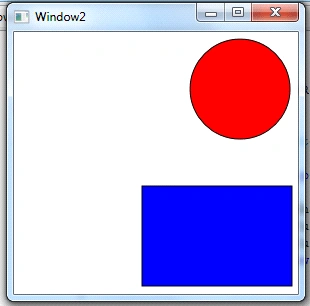
In this article, I illustrated a technique of how to position, move and resize shapes within a WPF scene. In the next article, I will reach the same goal but using the attached property notion.
Good dotneting!!!
Saz RahmanPosted Jun 21, 2011, 7:01 AM
Thanks for your nice article. It is really helpful. I want some shapes (rectangle, ellipse, triangle) in a side of the windows. When I click on any shape, it will draw this shape on the another side of the window, I can be able to write within this shape, I can move or resize this shape. How can I do it?
Patrick WellsPosted Nov 25, 2010, 7:39 AM
I'm getting a 'NullReferenceException was unhandled' error when I try to move a rectangle. It highlights the line: <code> transform.Matrix = new Matrix(1, 0, 0, 1, CurrentPoint.X - StartPoint.X, CurrentPoint.Y - StartPoint.Y); </code>