
Did you ever wish for a superhuman power to be impervious to bullets or travel outside your body? How about the superpower to be able to breathe underwater? Or how about a changing the way you look so you can disguise yourself as anyone, or anything? In this series of four articles, we will travel down the C# wrapper rabbit hole and see how it is all possible with some patterns: Proxy, Decorator, and Adapter.
Creating a Basic Wrapper.
These three patterns, proxy, decorator, and adapter are all implemented identically. They are all wrappers at the basic level. The functionality they provide is how we can make the distinction between them. Let's first look at a template for a basic wrapper and then at how to use a wrapper to implement each of these patterns can help us in our quest for the bizarre.
Before we begin to understand how to perform super-feats, we need to understand the basic super-power all C# developers are born with - our secret ability to wrap (not to be confused with rap). Here is how a wrapper works:
Let's say we have a Thing with a ThingString property and a method PrintThingString() as below:
class Thing
{
private string m_string;
public string ThingString
{
get { return m_string; }
set { m_string = value; }
}
public void PrintThingString()
{
Console.WriteLine(m_string);
}
}
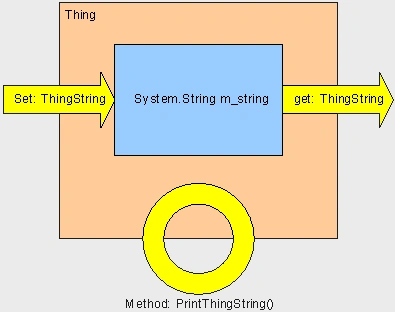
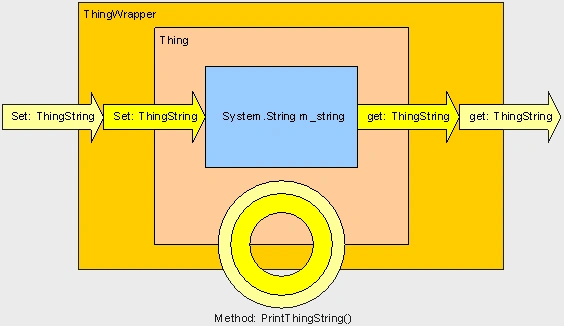
Here is how we create a basic ThingWrapper to wrap the Thing. It contains a reference to the Thing being wrapped and has the same signature. The ThingWrapper just passes requests into the wrapped Thing.
class ThingWrapper
{
Mudhitha DharmasenaPosted Mar 3, 2013, 8:28 AM
Thank you !
AkilPosted Apr 14, 2012, 3:15 AM
Please send me the clear example of Polymorphism with example
Premanshu MukherjiPosted Jun 10, 2011, 1:20 PM
hi there, this is indeed a good article and I love the way you make it so simple, with each line explained. I wonder why there's no link to the next article, in the series.
wendyPosted Feb 22, 2010, 3:31 AM
No Main method in your attached zip file. it's better change your run method name to Main method name. and add one more line Console.Read();