Software developers have used ActiveX controls on their web pages to add advanced functionality to the web experience. With my migration from a Visual Basic 6 world to a Microsoft .NET C# world, I had some questions as to how I could create an ActiveX control with. NET. After some research, I found out that the solution is really quite simple. Create a Windows control project in Visual Studio .NET and expose an interface to the COM world.
In this example, I will walk you through creating an ActiveX control that will show a simple user interface and accept input from a web page. This process will involve the following steps.
- Create an assembly (class library project) that contains an item of type User Control.
- Expose an interface for the control.
- Embed the user control into a web page.
- Transfer data from a web form to the control and display the data on the control.
Step 1. Create an assembly
You can use the example provided for download, or simply create your own project from scratch. In this section, I will outline everything you need to do in order to properly create your assembly.
First, you create a new project of type Class Library. Name the class library ActiveXDotNet.
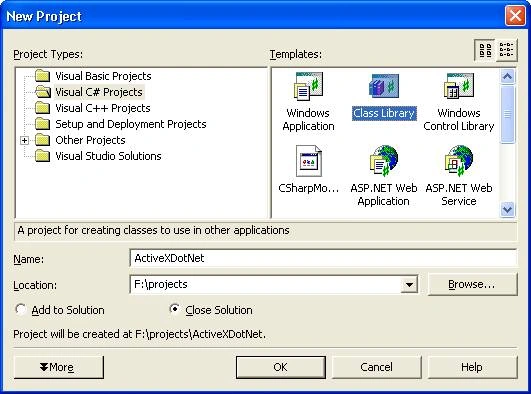
Once the project is created, delete the Class1.cs file from your project as it will not be necessary. Next, add a User Control to the project by right-clicking on the project in your solution explorer, choosing Add, then User Control. Name your user control myControl.
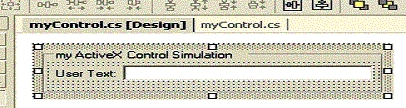
On the user control, add some UI elements, and a text box control named txtUserText. The txtUserText control will display the user data that is typed into the web form. This will demonstrate how to pass data to your User Control.
When you are done adding your user interface to the control we now have to add a key element to the control, an Interface. The interface will allow COM/COM+ objects to know what properties they can use. In this case, we are going to expose one public property named UserText. That property will allow us to set the value of the text box control.
Step 2. Expose the Interface for the control
First, create a private String to hold the data passed from the web form to the control.
private string mStr_UserText;
Place this String just inside the Class myControl.
Next, we will create a public property. The web page will use this property to pass text back to your control. This property will allow the reading and writing of the value mStr_UserText.
public String UserText
{
    get
    {
        return mStr_UserText;
    }
    set
    {
        mStr_UserText = value;
        // Update the text box control value also.
        txtUserText.Text = value;
    }
}
In this example, you will note the extra code in the set section of the public property. When a value is passed from the web form to the control we will set the private String value equal to the value passed to the property. In addition, we are simply going to modify the value of the Text Box control directly. Typically you would NOT do this. Instead, you would raise an event and then validate the data being passed by examining the private variable mStr_UserText. Then you would set the value of the Text Box Control. However, that would add significant code to this example and for simplicity's sake I am omitting that security precaution.
Now that you have a public property that .NET assemblies can use, you need to make that property available to the COM world. We do this by creating an Interface and making the myControl class inherit the interface. This will allow COM objects to see what properties we have made available.
Your code will now look like this.
namespace ActiveXDotNet {
    public interface AxMyControl {
        String UserText {
            set;
            get;
        }
    }
    public class myControl : System.Windows.Forms.UserControl, AxMyControl {
        private String mStr_UserText;
        public String UserText {
            get {
                return mStr_UserText;
            }
            set {
                mStr_UserText = value;
                //Update the text box control value also.
                txtUserText.Text = value;
            }
        }
    }
}
Notice that we now have an interface defined, the interface tells COM/COM+ that there is a public property available for use that is of type String and is readable (get) and writeable (set). All we do now is have the Class myControl inherit the interface and viola! We have a .NET assembly that acts like an ActiveX Control.
Step 3. Embed the user control on a web page
The last thing we do now is use the control in an example web page.
<html>
    <body color=white>
        <hr>
        <font face=arial size=1>
            <OBJECT id="myControl1" name="myControl1" classid="ActiveXDotNet.dll#ActiveXDotNet.myControl" width=288 height=72>
            </OBJECT>
        </font>
        <form name="frm" id="frm">
            <input type="text" name="txt" value="enter text here"><input type=button value="Click me" onClick="doScript();">
        </form>
        <hr>
    </body>
    <script language="javascript">
        function doScript()
        {
            myControl1.UserText = frm.txt.value;
        }
    </script>
</html>
You will notice in the HTML code above, that you call your .NET assembly very similar to an ActiveX control; however there is no GUID, and no .OCX file. Your CLASSID is now the path to your DLL and the Namespace.Classname identifier. Refer to the code above to understand the syntax of the CLASSID object tag property. Place the HTML file and your DLL in the same directory on your web server and navigate to the HTML document. (Do not load the HTML document by double clicking on it, navigate to it in your browser by using the Fully Qualified URL.) *NOTE: You might need to add your web server to your Trusted Sites list in your Internet Explorer browser.
Step 4. Transfer data from the web form to the user control
When you load the HTML page, your control should load into the page and you will see a web form with a text box and a button. In this example, if you type some text into the text box and click the button, it will use JavaScript to send the text from the web page form, to the User Control that you just built. Your User Control will then display the text in the Text Box control that I on the form.
Where do I go from here?
There are many issues that you should investigate in order to properly create User Controls that work on a web page. .NET Security plays a big part in what you can actually do within the confines of your code. You should also investigate code signing your control.

jujuPosted Jul 26, 2024, 11:57 AM
Hello, i am trying to create a C# ActiveX control (PictureBox in userControl). i have added some custom properties strings , stdole.IPictureDisp. The IPictureDisp is of type Unknown when i use the ActiveX in Excel VBA. The Code : [Guid(PictCtrl.InterfaceId), InterfaceType(ComInterfaceType.InterfaceIsDual)] public interface IAxPictCtrl { #region Properties [DispId(1)] bool Visible { get; set; } // Typical control property [DispId(2)] bool Enabled { get; set; } // Typical control property [DispId(3)] Color ForeColor { get; set; } // Typical control property [DispId(4)] Color BackColor { get; set; } [DispId(5)] string MonImage {get; set;} // Custom property [DispId(6)] string MonTexteAide { get; set; } [DispId(7)] AcceptType AcceptType { get; set; } [DispId(8)] stdole.IFontDisp MaPolice { get; set; } [DispId(9)] stdole.IPictureDisplay MyPicture { get; set; } // or stdole.StdPicture Color is OK ( OLE COLOR in VBA) , Font is OK What is wrong ? Original Post here with screen capture(sorry it is in French language) : https://www.developpez.net/forums/d2168331/dotnet/langages/csharp/utiliser-ipicturedisp-controle-activex-csharp/#post12036276
Maurizio BruccoleriPosted Mar 7, 2023, 10:31 AM
Hi, is there a way to use it on EDGE?
Alex FotiosPosted Jan 28, 2020, 10:43 PM
This is very old code and even if you run it you won't have an Office capable ActiveX.
jagadeesh kPosted Jul 19, 2019, 8:55 AM
Am getting following error Object doesn't support property or method 'PrintReports'
kalu singh raoPosted Jul 9, 2016, 11:25 AM
Nice...
Former memberPosted Nov 22, 2013, 12:55 AM
please upload full code classlibrary with aspx page
James ParkerPosted Jun 15, 2011, 3:34 AM
This article was written in 2003 and things have changed since then. My advice would be to avoid ActiveX controls, most client side requirements can be met using JavaScript.
Amol BPosted Jun 10, 2011, 1:33 AM
Hi, I have created same ActiveX control which is reading smart card number on client side and displaying it in txtUserText.Text. This functionality is working perfectly fine for me. My problem is that I want to read txtUserText.Text in order to save it in the database, but I am unable to get txtUserText.Text. Can you please help me and suggest some solution... from where I can read it ? through JavaSctipt or at in .cs file?? any kind of workaround will help for me. Please let me know.. Thanks in advance. -Amol
sutilPosted Jun 8, 2011, 5:36 AM
Where do you get the dll from? I've followed the example on Visual C# 2010 Express and no dll is created. Only myControl.cs class. Thanks in advance!
Imran HPosted Feb 23, 2011, 9:42 AM
Hello! Writing an ActiveX Control in .NET , and using HTML works fine with the information in web site. The same code did not work from ASPX page. If you have some details, please guide us. With regards Imran
LalithaPosted Sep 14, 2010, 6:14 AM
Thank you for the nice article on ActiveX control. I created a class library project and accessed it through web page and I'm able to see all my controls in webpage. I've a button in design, and on clicking that I need to select a file from the folder. While accessing file, its throwing below exception. "Application attempted to perform an operation not allowed by the security policy. To grant this application the required permission, contact your system administrator, or use the Microsoft .NET Framework Configuration Tool." Please guide me to solve this issue. Thanks in advance.
James ParkerPosted Jun 7, 2010, 8:57 AM
I have looked at the example and have found ActiveX controls to be very difficult to work with. If I rebuild the ActiveX control in .NET4 it no longer works. The ActiveX control does not work in the Visual Studio 2010 debug mode; you have to deploy it to IIS to test, which is very annoying.<?xml:namespace prefix = o ns = "urn:schemas-microsoft-com:office:office" /><o:p></o:p> <o:p>Does anyone know of a more up to date article on ActiveX controls? My issue is I want users to be able to access a shared drive from a web application. Is ActiveX controls the only solution? Thanks, James</o:p> <o:p></o:p>
Harish KumarPosted May 18, 2010, 8:58 AM
Hi, When i open the web page i am unable to view the control. ActiveX control is not loading in the page.
namar_ayajPosted May 11, 2010, 5:17 AM
I followed exactly as mentioned in the article. But still when I navigate to the html page I am not able to view the control.
Andrea ErcolinoeditedPosted May 6, 2010, 5:44 AMEdited May 6, 2010, 6:00 AM
After two days of R&D, I've got a solution that works. Follow David's article Mark the checkbox 'Make assembly COM-Visible' (dig to ActiveXDotNet properties window, Application tab, Assembly Information button) Build solution Copy ActiveXDotNet.dll from the development folder (Visual Studio 2008\Projects\ActiveXDotNet\ActiveXDotNet\bin\Release) to the web folder Add an .htaccess file to the web folder, with this line: AddType application/x-msdownload .dll Access the HTML page in the web folder from IE, using http For reloading the control, clear IE cache, close IE, open IE, and access the page again.
humzah alkindiPosted Mar 18, 2010, 1:04 AM
how can i load dependent dll along with my activex control?? I am using tomcat server.
madhav RPosted Mar 2, 2010, 9:18 AM
Hi, I have few visual controls as ActiveX controls and works in VB projects. I have to move them onto web with ASP.NET, is there any specific procedures to do and follow certain instructions? After searching in NET for some time used 'aximp' and 'tlbimp' utilities but couldn't succeeded, it doesn't provide drag and drop the control onto page from toolbox or placing as user control. And also found the article to write a .NET dll it works equivalent to ActiveX control with C#.NET/ASP.NET(C# coding) and tried to place the control on web page wherever required but it doesn't display the control instead display a small box on top-left conrner with 3 colored points inside small box. I have followed the steps as described in this article but couldn't get succeeded, not able to understand whats going wrong. i can place .aspx file instead html file in IIS folders? can you someone point me to write article or tell me some steps to follow to get succeeded. me running my web pages on local IIS server by targeting to access by other users with intranet using IP address. ur help is badly needed and thankful to you to folks for ur help. regards, madhav
Hardik PatadiaPosted Feb 26, 2010, 11:46 PM
Hi Mr. David i m beginer in C#.net Can u guide me how to develop the activex control for the desktop applications for example i want to create a textbox such that it provides validation itself of numeric or alphabets and then that i want to use that control in my project please guide me thank you hardik patadia
madhav RPosted Feb 26, 2010, 5:56 AM
Hi, I have done same as explained but held up with errors, me new to ASP.NET programming, working with XP OS and VS.NET2008, executing the ASP page in both FF and IE6SP2. i can see activex sometimes in IE with BIG box and on left-top corner with small box with 3 colors dots inside, but never in FF. nothing happening when click button...... can suggest me what changes to do thanks madhav
Madhavi SankoorPosted Feb 24, 2010, 11:45 PM
Hi, Followed the above procedure, Created the User control app and given its reference in the web application and in the javascript used the object tag,here mentioned the path of the dll in the classid. I'm not able to view ActiveX/User Control when Executed the application in IE8 Please suggest the solution for this. Thanks in advance
sarjerao ghatagePosted Sep 25, 2009, 2:14 AM
well
Pedro RibauPosted Aug 5, 2009, 6:40 PM
Great article! Thanks. It works for me in IE6 but I can't manage to put it working in IE7. Any suggestions?
py_sunil2001Posted Jul 10, 2009, 7:54 AM
Thsi example not working for me .. I am working in IE7
BC LinPosted May 4, 2009, 8:10 PM
I have tried to use this ActiveX Control in MS ACCESS without success. Is it possilble to use this ActiveX Control in applications other than browser?
Charity WorthingtonPosted Feb 12, 2009, 10:02 AM
I have data in a label within the activex control. I need to be able to pass that data back out to the webform that is hosting the activex control. Any suggestions?
tim darceyPosted Feb 11, 2009, 1:56 PM
What im trying to do now is create a usercontrol that holds a few basic windows controls (this works fine) and a 3rd party control (ProEssentials graphing tool). If I reference the ProEssentials dll and build I can still get the control to show up. Once I drag a ProEssentials object onto my usercontrol and build I no longer get the ActiveX window to show and see no errors. Do you know how I can get the 3rd party controls to work on my control?
J TPosted Feb 6, 2009, 4:59 PM
Hi, I have tried everything that has been said in the blog, but my control doesn't work on the web page or html page. All I see is red X in the rectangle where I should see user control. I have implemented this exactly as shown here... I am using VS2008 and C#. I have added ref to the ActiveXDotNet in my webapp. ActiveXDotNet is COM visible , also in Build properties of ActiveXDotNet project, I have checked check box that says "Register for COM interop". Took care GAC cache, and also I believe I have correct setting s for IIS. My user control doesn't even show up design environment of the web/html page. I see red X in a rectangle there as well. Please help me figure out whats going on... thanks in advance.
Sreenivasan PachaiyammalPosted Jan 13, 2009, 6:11 AM
i created a function in AxMyControl and myControl,then i try to call it from javascript but it showing me the following message, "Microsoft JScript runtime error: Object doesn't support this property or method" so please tell me your feedback and comment on this. thanks in advance.
robo orchistonPosted Feb 21, 2008, 6:13 PM
Great article. Everything works great for me, however if I create a control to read from the file system or print I get a sceurity exception ifIs there any way around this using this method of referencing a dll. However my same control works if I register the assembly manually using regasm on my machine. Do I have to create a Cab file to install the control manually or is there some way to give the control sufficient privilege to make calls to the file system.
Michael TaceloskyPosted Feb 11, 2008, 6:57 PM
Great article, thanks, David! The next logical step would be for the ActiveX object to dispatch an event to the Javascript, similar to the Actionscript (Flash) InternalInterface.call() method. Any suggestions on how to do that?
uday ageditedPosted Jan 7, 2008, 10:29 AMEdited Jan 7, 2008, 10:32 AM
Hi, We have developed one web application in .net to upload multiple files by single brows click. As web controls will not allow us to select multiple files in single browse click, we used windows control and used it in the web by referring the dll of the window’s control in the aspx page in Object Tag. Application is working fine the machine where the Microsoft visual studio 2005 is installed As per requirement of the application .Net framework 2.0 is need in the client machine so it is installed and settings are changed in the .Net framework configuration in the Admin Tools of the Control panel, But now the control is not loading that machine, we are unable to detect the cause of the same, Please give us some input regarding the application ASAP Thanks in Advance Uday
stevehPosted Dec 31, 2007, 11:12 AM
I'm wondering why this works in a simple .html file but once i create an .aspx page and embed the object, I get a javascript error saying 'myControl' is undefined.
saaaaaa ssssssssPosted Sep 13, 2007, 2:54 AM
Do we need .net framework on client machine for running activex control
saaaaaa ssssssssPosted Sep 13, 2007, 2:46 AM
Do we need .net framework on client machine for running activex control
Lars BjerregaardPosted Aug 16, 2007, 9:39 AM
Thanks for the article David. With a little help from some of the other commenters, I got it to work on NET 2.0 + IE on desktop. Big question for me now is: How do I get this to work on IE Mobile/Pocket PC/Windows Mobile? Thing is- when I create the project as a Mobile project, I can't do the "Make assembly COM-visible" thing, and nothing happens in IE Mobile. Anyone got a clue? I suspect/dread the answer is that this doesn't work in NETCF :-(
Chandra MohanPosted Aug 14, 2007, 6:14 AM
Not exactly related to the article, but i hv used the Article sample. All I want to do is allow drag and drop text between 2 textboxes. But just setting this one property on the textbox makes the control not display at all. Any idea how I can circumvent this and allow drag and drop?
Peter SmithPosted Jul 26, 2007, 4:46 PM
I tried this out (VS 2003, .NET 1.1 and .NET 2.0 on the machine), and it worked the first time! I then wanted my Active X.NET control to do more than it was able, so I decided to strongly name my assembly with a key. After that, it wouldn't display anything! Like an image on a website with 'load images' turned off. I made my AssemblyKeyFile() into "" again, and it worked fine again, albeit with the same old permissions. Just another thing to try if you're working with this, and you can't even get your control to show up.
AnaPosted May 15, 2007, 5:50 PM
Is it possible to instantiate this object programatically, using vbscript CreateObject() function or similar? Thank you!
Kevin DeYoungPosted Apr 30, 2007, 4:54 PM
I agree that creating the .NET equivalent of an ActiveX object doesn't seem to difficult. However I am having great difficulty in getting events from the .Net control. Can any light be shed on this subject?
GregPosted Mar 28, 2007, 7:21 AM
I've made my UC (vb.net) and it's embeded in the webpage. But I'm having issues with a DLL that that UC uses. For some reason, it's not recognising the references I have. (it is on design time, but not run time) any suggestions?
sPosted Mar 20, 2007, 10:28 AM
If I make class members (the members that I would like to expose) public, then why do I need interface to implement at all. I'm just experimenting with this code. Please let me know if I'm wrong.
MikePosted Feb 23, 2007, 4:23 PM
I had to open a new IE window after every change to the DLL, FYI. It still doesn't update the textbox, but it does show.
salon bPosted Feb 21, 2007, 1:48 AM
i m working on VS.NET2003 and tried this example. i m getting the HTML page having the input box and the command button "Click Me". when i enter anyt ext in the input box and click on the button then it gives the input box string on the URL after ?........but the button doesn't redirect to the user control page. Am i making any mistake?
salon bPosted Feb 21, 2007, 1:44 AM
i m working on VS.NET2003 and tried this example. i m getting the HTML page having the input box and the command button "Click Me". when i enter anyt ext in the input box and click on the button then it gives the input box string on the URL after ?........but the button doesn't redirect to the user control page. Am i making any mistake?
salon bPosted Feb 21, 2007, 1:43 AM
i m working on VS.NET2003 and tried this example. i m getting the HTML page having the input box and the command button "Click Me". when i enter anyt ext in the input box and click on the button then it gives the input box string on the URL after ?........but the button doesn't redirect to the user control page. Am i making any mistake?
salon bPosted Feb 21, 2007, 1:42 AM
i m working on VS.NET2003 and tried this example. i m getting the HTML page having the input box and the command button "Click Me". when i enter anyt ext in the input box and click on the button then it gives the input box string on the URL after ?........but the button doesn't redirect to the user control page. Am i making any mistake?
Doug KentPosted Feb 14, 2007, 10:56 AM
I am using Visual Studio 2005 and .NET 2.0 and am also only seeing an empty frame in Internet Explorer 7.0. In IE, I have set the domain (http://localhost in this case) to be trusted, and enabled all ActiveX options. I set the VS project Build property to "Register for COM interop". I set the VS project Application Assembly Information property to "make assembly COM-accessible". I cleared the gac cache. All for naught. What I've noticed is that I can enter absolutely anything (random characters, for example) in the classid attribute of the OBJECT tag, and the behavior remains unchanged. This suggests to me that IE is not resolving the classid to anything it can recognize as an DLL containing an activex control.
Mike CrandallPosted Jan 25, 2007, 3:43 PM
Has anyone got this working in .NET 2.0? All I get in the browser is a textbox html control displayed where the ActiveX control should be.
Mike CrandallPosted Jan 25, 2007, 3:36 PM
Has anyone got this working in .NET 2.0? All I get in the browser is a textbox html control displayed where the ActiveX control should be.
Cesare MarascoPosted Dec 29, 2006, 5:24 AM
Ok. Example run correctly. But if i modify source code the dll not change. I think because to the first run the dll is cached. Yes but where ?. How I can change dll when I change source code and i rebuild ?. I use IE 7.0. Thanks
Alex KovalenkoPosted Oct 24, 2006, 7:39 AM
Can I use these "ActiveX" in ASP ? Thanks
Francisco AlvesPosted Mar 22, 2006, 12:34 AM
I wonder if you have any information on how I can intercepet, from a html page, an event raised by the webcontrol. I used to develop activex componentes in Delphi and VB, and this process was pretty simple. But I am having problems to find information about it in both C# and VB 2005. I thank you in foward for your help. Regards, Francisco E Alves [email protected]
Patrick ClarkPosted Feb 10, 2006, 12:03 PM
Will this example run on a different web server than IIS? I am not having any success with running it outside of an IIS web server. Any assistance in running it elswhere would be greatly appreciated, I am looking to run it on Tomcat.