
Preface
This article is the first in a series of three articles. It's sole purpose is to
introduce you to domain events and commands. The next article will show how,
with almost no effort (thanks to Griffin.Decoupled) you can get started with the
command/event type of applications. The series will end with an article showing
how you can use the DDD domain model together with the command and event
handling.
Introduction
When we start our profession as developers we complete applications very quickly.
We giggle a bit for ourselves and look at the older programmers which finish
just half of the application in the same amount of time. Our applications look
good and work great. But in fact they are just lipstick on a pig:
The problems don't surface until you have to start maintaining the application.
You change the code in one place and suddenly a new bug appears in another. This
is one of the most common problems when developing applications. The problem is
really that you have high coupling between your classes. It might be because of
leaky abstractions or violated layer boundaries. It's a menace.
Another typical problem is that we have to hard-code the application flow as a
fixed sequence:
public
void Register(email,
string userName, string word)
{
// 1. create
var user = _repository.Create(email, userName,
word);
// 2. notify user
var email = new
MailMessage("[email protected]",
email, "Account created",
"Welcome DUUUDE!");
var client = new SmtpClient();
//configured in app.config
client.Send(email);
// 3. Notify admin
var email = new
MailMessage("[email protected]",
"[email protected]",
"Account created",
"User registered");
client.Send(email);
}
Which will force us to make changes that will affect the entire sequence.
Consider the following: after a period of time you get a new requirement: The
customer wants to audit all new users. To be able to do that we have to modify
that code above. Changing the code breaks the Open/Closed principle (one of the
SOLID ones). Why is that? Because every code change is a potential new bug. No
modifications also means that we do not have to test it either. No changes = No
new bugs (a bit simplified, but anyhow...).
To avoid changes we need some way to act upon actions/events.
Enter domain events
Domain events are one of the answers to our prayers.
Domain events are a concept which I've borrowed (shamelessly stolen) from domain
driven design. A domain event is a change (which is most often) driven by a
user. It can be upon user login, when an administrator locks a user account or
when a user posts a new forum reply.
Events are named like UserRegistered, ReplyPosted or OrderPayed. Events should
be defined in a way that the average client would understand. An event named
OrderUpdated is far to broad and doesn't really say anything (compared with
OrderPayed, ItemAddedToOrder or OrderPaymentMethodChanged).
As you've might have figured out the domain events should always be named in
past tense (it's just part of the best practice). Let's define a small event:
public
class ReplyPosted
: DomainEventBase
{
public ReplyPosted(string
threadId, int postedById,
string comment)
{
ThreadId = threadId;
PostedById = postedById;
Comment = comment;
}
public string
ThreadId { get; private
set; }
public string
PostedById { get;
private set; }
public string
Comment { get; private
set; }
}
Notice that we always use IDs instead of entities/objects in the domain events.
We also keep the number of properties at a minimum. Only include information
which is important to identify the entities in question and the information that
describes the change in the system.
Keeping the events lightweight makes them less likely to change in the future.
Trust me, you do not want to have to change all your event subscribers when your
application has grown. Compare the ReplyPosted event with an OrderUpdated event
and the amount of information that it would have had to contain (and the amount
of logic that all subscribers would have had to have).
Let's examine how the previous code snippet would look like when we are using
domain events:
public
void Register(email,
string userName, string word)
{
var user = _repository.Create(email, userName, word);
// publish the event, the
method is implementation specific
DomainEvent.Publish(new
UserRegistered(user.Id));
}
The event is simple enough; see:
public
class UserRegistered
: DomainEventBase
{
public UserRegistered(int
userId)
{
if (userId < 1)
throw new
ArgumentOutOfRangeException("userId",
userId, "Specify a valid user id");
UserId = userId;
}
public int
UserId { get; private
set; }
}
Our event is lean enough and will be published for us. Now we only need to act
upon that event. That's done with the help of subscribers. Let's create two (to
handle the code in the original method).
public
class
WelcomeEmailSender : ISubscribeOn<UserRegistered>
//read it as "I Subscribe On
UserRegistered"
{
public void
Handle(UserRegistered domainEvent)
{
var email = new
MailMessage("[email protected]",
email, "Account created",
"Welcome DUUUDE!");
var client =
new SmtpClient();
//configured in app.config
client.Send(email);
}
}
public
class
UserRegisteredEmailSender : ISubscribeOn<UserRegistered>
{
public void
Handle(UserRegistered domainEvent)
{
var email = new
MailMessage("[email protected]",
"[email protected]",
"Account created",
"User registered");
var client =
new SmtpClient();
//configured in app.config
client.Send(email);
}
}
You should always create a new class for every handler. It keeps them
lightweight and easier to read/maintain. If you are using an IoC container you
can also inject dependencies into them.
Let's also add support for the new client requirement: To be able to audit new
users.
public
class AuditNewUsers
: ISubscribeOn<UserRegistered>
{
IForbiddenWordsRepository _repository;
IUserRepository _userRepository;
public
AuditNewUsers(IForbiddenWordsRepository repository, IUserRepository
userRepository)
{
_repository = repository;
_userRepository = userRepository;
}
public void
Handle(UserRegistered domainEvent)
{
var user =
userRepository.Get(domainEvent.UserId);
if (_repository.Exists(user.UserName))
{
var email =
new MailMessage("[email protected]",
"[email protected]",
"Action required",
"You might want to inspect user #" + user.Id);
var client =
new SmtpClient();
//configured in app.config
client.Send(email);
}
}
}
As you see we only had to create a new event.
I hope that you've got the grasp of domain events and how they help you to write
more decoupled applications.
Command me, sire!
With the introduction of domain events we've got smaller classes which is more
SOLID. It also means that we've captured the essence of what the user intended
to do (the use case) by moving out all non-essential actions to event handlers.
That's a good start. But we can decouple our architecture even further.
A traditional layered application looks like this (may or may not be using
multiple tiers):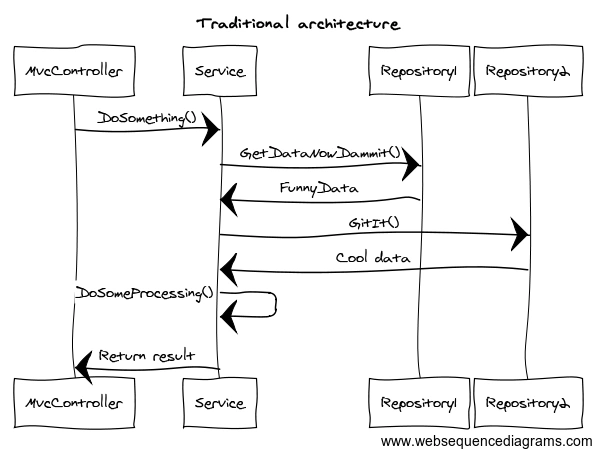
That design is great since it's very easy to follow what happens and when. The
problem is that the service classes tend to get fat and changed often. And as
you might know by now, every change of existing code is a potential bug. The
solution for this is to retire those service classes and instead introduce
commands.
Task based UIs vs CRUD UIs
But before we get into commands we'll have a prerequisite that we have to
fulfill: Our UIs must be task based.
A typical CRUD based UI looks something like this: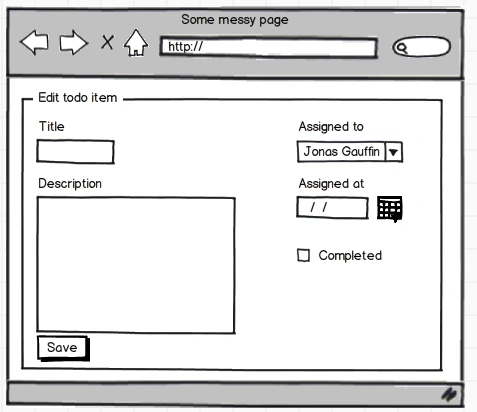
CRUD applications are often data-centric. That is, our application is modeled
from the database perspective. We just create UIs to allow the user to edit
everything. The problem with that is that there is not really a way to validate
that the correct combination of fields are properly validated.
Task-based applications are user-centric. The tasks are not something that you
make up by yourself but something which is defined by your client. They most
often correspond to a use case/story.
The corresponding task based UI looks like: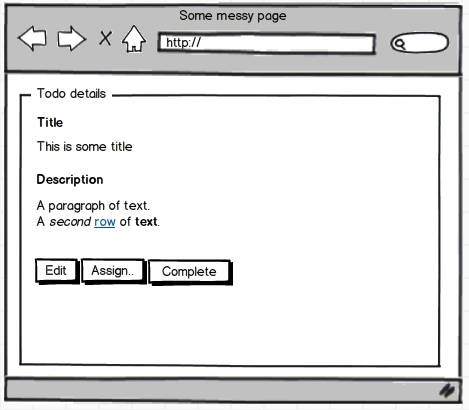
The change is really that we define a set of actions that the user can take.
Each of these actions are defined by your client. Your client probably doesn't
say "I want to be able to edit all fields" but more likely "I want to
be able to assign a case to a user". So you have a task named
AssignCaseToUser. That my dear ladies and gentleman is a command.
With this approach it's much easier to validate the information since we have a
specific action. For instance, it doesn't make sense to change the title when
assigning a task. So we can exclude that field from the action. Also, we know
that we should always update the AssignedAt field. Hence we do not expose that
field but just update it our-self.
What is a command?
A command is a use case, not a database operation or something technical. The
command is what the user (your client) wants to achieve. That also means that
you should not try to write/design commands for reuse. That will come back and
haunt you every night. Design a command to do what the user wants. Nothing more
and nothing less.
RegisterUser, AssignTask, LockForum are use case driven commands while
UpdateUserTable is more of an operation (and should really be part of a
command).
This distinction is important if we want to be able to re-factor or scale our
systems. The distinction makes our commands agnostic of the actual
implementation.
Commands are always in a valid state
A command should always make sure that it's information is valid. You've
probably seen commands that look like this:
public
class
DelegateTask
{
public int
TaskId { get; set;
}
public int
UserId { get; set;
}
}
The problem with that is that the command will fail if one of the fields are not
specified. Always validate the information when it's assigned, not later.
We should use the following convention:

Writing Decoupled and Scalable Applications
Join the conversation! Your thoughts help the community grow.
Sign in to leave a comment
It is the same account you read, post and publish with — and you will come straight back to this page.
saanPosted Mar 21, 2013, 6:33 PM
Hi. Love the article, this is exactly what I was looking for. A simple method for communicating across a decoupled components in an application. (and a very good read). If you don't mind a question though - how would you recommend communicating across decoupled components (in real time) if you should never have a response to a command? (i'm looking for a way to get around circular references, and was thinking something like this would be perfect). Thanks
Amit ChoudharyPosted Dec 26, 2012, 4:39 AM
This is bloody good, well explained and entertaining article.. enjoyed enough reading it.. Subscribing to you Jonas.
Suthish NairPosted Dec 6, 2012, 10:12 PM
Hi Jonas, Welcome to Mindcracker community and C# Corner. Truly a rocking article. Most times developers make mistakes that leads major testing and bug fixes. Sometimes I believe, during bug fixes only a developer understanding the actual requirement. Looking for more article from you... keep posting..
Vithal WadjePosted Dec 6, 2012, 3:30 AM
right jons
Jonas GauffinPosted Dec 6, 2012, 2:29 AM
imho managers should not be blamed for bugs. It's the developers that should make sure that their code works. Cutting corners just to get ready in time is the worst thing to do. What you get is a buggy application with all features instead of a fully working application with a subset of the specified features. Which application do you think is easier to continue to work with? Time estimation and management in very different subjects which is not addressed in my article.
Vithal WadjePosted Dec 6, 2012, 2:19 AM
mahesh sir,its also happens due to lack of new technologies knowledge ,because almost all managers knows old technologies and they dont spend time to know new technologies
Mahesh ChandPosted Dec 5, 2012, 1:04 PM
Good article. I do agree with Sam. Managers not following proper coding protocols, not having enough time to invent the optimal solutions and constantly changing requirements are the root cause of bugs. If you read Software Engineering and RD books, they recommend to spend 30% of the time on Testing for the entire project. In real-life, we hardly spend 10%.
Anil KumarPosted Dec 5, 2012, 12:41 AM
very nice !!!
Vithal WadjePosted Dec 5, 2012, 12:40 AM
Great article
Dinesh BeniwalPosted Dec 5, 2012, 12:33 AM
Great article
Sam HobbsPosted Dec 4, 2012, 5:52 PM
Thank you for the entertaining article. It was fun to edit. I have one more comment; however. In my opinion, the greatest cause of programmers introducing bugs by programming too quickly is mamangement trying to get quick results. I assume that still happens.