Introduction
Here are the steps to create a new Xamarin
Android Left Navigation Drawer Layout.
Let’s start,
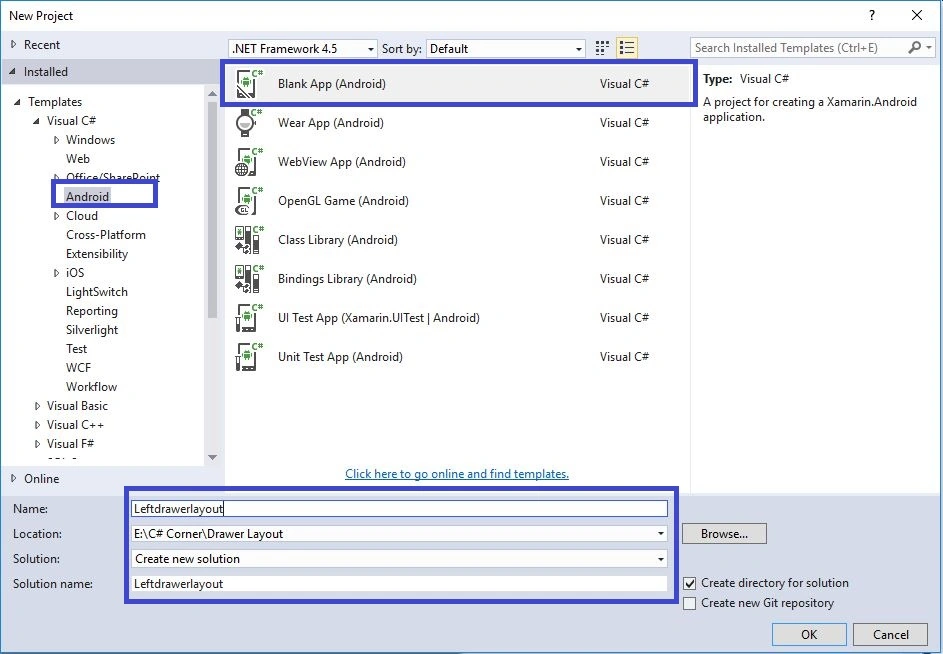
Step 1 - Open Visual Studio, New Project, Templates, Visual C#, Android, then click Blank App (Android).
Then give the Project Name and Project Location.
Step
2
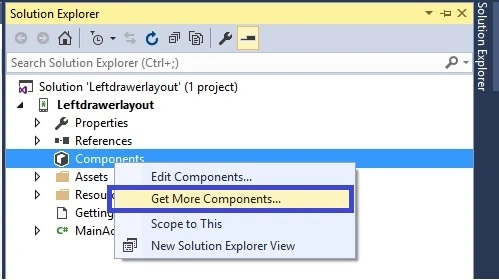
Next, we add V7 AppCompat References. Click Solution Explorer, Project
Name, Components, then
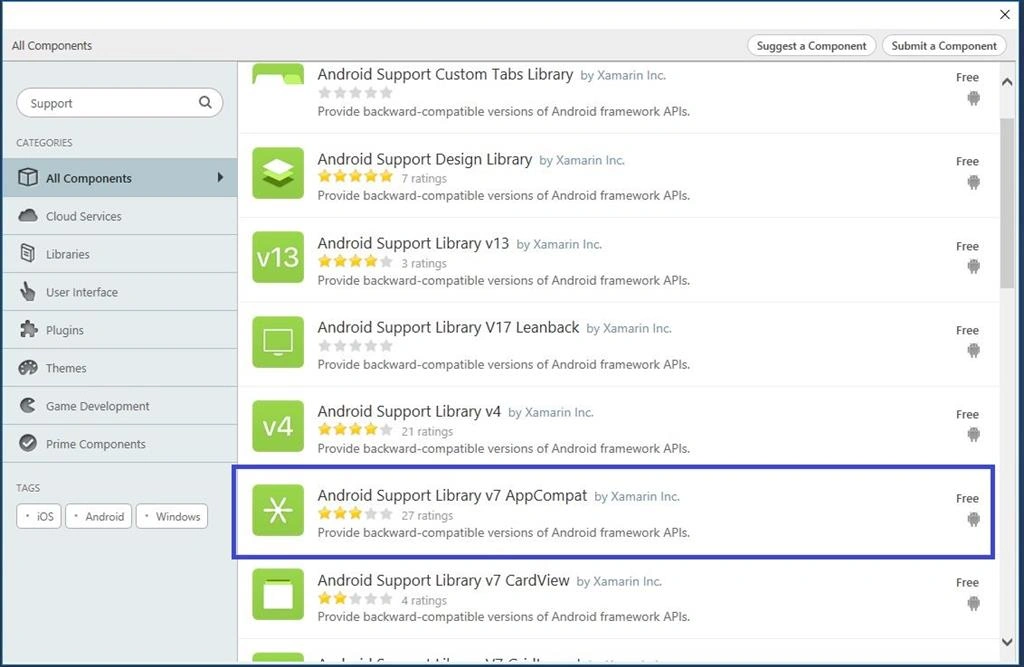
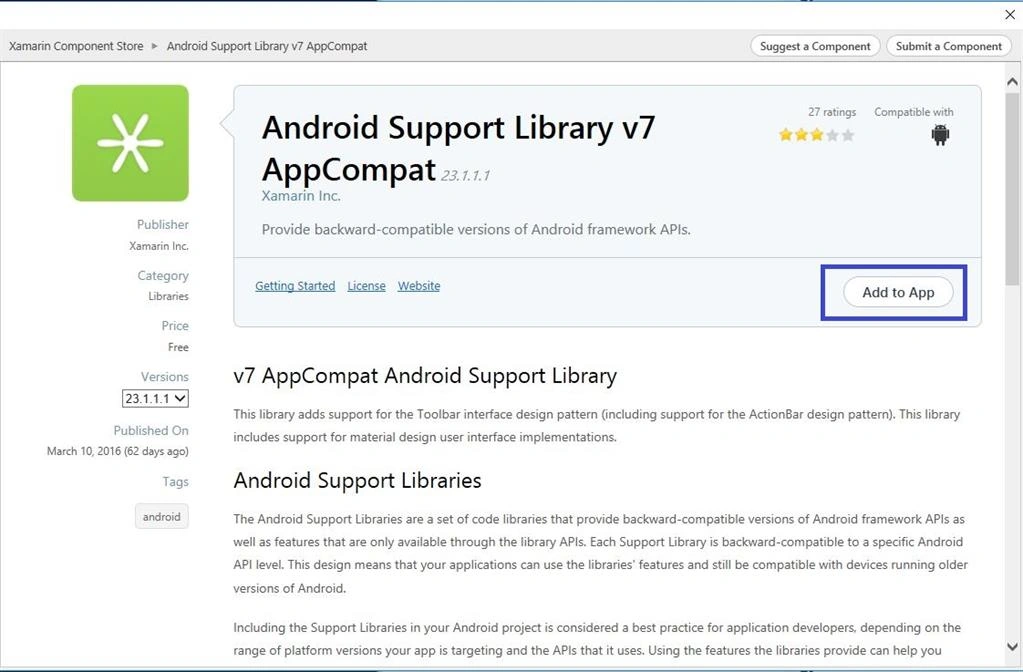
Right Click Get More Components to select, then popup window is visible. Search the Appcompat and then click to Add to App.
Step 3 - Next create a menu folder. Go to Solution Explorer, Project Name, Resources,
Right Click Add New Folder give the name for the menu.
Step 4 - Next go to Solution Explorer, Project Name, Resources, menu, then
Right Click Add New Item. Select XML and give the name for menu.xml.
Step 5 - Create two XML for Colors and Styles. Select Solution Explorer, Project Name, Resources, Values, then
Right Click Add New Item. Select XML to give the name for styles and colors.
Step 6 - Open menu.xml, then create menu items and give the following code
- <?xml version="1.0" encoding="utf-8"?>
- <menu
- xmlns:android="http://schemas.android.com/apk/res/android">
- <group android:checkableBehavior="single">
- <item
- android:id="@+id/nav_home"
- android:title="Home" />
- <item
- android:id="@+id/nav_messages"
- android:title="Messages" />
- <item
- android:id="@+id/nav_about"
- android:title="About" />
- <item
- android:id="@+id/nav_FeedBack"
- android:title="FeedBack" />
- </group>
- </menu>
Step 7 - Next, open Styles.xml file and then give the following code
- <?xml version="1.0" encoding="utf-8"?>
- <resources>
- <style name="Theme.DesignDemo" parent="Base.Theme.DesignDemo"></style>
- <style name="Base.Theme.DesignDemo" parent="Theme.AppCompat.Light.NoActionBar">
- <item name="colorPrimary">#2196F3</item>
- <item name="colorPrimaryDark">#1976D2</item>
- </style>
- </resources>
Step 8 - Next, open Colors.xml to create colors
- <?xml version="1.0" encoding="utf-8" ?>
- <resources>
- <color name="ColorPrimary">#2196F3</color>
- <color name="ColorPrimaryDark">#1976D2</color>
- <color name="accent">#E040FB</color>
- </resources>
Step 9 - Then open Main.axml file and create DrawerLayout and Navigation
- <?xml version="1.0" encoding="utf-8"?>
- <LinearLayout
- xmlns:android="http://schemas.android.com/apk/res/android"
- xmlns:app="http://schemas.android.com/apk/res-auto"
- android:orientation="vertical"
- android:layout_width="match_parent"
- android:fitsSystemWindows="true"
- android:layout_height="match_parent">
- <android.support.v7.widget.Toolbar
- android:id="@+id/toolbar"
- android:layout_width="match_parent"
- android:layout_height="wrap_content"
- android:minHeight="?attr/actionBarSize"
- android:background="#33B86C"
- app:popupTheme="@style/ThemeOverlay.AppCompat.Light"
- app:layout_scrollFlags="scroll|enterAlways" />
- <android.support.v4.widget.DrawerLayout
- android:id="@+id/drawer_layout"
- android:layout_height="match_parent"
- android:fitsSystemWindows="true"
- android:layout_width="match_parent">
- <RelativeLayout
- android:orientation="vertical"
- android:layout_width="match_parent"
- android:layout_height="match_parent" />
- <android.support.design.widget.NavigationView
- android:id="@+id/nav_view"
- android:layout_height="match_parent"
- android:layout_width="200dp"
- android:layout_gravity="start"
- android:fitsSystemWindows="true"
- app:menu="@menu/menu" />
- </android.support.v4.widget.DrawerLayout>
- </LinearLayout>
Step 10 - Next to open MainActivity.cs to give the following code.
- using System;
- using Android.App;
- using Android.Content;
- using Android.Runtime;
- using Android.Views;
- using Android.Widget;
- using Android.OS;
- using V7Toolbar = Android.Support.V7.Widget.Toolbar;
- using Android.Support.V7.App;
- using Android.Support.V4.Widget;
- using Android.Support.Design.Widget;
- namespace Leftdrawerlayout
- {
- [Activity(Label = "Leftdrawerlayout", Theme = "@style/Theme.DesignDemo", MainLauncher = true, Icon = "@drawable/icon")]
- public class MainActivity: AppCompatActivity
- {
- DrawerLayout drawerLayout;
- NavigationView navigationView;
- protected override void OnCreate(Bundle bundle)
- {
- base.OnCreate(bundle);
- SetContentView(Resource.Layout.Main);
- var toolbar = FindViewById < V7Toolbar > (Resource.Id.toolbar);
- SetSupportActionBar(toolbar);
- SupportActionBar.SetDisplayHomeAsUpEnabled(true);
- SupportActionBar.SetDisplayShowTitleEnabled(false);
- SupportActionBar.SetHomeButtonEnabled(true);
- SupportActionBar.SetHomeAsUpIndicator(Resource.Drawable.ic_menu);
- drawerLayout = FindViewById < DrawerLayout > (Resource.Id.drawer_layout);
- navigationView = FindViewById < NavigationView > (Resource.Id.nav_view);
- }
- public override bool OnOptionsItemSelected(IMenuItem item)
- {
- switch (item.ItemId)
- {
- case Android.Resource.Id.Home:
- drawerLayout.OpenDrawer(Android.Support.V4.View.GravityCompat.Start);
- return true;
- }
- return base.OnOptionsItemSelected(item);
- }
- }
- }
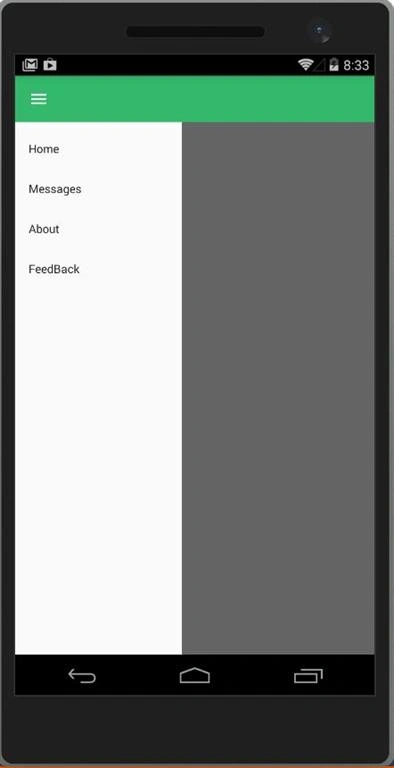
Step 11 - Then Debug and run the app
Finally, we have successfully created the Xamarin Android Left Navigation Drawer Layout Application.


 Step
2
Step
2
Juan GonzalesPosted Nov 12, 2019, 2:59 PM
What about click on each menu?
Mae Angel LagarePosted May 27, 2019, 3:59 AM
I'm getting an error says ERROR parsing XML: unbound prefix..help please
Bhanu PrasadPosted May 1, 2019, 4:18 AM
I am getting below error... Severity Code Description Project File Line Suppression State Error No resource found that matches the given name (at 'theme' with value '@style/Theme.DesignDemo'). LeftDraw.Android C:\Working Folder\Xamarin\LeftDraw\LeftDraw\LeftDraw\LeftDraw.Android\obj\Debug\81\android\manifest\AndroidManifest.xml
Bhanu PrasadPosted May 1, 2019, 4:16 AM
Code in Styles.xml file below: <?xml version="1.0" encoding="utf-8"?> <resources> <style name="Theme.DesignDemo" parent="Base.Theme.DesignDemo"></style> <style name="Base.Theme.DesignDemo" parent="Theme.AppCompat.Light.NoActionBar"> <item name="colorPrimary">#2196F3</item> <item name="colorPrimaryDark">#1976D2</item> </style> </resources I am getting below error... Severity Code Description Project File Line Suppression State Error No resource found that matches the given name (at 'theme' with value '@style/Theme.DesignDemo'). LeftDraw.Android C:\Working Folder\Xamarin\LeftDraw\LeftDraw\LeftDraw\LeftDraw.Android\obj\Debug\81\android\manifest\AndroidManifest.xml 9
Joan QuinteroPosted Nov 8, 2018, 7:01 PM
/Users/apple/Documents/David/encuestas/Encuestas/Encuestas/MainActivity.cs(9,9): Error CS0246: The type or namespace name 'NavigationView' could not be found (are you missing a using directive or an assembly reference?) (CS0246) (Encuestas)
Joan QuinteroPosted Nov 8, 2018, 7:01 PM
Hello anbu,
懿萱 郭Posted Jul 30, 2018, 8:55 PM
When i build ,it said layout_scrollFlags and orientation didn't declare!! what should i do next :( ??
Rie KumarPosted Jun 10, 2018, 1:08 PM
Thanks for the code.Thanks for the help, now I just gotta figure out how to have the home button switch to a back arrow and retract the drawer. '
Michael BrownPosted May 23, 2018, 9:11 AM
I downloaded the zip file and it will not compile. Missing to much stuff a NuGet restore is not working..... Any help please
Michael BrownPosted May 22, 2018, 2:07 PM
I do not see a Main.axml (step 9)
Michael GrinnellPosted May 10, 2018, 3:55 AM
How do I align ic_menu icon to the right?
Ram kumarPosted Apr 16, 2018, 6:41 AM
Hi,In my xamarin solution page not showing Component folder!Then how i add?anyone help me
Thamaraiselvan TPosted Apr 9, 2018, 1:47 AM
Hi, I create the main activity as u mentioned. Everything works fine. Now my need is to use this drawer layout in all pages. How can I re-use this like master page.
ghazalPosted Jan 1, 2018, 12:40 AM
How can i create submenu ? thx
ghazalPosted Jan 1, 2018, 12:33 AM
i had thie errorSeverity Code Description Project File Line Suppression StateError Severity Code Description Project File Line Suppression State Error 1: error: Error retrieving parent for item: No resource found that matches the given name 'Theme.AppCompat.Light.NoActionbar.
shake aliPosted Aug 19, 2017, 6:49 AM
hi, i am getting Error "no resource identifier found for attribute 'layout scroll flags' in package" and "menu" also in xamarin..?
eiraj ahmadPosted Aug 19, 2017, 3:45 AM
Sir Getting this error though i added menu.xml to menu folder No resource found that matches the given name (at 'menu' with value '@menu/menu') xamarin
Arnaud FleuryPosted Jul 31, 2017, 11:40 AM
Do you know how to do such thing ?
Arnaud FleuryPosted Jul 31, 2017, 11:40 AM
Hi ! got some problems to insert a layout in this drawerLayout...
chiam yehPosted Jul 27, 2017, 1:38 AM
It is work!! but may i know how to load another layout when click the item menu
Dipak ParekhPosted Jul 20, 2017, 9:29 AM
When i am trying to implement in this my project it generate error Java.Lang.RuntimeException: Unable to start activity ComponentInfo{projectName/md513ea1ea7951e2b6363d1a303343de4a9.MainActivity}: java.lang.IllegalStateException: No activity
Ankit PassiPosted Jul 14, 2017, 11:03 AM
Which settings control the accent color (green color) of the menubar ? can you make a seperate post for click on items displayed on drawer ?
Kumar BrosPosted Jul 10, 2017, 10:17 AM
Sir in this article kindly show me an example regarding how to navigate between pages as we click on respective menu item.
Kumar BrosPosted Jul 10, 2017, 10:15 AM
Sir, great articles. Really appreciated.
Suraj PandeyPosted Jul 1, 2017, 9:05 AM
Hi Anbu mani ji !! I want to open new activity ( StartActivity(typeof(MessageActivity)); ) when i click message on left drawer panel .what should i do ???
Bryan MinchalaPosted Jun 30, 2017, 12:19 PM
How do I put the other items of edit text and others in the normal screen of the activity not in the menu?
Divya RPosted Jun 22, 2017, 5:46 AM
All your tutorials are simple and easy to understand... great sir !!
Evgeni VesnakovPosted Jun 10, 2017, 2:47 PM
Hi Anbu , i want to make click event to button - about - from our drawerlayout , as an example :) i will be thankful for your help , i just cant get how to make them respond to user click on them...
Prashant BhattPosted Jun 2, 2017, 2:23 AM
Hi, we are getting two error. One at SupportActionBar.SetHomeAsUpIndicator(Resource.Drawable.ic_menu); as Resource.Drawable doesn't contain definition for ic_menu and 2nd as Error: No resource found that matches the given name (at 'menu' with value '@menu/menu'). in Main.axml file. Please let us know how to resolve these errors.
Simon BitzlPosted May 29, 2017, 4:33 AM
Does not work.. No resource identifier found for attribute 'popupTheme' in package 'Project.Project' Project G:\OneDrive\Projekte\Projekt-Ordner\Projects_C#\Project\Resources\layout\Main.axml And a lot more errors like this.
Muhammad AmmarPosted Apr 19, 2017, 1:45 AM
Hi, it gives an error at Resource.Id.toolbar. How to fix this error?
D SmitPosted Feb 27, 2017, 1:01 PM
Anbu, can we get in touch?
alex vidalPosted Jan 30, 2017, 5:12 PM
Good tutorial, for people who cant find component, use Nuget delete v4 or v7 and only install Xamarin.Android.Support.Design version23.4.0.1. i have a question in line: public override bool OnOptionsItemSelected(IMenuItem item) { switch (item.ItemId) { case Android.Resource.Id.Home: drawerLayout.OpenDrawer(Android.Support.V4.View.GravityCompat.Start); return true; always stay open de menu, how can i check if open or not? for use CloseDrawer, also how can i use click event of menu items? that line only check hamburger icon button. thanks
alex vidalPosted Jan 30, 2017, 5:05 PM
When i want to open a menu item, use intent? or what?
Boundavan VangPosted Jan 24, 2017, 2:02 AM
How to custom font NavigationView menu item
Boundavan VangPosted Jan 24, 2017, 2:01 AM
Hi , how to custom font menu item NavigationView
Veeramani DhanakodiPosted Jan 23, 2017, 1:11 AM
Hi Anbu, Great stuff.........
Rajni JainPosted Jan 18, 2017, 10:53 PM
Hello, I amgetting the error MainActivity.cs(22,9,22,21): error CS0246: The type or namespace name 'DrawerLayout' could not be found (are you missing a using directive or an assembly reference?) 0 Warning(s) 1 Error(s)
Anbu ManiPosted Jan 6, 2017, 7:33 AM
Find...References-> Manage Nuget Packages
Janak SabhayaPosted Jan 5, 2017, 11:59 PM
V4 Package is not visible in Xamarin Components
Janak SabhayaPosted Jan 5, 2017, 7:48 AM
Please help me how to resolve this error No resource found that matches the given name 'Theme.AppCompat.Light.NoActionBar'. LeftDrawerMenu
Hendry LimPosted Dec 19, 2016, 10:09 PM
No resource identifier found for attribute 'menu' in package 'Leftdrawerlayout.Leftdrawerlayout'No resource identifier found for attribute 'layout_scrollFlags' in package 'Leftdrawerlayout.Leftdrawerlayout'
Hendry LimPosted Dec 19, 2016, 10:09 PM
Hi anbu, the errors below. Thanks
Hendry LimPosted Dec 16, 2016, 9:46 AM
Hi Anbu, i used "add more components" but it shows "Android Support Library v7 AppCompat (Incomplete). I uninstalled and installed the components again but it still show Incomplete. I then used Nuget to install the package Xamarin.Android.Support.v7.AppCompat. This time, I see the Packages in my Solution Explorer and in my references, it also show Xamarin.Android.Support.v7.AppCompat and a few others. However, my app still doesn't compile. It still show the same 2 errors as above
Anbu ManiPosted Dec 15, 2016, 12:31 AM
Hey Check your packages..layout_scrollFlags include packages
Hendry LimPosted Dec 12, 2016, 6:34 AM
Hi Anbu, i get the above 2 errors when building the application. pl help if possible. Thanks
Hendry LimPosted Dec 12, 2016, 6:33 AM
No resource identifier found for attribute 'menu' in package 'Leftdrawerlayout.Leftdrawerlayout'No resource identifier found for attribute 'layout_scrollFlags' in package 'Leftdrawerlayout.Leftdrawerlayout'
Hendry LimPosted Dec 12, 2016, 6:31 AM
No resource identifier found for attribute 'layout_scrollFlags' in package 'Leftdrawerlayout.Leftdrawerlayout' Leftdrawerlayout
Royce LimPosted Dec 1, 2016, 3:51 AM
Hi Anbu, can i ask how to create different views when i click Home, for example. and when i click feedback, i get another view
Softec WarePosted Nov 11, 2016, 1:18 PM
Hi I get a lot of errors. Mostly it doesn't recognize Support. Am I doing something wrong?
Davronbek UmirovPosted Jun 9, 2016, 12:57 AM
Nice article.
ts lienPosted May 26, 2016, 5:38 AM
hi, i have error using NavigationView, I have imported using Android.Support.Design.Widget; on top. I had both Android Support Library v7 AppCompat and Android Support Design Library as Components. May i know is any other library file need to be imported to use NavigationView?
Chitranjansinh BariyaPosted May 21, 2016, 4:03 AM
I am getting error of support library V7. I am begginer to xamarin.
Pradeep SahooPosted May 18, 2016, 4:47 PM
Nice share .........
Kuppurasu NagarajPosted May 18, 2016, 1:43 PM
Nice Sharing..
Prasanna MuraliPosted May 18, 2016, 10:31 AM
Nice one anna......
Manoj KulkarniPosted May 18, 2016, 9:50 AM
Nice article. Thank you for sharing
Ketak BhalsingPosted May 18, 2016, 8:23 AM
Very Informative...
RajaPosted May 18, 2016, 2:55 AM
Good One
Mohammed IbrahimPosted May 17, 2016, 11:33 PM
nice