

Introduction
Xamarin.Forms code runs on multiple platforms - each of which has its own filesystem. This means that reading and writing files is most easily done using the native file APIs on each platform. Alternatively, embedded resources are a simpler solution to distribute data files with an app.
EventToCommand Behavior
EventToCommandBehavior class is a reusable Xamarin. Forms custom behavior that executes a command in response to any event firing.
The following behavior properties must be set to use the EventToCommand behavior.
- EventName: the name of the event the behavior listens to(Ex: Appearing).
- Command: the command to be executed. The behavior expects to find the ICommand instance on the BindingContext of the attached control, which may be inherited from a parent element
Prerequisites
Visual Studio 2017 or later (Windows or Mac)
Setting up a Xamarin.Forms Project
Start by creating a new Xamarin.Forms project. You will learn more by going through the steps yourself.
Create a new or existing Xamarin forms(.Net standard) Project, with Android, and iOS platforms.
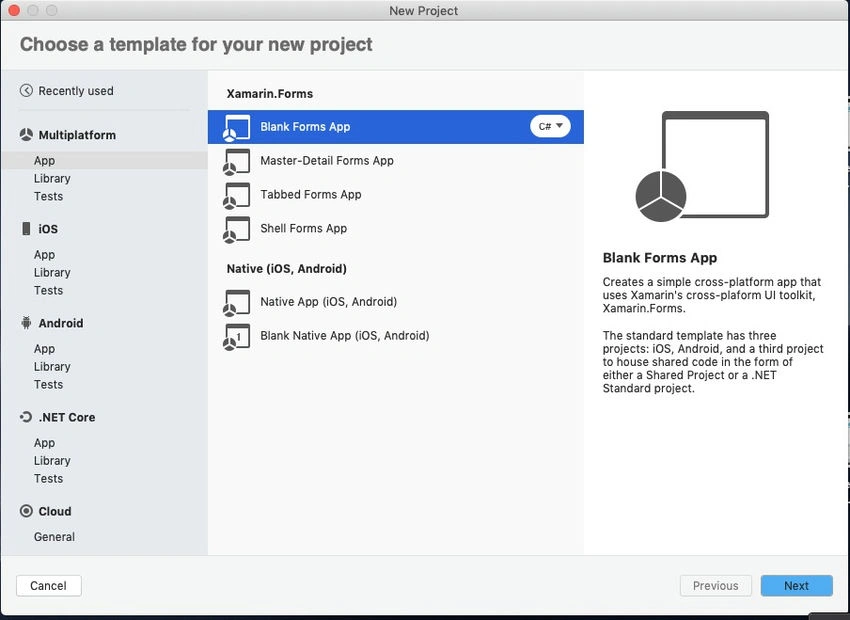
Create a Behaviour Base class
Now, create a Behaviour Base class Derived from Behavior and BindableObject
BehavourBase.cs
public class BehaviorBase<T> : Behavior<T> where T : BindableObject
{
    public T AssociatedObject { get; private set; }

    protected override void OnAttachedTo(T bindable)
    {
        base.OnAttachedTo(bindable);
        AssociatedObject = bindable;

        if (bindable.BindingContext != null)
            BindingContext = bindable.BindingContext;

        bindable.BindingContextChanged += OnBindingContextChanged;
    }

    protected override void OnDetachingFrom(T bindable)
    {
        base.OnDetachingFrom(bindable);
        bindable.BindingContextChanged -= OnBindingContextChanged;
        AssociatedObject = null;
    }

    void OnBindingContextChanged(object sender, EventArgs e)
    {
        OnBindingContextChanged();
    }

    protected override void OnBindingContextChanged()
    {
        base.OnBindingContextChanged();
        BindingContext = AssociatedObject.BindingContext;
    }
}
Create EventToCommand Behaviour
Here, create an EventToCommand Behaviour Class to convert your events to Command and also implement bindable properties.
- EventName
- Command
EventToCommandBehaviour.cs
public class EventToCommandBehavior : BehaviorBase<VisualElement>
{
    Delegate eventHandler;
    public static readonly BindableProperty EventNameProperty = BindableProperty.Create("EventName", typeof(string), typeof(EventToCommandBehavior), null, propertyChanged: OnEventNameChanged);
    public static readonly BindableProperty CommandProperty = BindableProperty.Create("Command", typeof(ICommand), typeof(EventToCommandBehavior), null);

    public string EventName
    {
        get { return (string)GetValue(EventNameProperty); }
        set { SetValue(EventNameProperty, value); }
    }

    public ICommand Command
    {
        get { return (ICommand)GetValue(CommandProperty); }
        set { SetValue(CommandProperty, value); }
    }

    protected override void OnAttachedTo(VisualElement bindable)
    {
        base.OnAttachedTo(bindable);
        RegisterEvent(EventName);
    }

    protected override void OnDetachingFrom(VisualElement bindable)
    {
        DeregisterEvent(EventName);
        base.OnDetachingFrom(bindable);
    }

    static void OnEventNameChanged(BindableObject bindable, object oldValue, object newValue)
    {
        var behavior = (EventToCommandBehavior)bindable;

        if (behavior.AssociatedObject == null) return;

        string oldEventName = (string)oldValue;
        string newEventName = (string)newValue;

        behavior.DeregisterEvent(oldEventName);
        behavior.RegisterEvent(newEventName);
    }

    void RegisterEvent(string name)
    {
        if (string.IsNullOrWhiteSpace(name)) return;

        EventInfo eventInfo = AssociatedObject.GetType().GetRuntimeEvent(name);

        if (eventInfo == null)
            throw new ArgumentException(string.Format("EventToCommandBehavior: Can't register the '{0}' event.", EventName));

        MethodInfo methodInfo = typeof(EventToCommandBehavior).GetTypeInfo().GetDeclaredMethod("OnEvent");
        eventHandler = methodInfo.CreateDelegate(eventInfo.EventHandlerType, this);
        eventInfo.AddEventHandler(AssociatedObject, eventHandler);
    }

    void DeregisterEvent(string name)
    {
        if (string.IsNullOrWhiteSpace(name) || eventHandler == null)
            return;

        EventInfo eventInfo = AssociatedObject.GetType().GetRuntimeEvent(name);

        if (eventInfo == null)
            throw new ArgumentException(string.Format("EventToCommandBehavior: Can't de-register the '{0}' event.", EventName));

        eventInfo.RemoveEventHandler(AssociatedObject, eventHandler);
        eventHandler = null;
    }

    void OnEvent(object sender, object eventArgs)
    {
        if (Command == null) return;

        object resolvedParameter;

        resolvedParameter = eventArgs;

        if (Command.CanExecute(resolvedParameter))
            Command.Execute(resolvedParameter);
    }
}
sayyad hasanPosted Jun 10, 2021, 11:05 AM
Thanks dear Raj, really it helped me a lot, I have an issue Cleanup is giving error #region Methods public virtual void Refresh() { } public override void Cleanup() { base.Cleanup(); } #endregion
Vidyadharran GPosted Dec 7, 2019, 3:14 AM
Nice explanation bro :)
Logesh PalaniPosted Dec 5, 2019, 10:18 AM
Helpful one :)