

The past March 19th, James Montemagno with Miguel de Icaza and Scott Hanselman presented a new preview version of Xamarin Forms with support for Windows Store and Windows Phone projects, during the second day of DotNetConf 2015. You can have a look at the original video here at Channel9.
The support for Windows XAML and universal projects in Xamarin.Forms was something developers have been waiting for for a long time now. To date, Xamarin.Forms only supports Windows Phone 8.0 Silverlight projects, making it unable to use some scenarios.
This release is just in preview mode, but you can start playing with it and have a look at what will come in the future and start supporting Universal Apps in your Forms solutions.
Preparing a new Xamarin.Forms solution
To start testing this preview, you will need to create a new Xamarin.Forms project, using the portable template, from Visual Studio:

The first thing after your project is created, update the Xamarin.Forms NuGet packages used in the project, so you have the same version in all projects in the solution. To do it, just right-click on the solution name in the Solution Explorer and tap the "Manage NuGet Packages for solution" menu item. Change the channel from "Stable only" to "Include prerelease" so you can get the newest version out there. In the Updates section you will see the available updates for Xamarin.Forms and Xamarin Support Library. Click the "Update All" button:
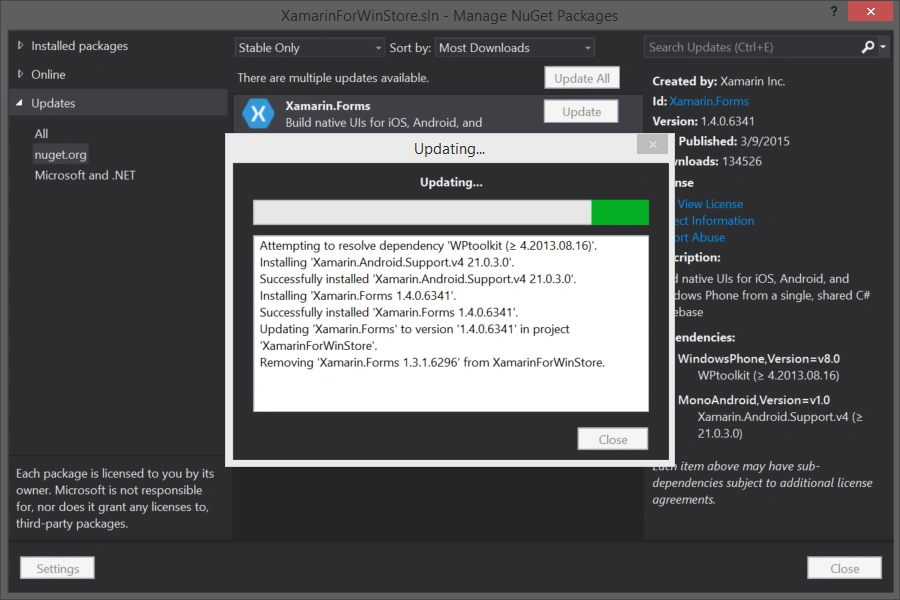
Now you can add support for Windows Universal projects. First you need to add a new Windows Universal project to your solution. If you don't want to support Windows Phone 8.0, remove the Windows Phone 8 project created with the Xamarin.Forms template.
Now, you need to add the Xamarin.Forms NuGet to your new Windows Universal project. Just like before, right-click on the solution and open the NuGet manager for the solution. Select the Online node in the left side tree, be sure the channel is established in "Include prerelease" and search for Xamarin.forms.windows as in the following:
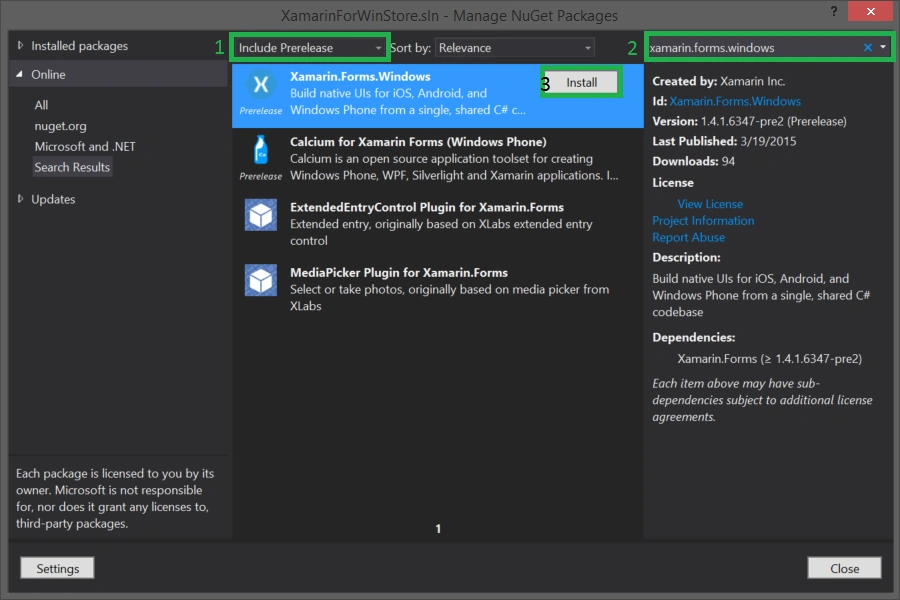
After clicking Install, NuGet will ask you what projects it should install this package for, by default it selected the compatible projects, so you only need to click the OK button to start the installation:

Now you have the libraries needed in your Universal project so it can support Xamarin.Forms. Now you need to add a reference to your Universal project for the Xamarin.Forms portable class library with our shared code and views. The problem is, by default Xamarin.Forms created PCL doesn't support Windows Phone 8.1 or Windows Store:
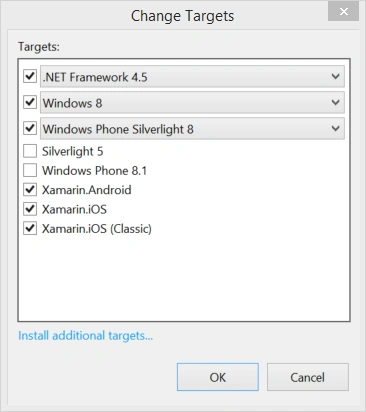
You will need to go to the PCL project properties and edit the target frameworks so you can remove Windows Phone Silverlight 8 (in case you don't need it anymore) and add Windows Phone 8.1 and Windows 8.1 support:
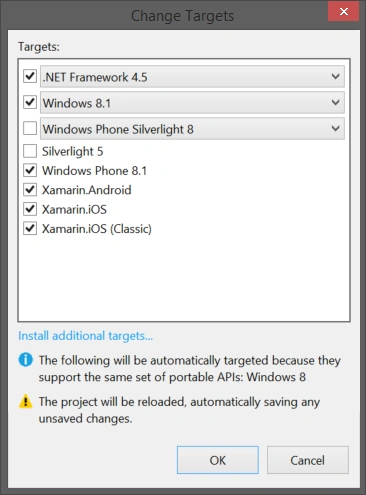
After doing this, Visual Studio should reload the project with the new target frameworks. Now you can add a reference to this project in each of the universal sub projects.
Just a few more steps to go. To make this work, you need to tell the Universal projects to initialize and load the Xamarin.Forms app.
Starting Xamarin.Forms in a universal project
Asfend YarPosted Mar 7, 2016, 3:25 PM
'm stuck in xamarin forms /Actually I am working on visual studio and got a lot of errors.When first I open a new project then at the first build I receive 1600+ errors and if I create a Xamarin forms portable prohect then some namespace issues are occured that is System and App so kindly tell me know what will i do
Asfend YarPosted Mar 4, 2016, 4:29 AM
my xamarine form shows 1600 plus error on startup ..What can I do ??
Asfend YarPosted Mar 4, 2016, 4:27 AM
nice
Tom MohanPosted Mar 23, 2015, 8:23 PM
useful