

Introduction
The Xamarin.Forms TabbedPage consists of a list of tabs and a larger detailed area, with each tab loading content into the detail area. But If we want to add some extra controls top of tabbed page or bottom of the tabbed page we can't; in that case, we need to create our own custom tabs. So, this article will explain to you how we can create our own custom tabbed page.
Requirements
- This article's source code is prepared by using Visual Studio with MAC machine. And it is better to install the latest Visual Studio updates from here.
- This application is targeted for Android, iOS. And tested on Android device & iOS simulator.
- This project is Xamarin.Forms PCL project.
Description
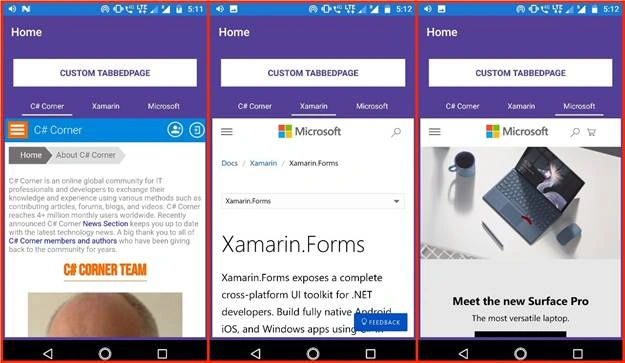
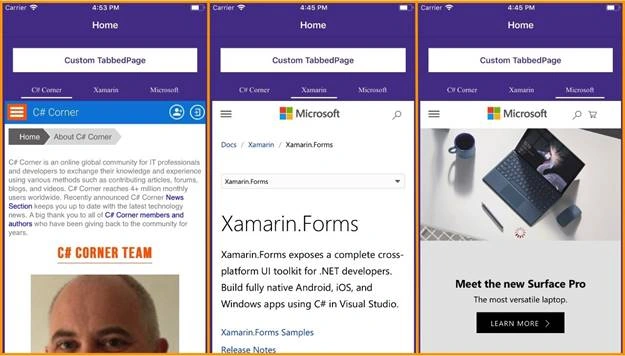
In this article, we going to create three custom tabs such as C# Corner, Xamarin, Microsoft.
Let's start creating Custom TabbedView.
Step 1
First, follow the below steps to create the new Xamarin.Forms project.
- Open Visual Studio for Mac.
- Click on the File menu, and select New Solution.
- In the left pane of the dialog, let's select the type of templates to display. Multiplatform > App > Xamarin.Forms > Blank Forms App and click on Next.
-
Next Enter your app name (Ex: CustomTabbedPage). At the bottom select target platforms to Android & iOS and shared code to Portable Class Library and click on Next button.
- Then choose project location with the help of Bbowse button and click on create.
Now, the project structure will be created like below.
- CustomTabbedPage
It is for Shared Code - CustomTabbedPage.Droid
It is for Android. - CustomTabbedPage.iOS
It is for iOS
PCL
Create a class with RibbonView name it should inherit from ContentView and place it inside ControlsToolkit -->Custom folder and add code.
RibbonView.cs
- using System;
- using System.Collections;
- using System.Collections.Generic;
- using System.Linq;
- using System.Windows.Input;
- using Xamarin.Forms;
- namespace CustomRabbedPageControlsToolkit.Custom {
- public class RibbonView: ContentView {
- #region ItemsSource property
- public static readonly BindableProperty ItemsSourceProperty = BindableProperty.Create(nameof(ItemsSource), typeof(IList), typeof(RibbonView), null, propertyChanged: OnItemsSourceModified);
- public IList ItemsSource {
- get {
- return (IList) GetValue(ItemsSourceProperty);
- }
- set {
- SetValue(ItemsSourceProperty, value);
- }
- }
- private static void OnItemsSourceModified(object sender, object oldValue, object newValue) {
- RibbonView rv = (RibbonView) sender;
- rv._itemsContainerLayout.Children.Clear();
- IEnumerator iter = ((IList)newValue).GetEnumerator();
- int index = 0;
- while (iter.MoveNext()) {
- String label = (String)iter.Current;
- StackLayout layout = new StackLayout() {
- Orientation = StackOrientation.Vertical,
- VerticalOptions = LayoutOptions.FillAndExpand,
- HorizontalOptions = LayoutOptions.FillAndExpand,
- Padding = new Thickness(10, 10, 10, 0),
- };
- Label titleLabel = new Label() {
- Text = label,
- TextColor = rv.TextColor,
- FontSize = rv.FontSize,
- Style = rv.Style,
- VerticalTextAlignment = TextAlignment.Center,
- HorizontalTextAlignment = TextAlignment.Center,
- VerticalOptions = LayoutOptions.FillAndExpand,
- HorizontalOptions = LayoutOptions.FillAndExpand
- };
- BoxView box = new BoxView() {
- BackgroundColor = rv.BarColor,
- VerticalOptions = LayoutOptions.EndAndExpand,
- HeightRequest = 2,
- HorizontalOptions = LayoutOptions.FillAndExpand
- };
- layout.Children.Add(titleLabel);
- layout.Children.Add(box);
- layout.GestureRecognizers.Add(new TapGestureRecognizer() {
- Command = new Command((obj) => {
- rv.OnSelectedItem(label);
- })
- });
- ++index;
- rv._itemsContainerLayout.Children.Add(layout);
- }
- rv.OnSelectedItem(((List<String>)rv.ItemsSource).ElementAt(rv.SelectedItemIndex));
- }
- #endregion
- #region Textcolor property
- public static readonly BindableProperty TextColorProperty = BindableProperty.Create(nameof(TextColor), typeof(Color), typeof(RibbonView), Color.Black);
- public Color TextColor {
- get {
- return (Color)GetValue(TextColorProperty);
- }
- set {
- SetValue(TextColorProperty, value);
- }
- }
- #endregion
- public static new readonly BindableProperty StyleProperty = BindableProperty.Create(nameof(Style), typeof(Style), typeof(RibbonView), null);
- public new Style Style {
- get {
- return (Style)GetValue(StyleProperty);
- }
- set {
- SetValue(StyleProperty, value);
- }
- }
- #region Barcolor property
- public static readonly BindableProperty BarColorProperty = BindableProperty.Create(nameof(BarColor), typeof(Color), typeof(RibbonView), Color.Black);
- public Color BarColor {
- get {
- return (Color) GetValue(BarColorProperty);
- }
- set {
- SetValue(BarColorProperty, value);
- }
- }
- #endregion
- #region FontSize property
- public static readonly BindableProperty FontSizeProperty = BindableProperty.Create(nameof(FontSize), typeof(int), typeof(RibbonView), 13);
- public int FontSize {
- get {
- return (int) GetValue(FontSizeProperty);
- }
- set {
- SetValue(FontSizeProperty, value);
- }
- }
- #endregion
- #region SelectedItemIndex property
- public static readonly BindableProperty SelectedItemIndexProperty = BindableProperty.Create(nameof(SelectedItemIndex), typeof(int), typeof(RibbonView), 0);
- public int SelectedItemIndex {
- get {
- return (int) GetValue(SelectedItemIndexProperty);
- }
- set {
- SetValue(SelectedItemIndexProperty, value);
- }
- }
- #endregion
- #region ItemSelected property
- public static readonly BindableProperty ItemSelectedProperty = Create(nameof(ItemSelected), typeof(ICommand), typeof(RibbonView), null);
- public ICommand ItemSelected {
- get {
- return (ICommand) GetValue(ItemSelectedProperty);
- }
- set {
- SetValue(ItemSelectedProperty, value);
- }
- }
- #endregion
- StackLayout _mainLayout;
- StackLayout _itemsContainerLayout;
- public RibbonView() {
- _mainLayout = new StackLayout() {
- HorizontalOptions = LayoutOptions.FillAndExpand,
- Padding = new Thickness(0),
- Spacing = 0
- };
- _itemsContainerLayout = new StackLayout() {
- Orientation = StackOrientation.Horizontal,
- HorizontalOptions = LayoutOptions.FillAndExpand,
- VerticalOptions = LayoutOptions.FillAndExpand,
- Padding = new Thickness(5, 5, 5, 0),
- Spacing = 0
- };
- _mainLayout.Children.Add(_itemsContainerLayout);
- // _mainLayout.Children.Add(new BoxView() { HeightRequest = 1, BackgroundColor = Color.Silver, HorizontalOptions = LayoutOptions.FillAndExpand });
- Content = _mainLayout;
- }
- private void OnSelectedItem(String labelTitle) {
- int i = 0;
- IEnumerator iter = ItemsSource.GetEnumerator();
- if (this.SelectedItemIndex > -1) {
- StackLayout itemStack = (StackLayout) _itemsContainerLayout.Children.ToArray()[this.SelectedItemIndex];
- BoxView bv = (BoxView)itemStack.Children.ToArray()[1];
- bv.BackgroundColor = this.BackgroundColor;
- }
- while (iter.MoveNext()) {
- StackLayout itemStack = (StackLayout) _itemsContainerLayout.Children.ToArray()[i];
- BoxView bv = (BoxView) itemStack.Children.ToArray()[1];
- if (((string) iter.Current).CompareTo(labelTitle) == 0) {
- bv.BackgroundColor = this.BarColor;
- this.SelectedItemIndex = i;
- } else {
- bv.BackgroundColor = this.BackgroundColor;
- }
- i += 1;
- }
- if (ItemSelected != null) {
- ItemSelected.Execute(this.SelectedItemIndex);
- }
- }
- }
- }
Jordan HewittPosted Jun 14, 2018, 12:14 PM
What would you do if you want to have page controls along with their own view models consisting as the content you are displaying when a different tab is selected?
Ike BarrettPosted May 28, 2018, 9:11 AM
This version worked great...but I am new and still struggle a little with MVVM and am trying to use a stacklayout. I started an ugly workaround, but I think I am overcomplicating this. What I did is where you have "webview" I changed to a stacklayout linking to three separate content views (pages I created elsewhere) and I was hoping to add a IsVisible property. But where I am struggling is what do I change the webview.Navigated to be able to send the selection and to what...and how do I bind back to a property in the ViewModel? I am sure there is something simple, but just missing it. Either way, this is a giant leap in the progress of my app and pretty good...to bad Xamarin doesn't support this natively better.