

Introduction
In the previous chapter, I explained how you can prepare your environment for Android or iOS application development, in this chapter I will start presenting the structure of our page in Xamarin.Forms.
Xamarin.Forms are based on Page notion where we can create a mobile application using XAML to design our page and C# language for code-behind.
We have five types: ContentPage, NavigationPage, TabbedPage, CarouselPage and MasterDetailPage.
Building the Sample
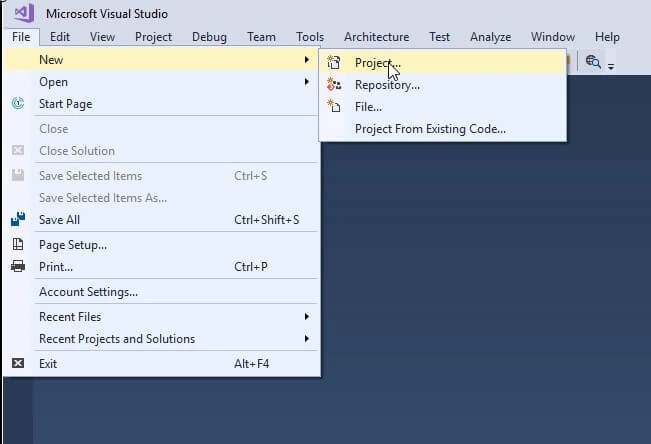
To start a new project on Visual Studio 2017, we choose File/New/Project
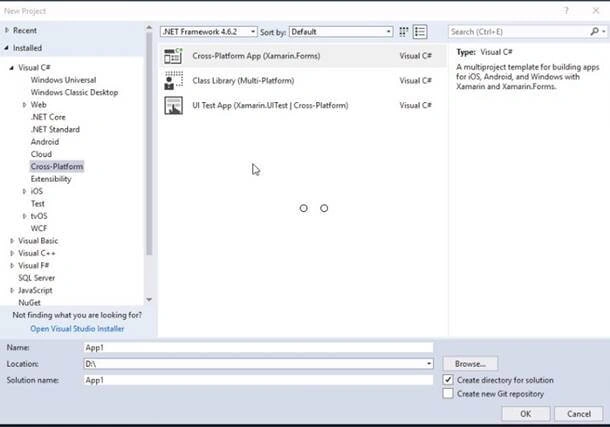
We will get another window to select in Visual C#/Cross-Platform, the .NET framework will be the last version, in our case the framework 4.6.2,
After another window is displayed to choose between a Blank App and a Master-Detail project (That integrate the use of MVVM Pattern), this template allows you to select what you’d like, even the platforms you want on targeting, and your code sharing strategy.
Before we get this window,
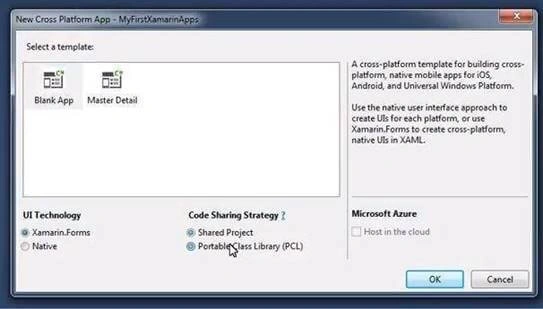
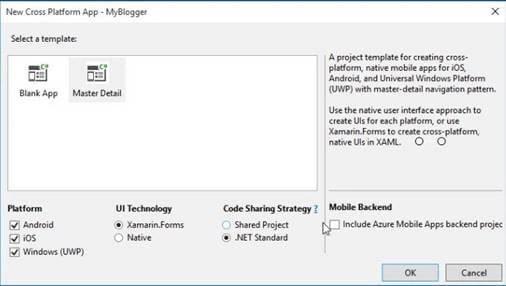
But in the recent version of Visual Studio 2015 15.5.2, we don’t have in "Code Sharing Strategy" the PCL (Portable Class Library), it’s replaced by .NET Standard! Even, we are able to select the Platform from the same interface.
Let’s understand some points related to this.
PCL or Portable Class Library is a group of libraries that target a set of the platform (have the ‘least common denominator’ of APIs of those platforms).
For more details click here.
.NET standard: it’s a ‘standard’ set of APIs rather than a platform. Here we are not talking about platforms, it’s only the standard (now 2.0) and your code will work on all platforms that support it. But in November 2017, .NET Standard Comes to Xamarin.Forms Project Templates.
So, targeting a PCL to .NET Standard only differs in the sense that types and namespace pointers are standardized in a different way.
The new version of .NET Standard 2.0 is dedicated to sharing code via various platforms, by introducing it in Xamarin.Forms via the cross-platform app wizard now, it will use PackageReference by default. Let's take a look at new windows,
For more details related to the .NET Standard, this is the GitHub,
https://github.com/dotnet/standard
And this is a good article that explains that,
https://blog.xamarin.com/building-xamarin-forms-apps-net-standard/
Description - Structure
The first page that you get is this one, so what is Page? And what can it contain?
The page is the primary container, in our sample, it’s a ContentPage.
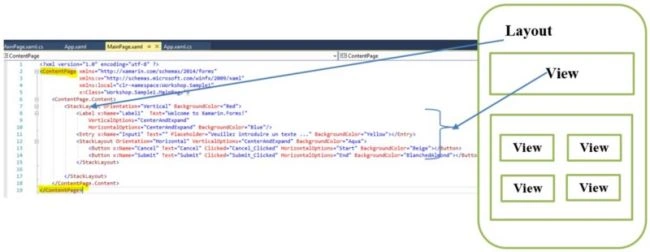
Inside the Page, we will add a Layout, in the sample we use StackLayout, and inside the StackLayout, we will add the view that is a list of Controls, in this sample we used: a Label, an Entry (Input text) and a Button.
Pages
Xamarin.Forms offer many possibilities of pages, allowing to propose different experiences of navigation. To define exactly what is an instance of Xamarin.Forms.Page, the official documentation presents a clear and concise definition.
As mentioned in this link: https://developer.xamarin.com/guides/xamarin-forms/user-interface/controls/pages/
“A Page is a visual element that occupies most or all of the screen and contains a single child. A page represents a View Controller in iOS a Page in Windows and acts a lot like an Activity on Android, but is not activity an activity.”
ContentPage
The simplest page without any particular feature is the template to use to start a blank page.
XAML
- <? xml version = "1.0" encoding = "utf-8"?>
- <ContentPage xmlns = "http://xamarin.com/schemas/2014/forms"
- xmlns: x = "http://schemas.microsoft.com/winfx/2009/xaml"
- x: Class = "Sample.MyContentPage"
- Title = "ContentPage Presentation" Padding = "10">
- <StackLayout>
- <Label Text = "Welcome to Xamarin.Forms !" />
- </StackLayout>
- </ContentPage>
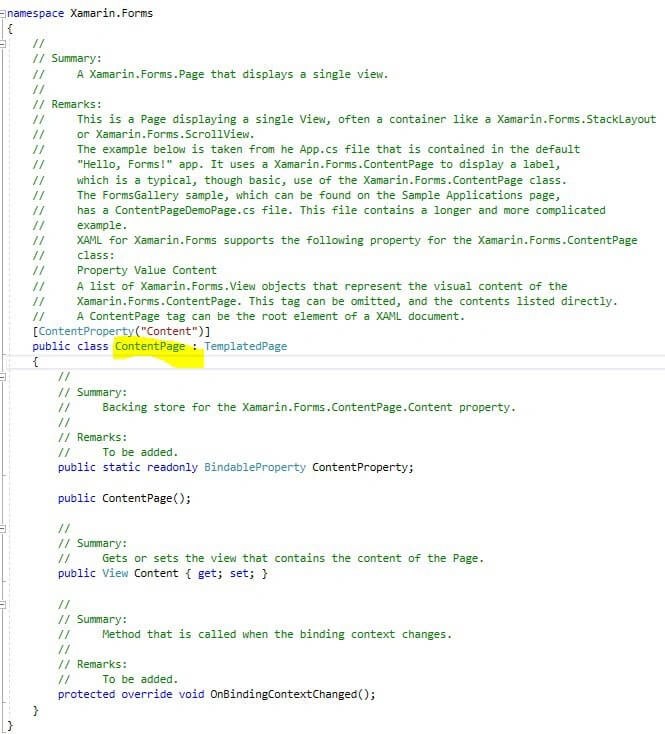
ContentPage iherit from TemplatedPage, this is the base class inXamarin.Forms.dll,
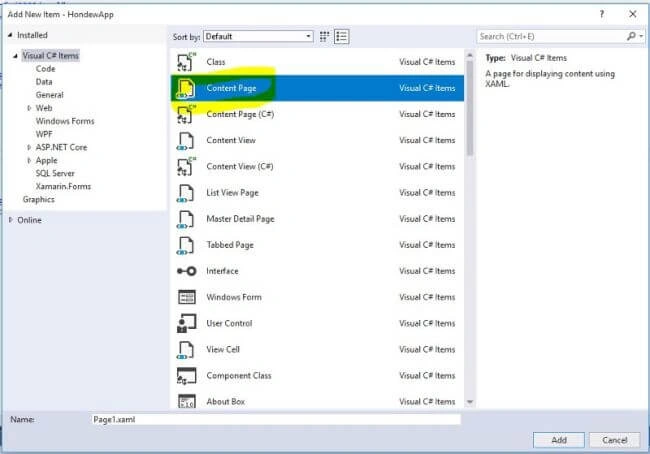
To add a new ContentPage we select: New Item/ContentPage.xaml
NavigationPage
It's a type of Page which can hold multiple pages but display only one and rpovide the capability navigation between them.
In this video you will find a sample that uses the NavigationPage, we are able to navigate from a page to another.
https://www.youtube.com/watch?v=dgh66o3efy4
In our sample, we have instantiated a new NavigationPage object and in the constructor the first page to display it.
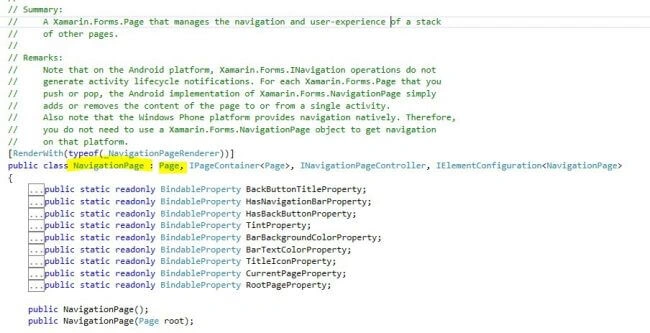
NavigationPage inherit from Page class.
We have some functions to use when we would like to move from a page to another.
If we want to go to another page from a button action event we use this: Navigation.PushAsync(new AboutPage());
Or for asynchronous mode: Navigation.PushModalAsync(new AboutPage());
We can go back to the previous page but using this: Navigation.PopAsync(); or Navigation.PopModalAsync();
Other methods are used,
Navigation.PopToRootAsync(); to Pops all but the root Xamarin.Forms.Page off the navigation stack.
We can use the navigation in XAML part like this,
XAML
- <NavigationPage Title="Schedule" Icon="schedule.png">
- <x:Arguments>
- <local:MyPage1 />
- </x:Arguments>
- </NavigationPage>
This example we call a Page having as title Schedule and an Icon "schedule.png", the content of our page is inside MyPage1 that is a ContentView, not ContentPage.
I invite you to read more about it at this link: https://developer.xamarin.com/api/type/Xamarin.Forms.NavigationPage/
TabbedPage
As the name of this type, it’s like tabulation in the web or a Pivot control, it allows to display a page containing several tabs.
You can find an example about TabbedPage at my YouTube Channel,
https://www.youtube.com/watch?v=gJyKIocFkeQ
In the video, we created the TabbedPage with C#,
C#
- public App() {
- var tabbedPage = new TabbedPage();
- tabbedPage.Children.Add(new Page1());
- tabbedPage.Children.Add(new Page2());
- tabbedPage.Children.Add(new Page3());
- MainPage = tabbedPage
- }
ameer KhanPosted Aug 10, 2019, 1:19 PM
Helpful :)
Naresh SinghalPosted Jan 24, 2018, 5:26 AM
Good done madam.....