

Introduction

This article demonstrates how to display web and HTML content in your app using WebView control in Xamarin.Forms application. The WebView displays the HTML content inside your app and shows how much content is loading in your HTML and web content of your app. This function is available in Xamarin.Forms.
This article demonstrates how to display web and HTML content in your app using WebView control in Xamarin.Forms application. The WebView displays the HTML content inside your app and shows how much content is loading in your HTML and web content of your app. This function is available in Xamarin.Forms.
Step 1
You can create a new Xamarin.Forms app by going to File >> New Project >>Visual C# >>Cross Platform >> Cross Platform App (Xamarin.Native or Xamarin.Forms ) and give the app name and solution name. Then, click OK.
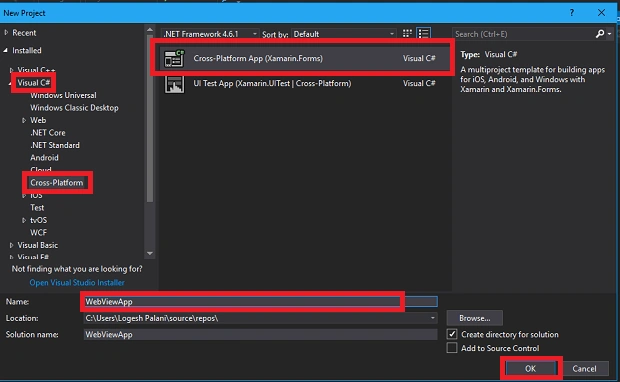
You can create a new Xamarin.Forms app by going to File >> New Project >>Visual C# >>Cross Platform >> Cross Platform App (Xamarin.Native or Xamarin.Forms ) and give the app name and solution name. Then, click OK.
Step 2
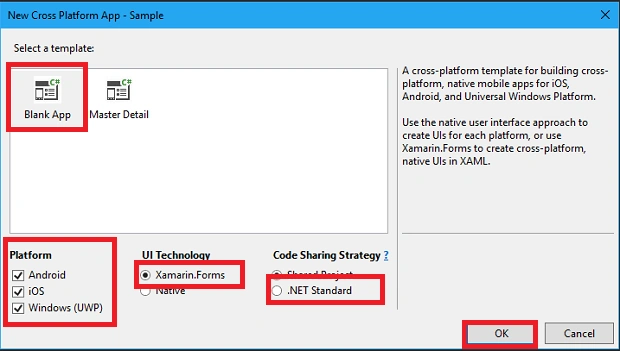
Now, select Blank App >> Platforms(Android, Universal Windows Platform, iOS) >> Xamarin.Forms >> .NET Standard and press OK.
Now, select Blank App >> Platforms(Android, Universal Windows Platform, iOS) >> Xamarin.Forms >> .NET Standard and press OK.
Step 3
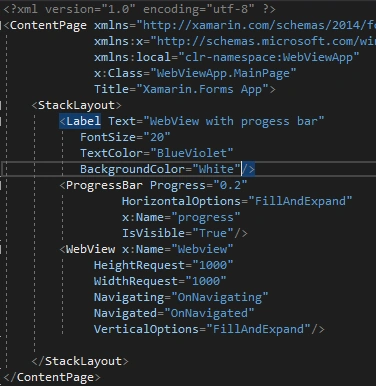
This opens the WebView and ProgressBar control to your MainPage.xaml page. For that, Solution Explorer >> WebViewApp(PCL) >>MainPage.xaml and double-click to open its design view. Here is the code.
This opens the WebView and ProgressBar control to your MainPage.xaml page. For that, Solution Explorer >> WebViewApp(PCL) >>MainPage.xaml and double-click to open its design view. Here is the code.
MainPage.Xaml code
Used controls,
- WebView
- ProgressBar
- <?xml version="1.0" encoding="utf-8" ?>
- <ContentPage xmlns="http://xamarin.com/schemas/2014/forms"
- xmlns:x="http://schemas.microsoft.com/winfx/2009/xaml"
- xmlns:local="clr-namespace:WebViewApp"
- x:Class="WebViewApp.MainPage"
- Title="Xamarin.Forms App">
- <StackLayout>
- <Label Text="WebView with progess bar"
- FontSize="20"
- TextColor="BlueViolet"
- BackgroundColor="White"/>
- <ProgressBar Progress="0.2"
- HorizontalOptions="FillAndExpand"
- x:Name="progress"
- IsVisible="True"/>
- <WebView x:Name="Webview"
- HeightRequest="1000"
- WidthRequest="1000"
- Navigating="OnNavigating"
- Navigated="OnNavigated"
- VerticalOptions="FillAndExpand"/>
- </StackLayout>
- </ContentPage>
Join the conversation! Your thoughts help the community grow.