

As a response for the first question posed as a part of the first part of the article How does an XAML interface interact with C# code behind within a Silverlight 2 context: Part I. I will provide real use case scenarios of binding between source object written in C# and XAML UI
Scenario 1: Create a binding within XAML code zone
It is quite simple to bind a C# code behind object to an XAML UI, but some rules should be respected. Let's consider this XAML UI:
<UserControl xmlns:data="clr-namespace:System.Windows.Controls;assembly=System.Windows.Controls.Data" x:Class="Silverlight.Page" xmlns="http://schemas.microsoft.com/winfx/2006/xaml/presentation" xmlns:x="http://schemas.microsoft.com/winfx/2006/xaml" Width="300" Height="300">
<Grid x:Name="LayoutRoot" Background="Azure" >
<Grid.ColumnDefinitions>
<ColumnDefinition Width="80"/>
<ColumnDefinition Width="80"/>
</Grid.ColumnDefinitions>
<Grid.RowDefinitions>
<RowDefinition Height="20"/>
<RowDefinition Height="20"/>
<RowDefinition Height="20"/>
</Grid.RowDefinitions>
<TextBlock Grid.Column="0" Grid.Row="0"> First name</TextBlock>
<TextBlock Grid.Column="1" Grid.Row="0"> Last name</TextBlock>
<TextBlock x:Name="txtFirstName" Grid.Column="0" Grid.Row="1" Text= "Bejaoui" />
<TextBlock x:Name="txtLastName" Grid.Column="1" Grid.Row="1" Text="Bechir" />
</Grid>
</UserControl>
The result of this XAML is 
Figure 1
Ok, what if I want to provide the data "Bejaoui" and "Bechir" from a given C# object, what's should I do?
Well, first let's define a Person object in the C# code behind
public class Person
{
public Person()
{
}
public Person(string FirstName, string LastName)
{
this.FirstName = FirstName;
this.LastName = LastName;
}
public string FirstName
{
get; set;
}
public string LastName
{
get; set;
}
}
The class must be public and must have at least a parameter less constructor otherwise a run time error will be raised.
Then we switch to the XAML code editor and we add a reference to our namespace, In this case, my customized namespace that holds the Person object is called Silverlight.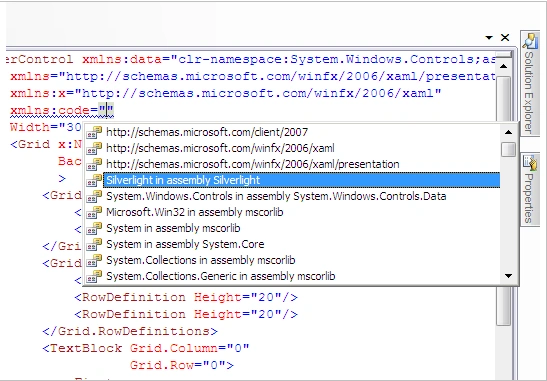
Figure 2
<UserControl xmlns:data="clr-namespace:System.Windows.Controls;assembly=System.Windows.Controls.Data" x:Class="Silverlight.Page" xmlns="http://schemas.microsoft.com/winfx/2006/xaml/presentation" xmlns:x="http://schemas.microsoft.com/winfx/2006/xaml" xmlns:code="clr-namespace:Silverlight" Width="300" Height="300">
The word code is chosen arbitrary, you can use whatever you want as keyword, but once it is set it will be used to reference your namespace until the end of the project. Of Corse you can change it, but you have the obligation to change all the old keywords by the new ones throughout the entire project.
The next step is to create the resources for the both TextBlocks. We add a new tag for that purpose
<Grid.Resources></Grid.Resources>
Those above tags should be nested within the Main container which is a Grid control in our case. Now, we can add a code as it is recognized now by the environment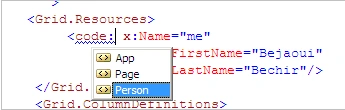
Figure 3
Say that I want to create a person, first I have to give it an identifier through x:Name attribute, else a runtime error will be raised later when running the application.
<Grid.Resources>
<code:Person x:Name="me" FirstName="Bejaoui" LastName="Bechir"/>
</Grid.Resources>
At the other hand, the Text attribute of the both TextBlocks should be set as follow:
<TextBlock x:Name="txtFirstName" Grid.Column="0" Grid.Row="1" Text= "{Binding FirstName,Source={StaticResource me}}" />
<TextBlock x:Name="txtLastName" Grid.Column="1" Grid.Row="1" Text="{Binding LastName,Source={StaticResource me}}" />
As you can remark, the Binding attribute targets the object property and the StaticResource should refer to the given Person instance and therefore x:Name of the person instance should be set to a value that will be used as a reference.
This is the resulting XAML code:
<UserControl xmlns:data="clr-namespace:System.Windows.Controls;assembly=System.Windows.Controls.Data" x:Class="Silverlight.Page" xmlns="http://schemas.microsoft.com/winfx/2006/xaml/presentation" xmlns:x="http://schemas.microsoft.com/winfx/2006/xaml" xmlns:code="clr-namespace:Silverlight" Width="300" Height="300">
<Grid x:Name="LayoutRoot" Background="Azure" >
<Grid.Resources>
<code:Person x:Name="me" FirstName="Bejaoui" LastName="Bechir"/>
</Grid.Resources>
<Grid.ColumnDefinitions>
<ColumnDefinition Width="80"/>
<ColumnDefinition Width="80"/>
</Grid.ColumnDefinitions>
<Grid.RowDefinitions>
<RowDefinition Height="20"/>
<RowDefinition Height="20"/>
<RowDefinition Height="20"/>
</Grid.RowDefinitions>
<TextBlock Grid.Column="0" Grid.Row="0"> First name</TextBlock>
<TextBlock Grid.Column="1" Grid.Row="0"> Last name</TextBlock>
<TextBlock x:Name="txtFirstName" Grid.Column="0" Grid.Row="1" Text= "{Binding FirstName,Source={StaticResource me}}" />
<TextBlock x:Name="txtLastName" Grid.Column="1" Grid.Row="1" Text="{Binding LastName,Source={StaticResource me}}" />
</Grid>
</UserControl>
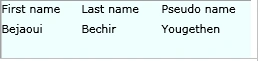
The result will be
Figure 4
Suppose now that I want to add a new member to the class Person, should this be reflected at the XAML level?
The response is simply yes. Say that the Person class will be modified as follow
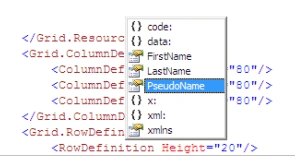
Gowtham RajamanickamPosted May 20, 2015, 1:01 AM
good
Name NamePosted Jan 9, 2009, 12:30 PM
You're great Bechir, I Have look after in the internet for this solution but I have never found a sufficient solution to my problem anywhere but this article respond exactly to my requirements now I can create interaction between C# And XAML thank you