

Introduction:
This article discusses the construction of a simple utility that may be used to locate and evaluate paths within an XML document, and to test queries against those paths. The application allows the user to open an XML document into a TreeView control for easy viewing of the structure; the user may right click on any node within the TreeView to expose a context menu that will allow the user to copy the current path to that node. The user may then open a test window up and paste the copied path into an expression text box. Once the path has been pasted into the text box, the user may test the path directly, or may edit the path and test the edit.
The project includes a collection of sample XML documents which may be used to try out the application.
To use the application, open the main form and use the file menu to open an xml document. The document will be displayed in the main form using a TreeView control. The user may click on any node in the TreeView and the path to that node as well as the node type will be displayed in the status bar at the bottom of the window.
The user may right click on any selected node and select from one of three options:
- Copy only the text contained in the current node.
- Copy the path to the node formatted as a query for that attribute value.
- Copy the full path exactly as it is.
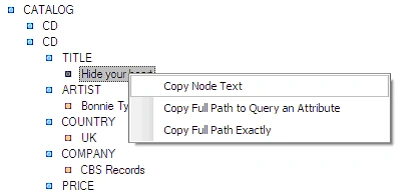
Figure 1: Context Menu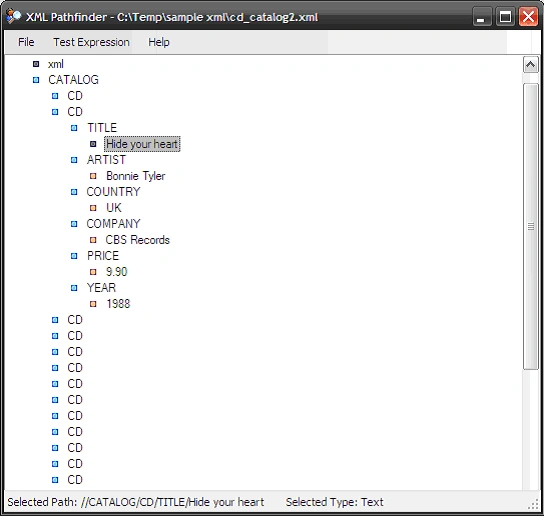
Figure 2: The Main Form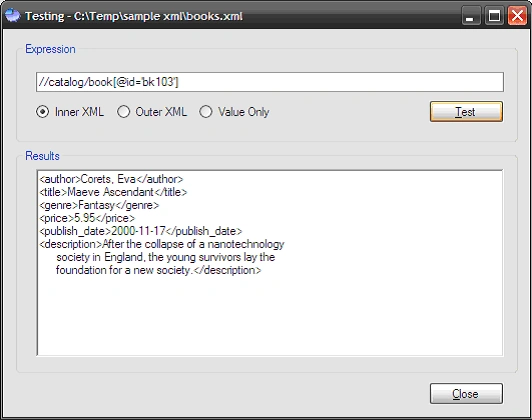
Figure 3: The Test Form (Example shows use of the "Copy Full Path to Query an Attribute" context menu option)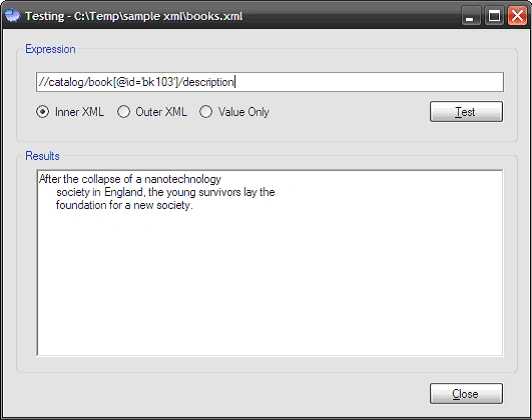
Figure 4: Editing a path manually to test alternative paths ("/description" added to path shown in Figure 3)
The intent of the application was to provide a simple tool that may be used to test paths for XPath based queries; it is intended to simplify viewing the XML and to make it easier to identify specific paths within an XML document.
Getting Started:
In order to get started, unzip the included project and open the solution in the Visual Studio 2005 environment. In the solution explorer, you should note these files: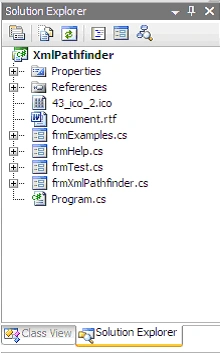
Figure 5: Solution Explorer
The Main Form (frmXmlPathfinder.cs).
The main form is used to open XML documents and to display them in TreeView format; form also provides the interface necessary to copy node paths and to open a test window which may be used to test XPath based queries against the XML document's content. The code is annotated and should be easy enough to follow from the descriptions provided:
If you'd care to open the code view up in the IDE you will see that the code file begins as follows:
using System;
using System.Collections.Generic;
using System.ComponentModel;
using System.Data;
using System.Drawing;
using System.Linq;
using System.Text;
using System.Windows.Forms;
using System.Xml;
using System.Xml.XPath;
The imports are primarily per the default configuration for a Windows application; the System.Xml and System.Xml.XPath library import are the only departure from the default.
Following the imports, the namespace and class are defined and a constructor added. A local string variable it declared and used to hold the path to the XML document.
namespace XmlPathfinder
{
/// <summary>
/// A simple utility to find paths in an xml document
/// </summary>
public partial class frmXmlPathfinder : Form
{
// private member variables
private string mFilePath; // the file of interest
public frmXmlPathfinder()
{
InitializeComponent();
// init the file path as empty
mFilePath = string.Empty;
}
Next up is the method used to exit the application.
/// <summary>
/// Exit the application
/// </summary>
/// <param name="sender"></param>
/// <param name="e"></param>
private void tspExit_Click(object sender, EventArgs e)
{
Application.Exit();
}
/// <summary>
/// Write the xml document into a treeview to make
/// easier to read and navigate, starting with the top
/// of the document, the method uses recursion to
/// populate the treeview with all the child nodes
/// </summary>
/// <param name="currentNode"></param>
/// <param name="nodCollection"></param>
private void PushToTreeView(XmlNode currentNode, TreeNodeCollection nodCollection)
{
TreeNode insertNode = nodCollection.Add(currentNode.Name);
switch (currentNode.NodeType)
{
case XmlNodeType.Element:
insertNode.Text = currentNode.Name;
insertNode.Tag = "Element";
insertNode.ImageIndex = 1;
break;
case XmlNodeType.Attribute:
insertNode.Text = "@" + currentNode.Name;
insertNode.Tag = "Attribute";
insertNode.ImageIndex = 2;
break;
case XmlNodeType.Text:
insertNode.Text = currentNode.Value;
insertNode.Tag = "Text";
insertNode.ImageIndex = 3;
break;
case XmlNodeType.CDATA:
insertNode.Text = currentNode.Value;
insertNode.Tag = "CDATA";
insertNode.ImageIndex = 4;
break;
case XmlNodeType.Comment:
insertNode.Text = currentNode.Value;
insertNode.Tag = "Comment";
insertNode.ImageIndex = 5;
break;
case XmlNodeType.Entity:
insertNode.Text = currentNode.Value;
insertNode.Tag = "Entity";
insertNode.ImageIndex = 6;
break;
case XmlNodeType.Notation:
insertNode.Text = currentNode.Value;
insertNode.Tag = "Notation";
insertNode.ImageIndex = 7;
break;
default:
break;
}
// recursive stuff
// check the current node for attributes
if (currentNode.Attributes != null && currentNode.Attributes.Count > 0)
{
// write out the attributes to the treeview
foreach (XmlAttribute attribute in currentNode.Attributes)
{
PushToTreeView(attribute, insertNode.Nodes);
}
}
// check the current node for child nodes
if (currentNode.HasChildNodes)
{
// write out the child nodes to the treeview
foreach (XmlNode childNode in currentNode.ChildNodes)
{
PushToTreeView(childNode, insertNode.Nodes);
}
}
}
/// <summary>
/// Open a new xml document
/// </summary>
/// <param name="sender"></param>
/// <param name="e"></param>
private void tspOpen_Click(object sender, EventArgs e)
{
try
{
openFileDialog1.Title = "Open XML File";
openFileDialog1.Filter = "XML Files|*.xml";
openFileDialog1.DefaultExt = "XML";
openFileDialog1.FileName = "";
openFileDialog1.ShowDialog();
if (openFileDialog1.FileName == "")
return;
// set the file path member var
mFilePath = openFileDialog1.FileName;
// Clear the treeview.
treeXml.Nodes.Clear();
// set the wait cursor
this.Cursor = Cursors.WaitCursor;
// create a new xml doc
XmlDocument doc = new XmlDocument();
try
{
// load the xml doc
doc.Load(mFilePath);
// set the form text to include
// the file name
this.Text = "XML Pathfinder - " + mFilePath;
// return the cursor
this.Cursor = Cursors.Default;
}
catch (Exception ex1)
{
// return the cursor
this.Cursor = Cursors.Default;
// tell a story
MessageBox.Show(ex1.Message);
return;
}
// open the doc into the treeview for
// inspection
PushToTreeView(doc, treeXml.Nodes);
// restore the cursor
this.Cursor = Cursors.Default;
}
catch (Exception ex2)
{
// snitch
MessageBox.Show(ex2.Message, "Unable to Open Document");
}
David CunninghamPosted Nov 3, 2009, 7:50 PM
Very nice article and sample. Thanks.