

Pre-requisite to understand this
Azure Subscription & Tenant – Logical boundary for resources and identities
Azure Active Directory (Entra ID) – Central identity and access management service
Azure Virtual Network (VNet) – Network isolation in Azure
Azure RBAC – Role-based authorization for Azure resources
Azure PaaS & IaaS Services – App Service, AKS, VM, SQL, Storage
Azure Monitor & Defender – Logging, monitoring, and threat protection
Introduction
Zero Trust Architecture in Azure is implemented using identity-first security, conditional access, and continuous verification across users, devices, applications, and workloads. Azure’s native services such as Azure AD (Entra ID), Conditional Access, Azure Firewall, Private Endpoints, and Defender for Cloud provide a tightly integrated ecosystem for Zero Trust. Instead of relying on network location, Azure Zero Trust evaluates identity, device health, access context, and risk signals before granting access to any resource.
What problem we can solve with this?
In traditional Azure deployments, users and services often gain broad access once inside a VNet or VPN. This creates a large blast radius when credentials are compromised or workloads are misconfigured. Azure Zero Trust eliminates implicit trust by enforcing identity validation and policy evaluation for every request. It also protects PaaS services that are traditionally exposed over public endpoints. Azure Zero Trust enables secure remote access, protects APIs, and reduces lateral movement inside VNets while improving visibility and compliance.
Problems addressed:
Prevents misuse of stolen Azure AD credentials
Reduces attack surface of Azure VNets
Secures PaaS services without public exposure
Blocks lateral movement between Azure workloads
Enables secure remote and hybrid access
Improves auditability and compliance
How to implement / use this in Azure?
Azure Zero Trust is implemented by combining Entra ID, Conditional Access, Azure networking controls, and continuous monitoring. Users and workloads authenticate through Entra ID using MFA and risk-based policies. Access to Azure resources is controlled using RBAC and managed identities. Network access is restricted using Private Endpoints, NSGs, and Azure Firewall. Defender for Cloud and Azure Monitor continuously assess security posture and detect threats. Policies are enforced dynamically and automatically.
Implementation steps in Azure:
Azure Entra ID (Azure AD) – Central identity provider
Conditional Access Policies – Context-aware access decisions
Managed Identities – Passwordless service authentication
Private Endpoints – Eliminate public exposure of services
Azure Firewall / NSG – Network-level enforcement
Defender for Cloud – Continuous threat detection
Sequence Diagram
This sequence illustrates how Azure enforces Zero Trust access for applications. The user authenticates via Azure Entra ID with MFA and risk evaluation. Conditional Access policies validate the context before issuing a token. The application gateway or Front Door enforces access before forwarding traffic to backend services. All activities are logged to Azure Monitor and Defender for Cloud for continuous analysis.
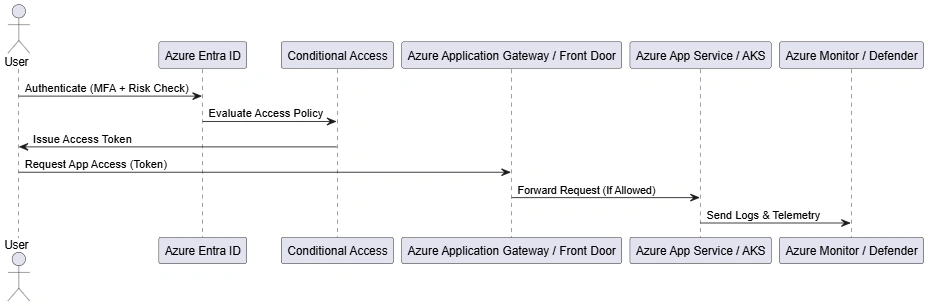
Key points:
Identity verification happens before network access
Conditional Access evaluates risk dynamically
Application access is token-based
Monitoring is continuous and automated
Component Diagram
This component diagram shows the logical architecture of Azure Zero Trust. Azure Entra ID and Conditional Access handle identity and policy decisions. Azure Application Gateway acts as the policy enforcement point for application traffic. Backend services run on App Service or AKS and send logs to Azure Monitor and Defender. Each component plays a role in enforcing Zero Trust principles.
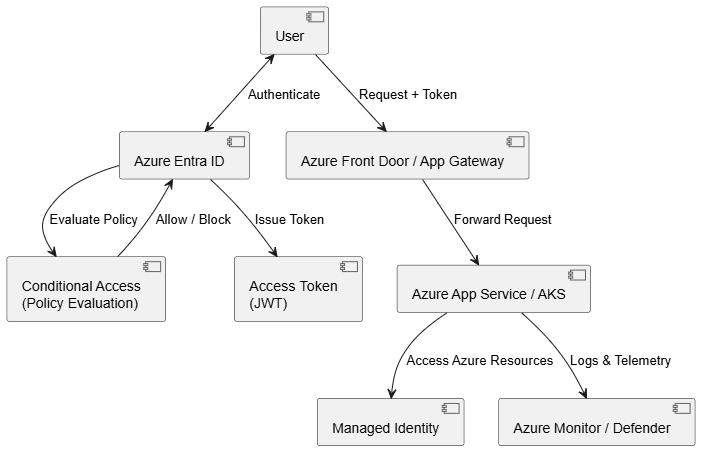
Key points:
Identity is centralized in Entra ID
Policy decision is separated from enforcement
Application Gateway protects backend services
Monitoring enables threat detection
Deployment Diagram
This deployment diagram represents how Zero Trust is physically implemented in Azure. User traffic enters through the internet but must pass through Azure Application Gateway. Identity and access decisions are handled by Entra ID and Conditional Access. Applications and databases are isolated inside VNets using Private Endpoints. Monitoring and Defender services continuously analyze logs and security signals.
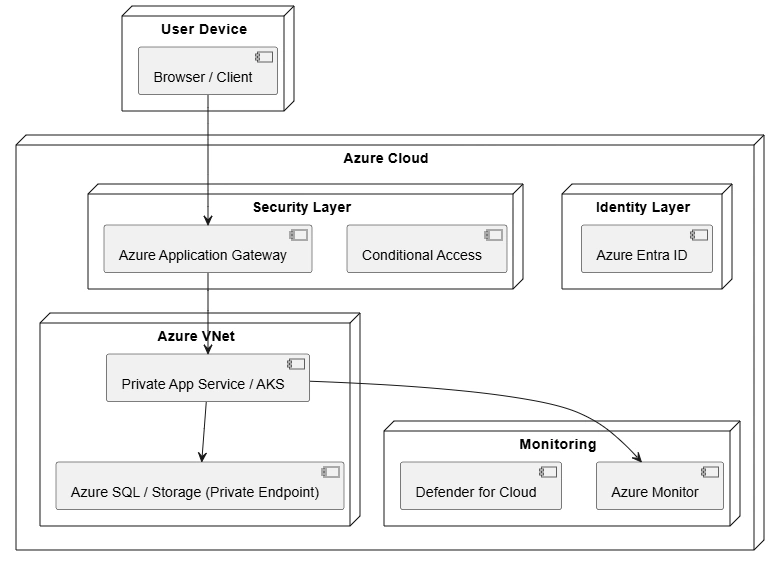
Key points:
No direct access to Azure workloads
PaaS services are private by default
Identity and policy live outside VNets
Continuous security monitoring is enforced
Advantages
Native Azure Integration – No third-party dependency
Identity-Driven Security – Entra ID as control plane
Reduced Public Exposure – Private Endpoints everywhere
Scalable & Automated – Policy-based enforcement
Strong Compliance Support – Built-in auditing
Cloud-Native Security – Designed for PaaS and AKS
Summary
Zero Trust Architecture in Azure replaces traditional perimeter based security with an identity-centric, policy-driven approach. By leveraging Azure Entra ID, Conditional Access, private networking, and continuous monitoring, organizations can secure users, applications, and data regardless of location. Azure’s native services make Zero Trust practical, scalable, and deeply integrated into cloud operations. Implementing Zero Trust in Azure significantly reduces risk while enabling modern cloud and remote-first architectures.
Join the conversation! Your thoughts help the community grow.