Let’s create a MVC application and name it MVCDemo.
Let’s create a model and name it StudentModel.
- public class StudentModel
- {
-
- public int StudentId { get; set; }
-
- public string Name { get; set; }
-
- public bool IsRequired { get; set; }
-
- public string Address { get; set; }
-
- public string City { get; set; }
-
- }
- public ActionResult HtmlView()
- {
- List<StudentModel> objSt = new List<StudentModel>();
- StudentModel s = new StudentModel();
- s.Name = "Pramod";
- s.IsRequired = false;
- s.Address = "Shalimar Garden";
- s.City = "Ghaziabad";
- objSt.Add(s);
-
- StudentModel s1 = new StudentModel();
- s1.Name = "Anuj";
- s1.IsRequired = true;
- s1.Address = "New Delhi";
- s1.City = "New Delhi";
- objSt.Add(s1);
- ViewData["Data"] = objSt;
- return View();
- }
Let’s add a view and name it HtmlView.
- @using MvcDemo.Models;
- @{
- ViewBag.Title = "HtmlView";
- }
-
- <h2 style="font-family:Verdana;">HtmlView</h2>
- <div style="font-family:Verdana; font-size:13px; border:dashed 1px black; width:350px;">
- <table>
- <tr>
- <td style="font-family:Verdana; font-size:14px; font-weight:bold;">Name</td>
- <td style="font-family:Verdana; font-size:14px; font-weight:bold;">Address</td>
- </tr>
- @{
- if(ViewData["Data"]!=null)
- {
- if(ViewData.Values !=null && ViewData.Values.Count()>0)
- {
- foreach (var item in ViewData["Data"] as List<StudentModel>)
- {
- <tr>
- <td style="font-family:Verdana; font-size:12px;">@item.Name</td>
- <td style="font-family:Verdana; font-size:12px;">@item.Address</td>
- </tr>
- }
- }
- }
- }
- </table>
- </div>
Press F5 and run the application and see the output.
Output 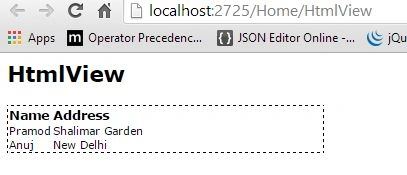
I hope you enjoy this article.
Happy coding.


Pramod ThakurPosted Sep 20, 2016, 2:14 AM
Thanx Subash
SubashPosted Sep 19, 2016, 8:08 AM
Nice work bro
Kiran ThakurPosted Jan 16, 2016, 5:35 AM
thnx..
Pramod ThakurPosted Jan 6, 2015, 9:05 AM
tnx ??
Pankaj BajajPosted Jan 6, 2015, 8:07 AM
Nice Pramod, Thanks for sharing.
Pramod ThakurPosted Jan 5, 2015, 9:07 AM
thank you Manish Kumar Choudhary :)
Manish Kumar ChoudharyPosted Jan 5, 2015, 9:03 AM
Nice one...
Pramod ThakurPosted Jan 5, 2015, 8:26 AM
Ya i know that.. But you can use that this way also.. Someone ask me in an interview that how can we access viewbag variable having list.. So i have share this to all..
Bhushan GawalePosted Jan 5, 2015, 8:16 AM
Nice Article, one might use ViewBag instead to avoid the typecasting of datatypes. Having said that it is not a good way to pass huge data (e.g. collections) on a view data - preferable way to achieve the same would be use of Model.