

For creating this type of animation we are going to use HTML5, CSS3 and J Query. In CSS3, I am using transform:scaleX() for moving object from one direction to other.
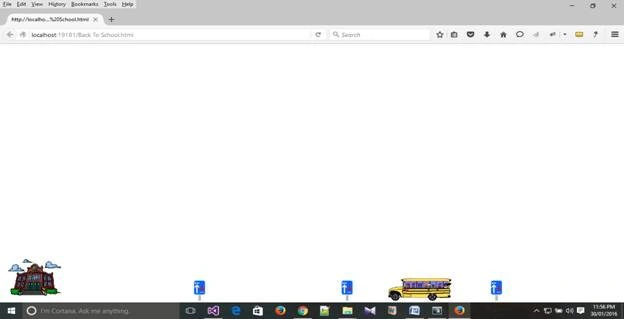
Used Objects
- School
- School Bus
- KM Sign Board
In HTML, I am using one container <div>. In that container I am going to place five images including School, KM Sign Board (Three Images) and School Bus.
Here's the code for continuously fade in and fade out of an Image
- function fadeloop(el, timeout, timein, loop)
- {
- var $el = $(el),
- intId, fn = function()
- {
- $el.fadeOut(timeout).fadeIn(timein);
- };
- fn();
- if (loop)
- {
- intId = setInterval(fn, timeout + timein + 100);
- return intId;
- }
- return false;
- }
- var distanceBall = 0;
- var directionBall = 1;
- document.getElementById('animatedImage').style.top = 10;
- document.getElementById('animatedImage').style.left = 10;
- var timerToggle = null;
- animateBall();
- var setting = 0;
- function animateBall()
- {
- document.getElementById("animatedImage").style.right = (distanceBall - 100) + "px";
- fadeloop('#christmastree', 8000, 7000, true);
- distanceBall += directionBall;
- if (distanceBall > window.screen.width - 180)
- {
- document.getElementById('animatedImage').style.top = 10;
- document.getElementById('animatedImage').style.left = 10;
- directionBall = -1;
- document.getElementById('img1').className = 'left';
- } else if (distanceBall < 0)
- {
- directionBall = 1;
- document.getElementById('img1').className = 'right';
- }
- timerToggle = setTimeout(function()
- {
- animateBall();
- }, 0.1);
- }
- <script type="text/javascript">
- function fadeloop(el, timeout, timein, loop)
- {
- var $el = $(el),
- intId, fn = function()
- {
- $el.fadeOut(timeout).fadeIn(timein);
- };
- fn();
- if (loop)
- {
- intId = setInterval(fn, timeout + timein + 100);
- return intId;
- }
- return false;
- }
- var distanceBall = 0;
- var directionBall = 1;
- document.getElementById('animatedImage').style.top = 10;
- document.getElementById('animatedImage').style.left = 10;
- var timerToggle = null;
- animateBall();
- var setting = 0;
- function animateBall()
- {
- document.getElementById("animatedImage").style.right = (distanceBall - 100) + "px";
- fadeloop('#christmastree', 8000, 7000, true);
- distanceBall += directionBall;
- if (distanceBall > window.screen.width - 180)
- {
- document.getElementById('animatedImage').style.top = 10;
- document.getElementById('animatedImage').style.left = 10;
- directionBall = -1;
- document.getElementById('img1').className = 'left';
- } else if (distanceBall < 0)
- {
- directionBall = 1;
- document.getElementById('img1').className = 'right';
- }
- timerToggle = setTimeout(function()
- {
- animateBall();
- }, 0.1);
- }
- </script>
Join the conversation! Your thoughts help the community grow.