Database has always been an integral part of any application be it Web/Desktop/Mobile. If we give an eagle eye statement to what database is, it can be stated that "Database is a bucket where you can dump all your application data for future reuse". Since the inception of software development industry database has always played an important role, they have been in different formats such as file, binaries, most popular in form of database software such as MS SQL Server, MySQL, Oracle etc.
One of the most important aspects or better to say key pain areas for any application delivery is "how to keep database deployment aligned with application deployment". I remember not too long back, we used to create long scripts for database deployment and pass on to database administrator team, who then used to run them on post-development servers. And then long ping-pong of communication as script failed on other environments lots and lots of pain. Scary one... were the ones where DDL used to corrupt the database or used to hamper other systems using the same database.
With new DevOps way of project execution, we have reached a starting point where database and application deployment can be automated dramatically. This reduces the overhead from DBA and developers ***if you follow the rules :) *****
One of the key components of DevOps automation is reducing humans dependency by scripting every workflow requiring humans. In order show some light to that ideology I have been working on database backup and restore scripts using Powershell, below are the scenarios where this can help:
- Backup database pre-deployment and restore in case of deployment failure
- Version database snapshot with the application, for enabling backward and forward deployment
- Data persistence for disaster recovery
- Specific version rollback for DEV and Test environment
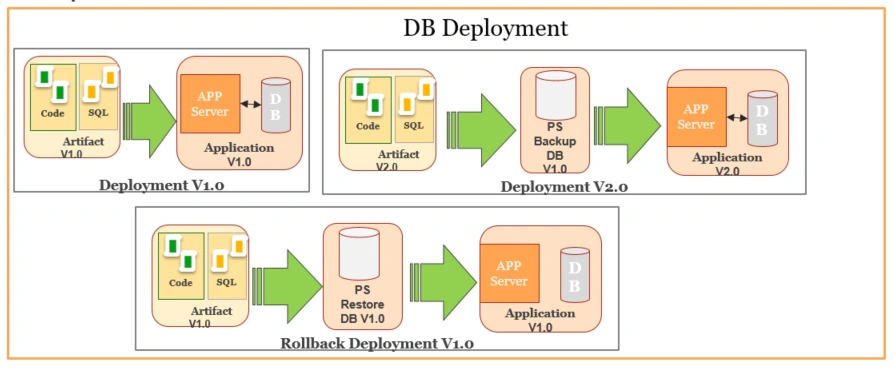
Below is the script which can be used for backup and restore MS SQL Server database. The beauty of the script is you can use the script standalone or inject in a DevOps pipeline process.
The script loads MS SQL Server objects from Gac for any execution of sql scripts or database object access
- [System.Reflection.Assembly]::LoadWithPartialName("Microsoft.SqlServer.Smo")
Verify if the database name exists on the server provided
- $QueryDB= " IF (EXISTS (SELECT name FROM master.dbo.sysdatabases WHERE (name = '"+"$dbname"+"'))) BEGIN Select 1 AS IsDbExist END ELSE BEGIN Select 0 AS IsDbExist END"
- $CDDBCheck= Invoke-Sqlcmd -Query $QueryDB -ServerInstance $($ServerName) -Database $($dbname)
Check for script execution type i.e. if the user wants to take a backup or wants to restore existing backup
- if( $ExecutionType -eq "backup"){}
If execution type is take
backup then create a new directory in location available in $DBBackupPath.
- $FileExists = Test-Path $DBBackupPath\$($buildID)
- if($FileExists -eq $False){
- Write-Output "************Folder with Build Id Created************"
- New-Item $DBBackupPath\$($buildID) -type directory
- }
Backup database at buidId folder create in step 4.
- Backup-SqlDatabase -ServerInstance $($ServerName) -Database $($dbname) -BackupFile "$DBBackupPath\$($buildID)\$($buildID).bak"
In order for the restore to work seamless, we need to first kill all the connections and process accessing the database.
- $SQlSvr1 = New-Object Microsoft.SqlServer.Management.Smo.Server "$($ServerName)"
- $SQlSvr1.KillAllprocesses($($dbname))
If execution type is restored, then restore backup from location in $DBBackupPath and adding the desired version folder details.
- Restore-SqlDatabase -ServerInstance $($ServerName) -Database $($dbname) -BackupFile "$DBBackupPath\$($buildID)\$($buildID).bak" -ReplaceDatabase
The overall script is as below:
- param (
- [string]$buildID, #Use the build id can be string or number
- [string]$dbname ,#Database name
- [string]$ServerName,# Database server name
- [string]$DBBackupPath, #Location where backup file will be saved
- [string]$ExecutionType #Script execution type for Backup-->backup, for Restore-->restor
- )
-
-
- Write-Output "************BuildId************" $($buildID)
- Write-Output "************DB Name************" $($dbname)
- Write-Output "**********Server Name**********" $($ServerName)
-
-
- [System.Reflection.Assembly]::LoadWithPartialName("Microsoft.SqlServer.Smo")
-
-
-
-
- Write-Output "************ Start Check Database exists************"
- $QueryDB= " IF (EXISTS (SELECT name FROM master.dbo.sysdatabases WHERE (name = '"+"$dbname"+"'))) BEGIN Select 1 AS IsDbExist END ELSE BEGIN Select 0 AS IsDbExist END"
- $CDDBCheck= Invoke-Sqlcmd -Query $QueryDB -ServerInstance $($ServerName) -Database $($dbname)
- Write-Output $CDDBCheck
-
-
- if ($CDDBCheck.IsDbExist -eq 1)
- {
-
- if( $ExecutionType -eq "backup"){
- $FileExists = Test-Path $DBBackupPath\$($buildID) # D:\CICD_DB_Backup\$($buildID)
- if($FileExists -eq $False){
- Write-Output "************Folder with Build Id Created************"
- New-Item $DBBackupPath\$($buildID) -type directory
- }
- Write-Output "************DB Backup Started************"
- Backup-SqlDatabase -ServerInstance $($ServerName) -Database $($dbname) -BackupFile "$DBBackupPath\$($buildID)\$($buildID).bak"
- Write-Output "************DB Backup End************"
- }else{
- $SQlSvr1 = New-Object Microsoft.SqlServer.Management.Smo.Server "$($ServerName)"
- $SQlSvr1.KillAllprocesses($($dbname))
-
- Write-Output "************DB Restore Started************"
- Write-Output "Restoring File : $DBBackupPath\$($buildID)\$($buildID).bak"
- Restore-SqlDatabase -ServerInstance $($ServerName) -Database $($dbname) -BackupFile "$DBBackupPath\$($buildID)\$($buildID).bak" -ReplaceDatabase
- Write-Output "************DB Restore End************"
- }
-
- }
- else
- {
- Write-Output "************************************************"
- Write-Output "************Database Server does not exists*****"
- Write-Output "************************************************"
- }
The script above is "A" way not "THE" way to automate database deployments. There are endless different ways you can automate the deployment. A few are as below:
- DacPac
- Batch files
- DbDeploy.Net
Summary
The idea here is to throw some light on how we can use PowerShell to automate database deployment and also use the same PowerShell script if we migrated to any of the DevOps workflows such as using VSTS CICD or Jenkins CICD.


Join the conversation! Your thoughts help the community grow.