

Introduction
Recently, I got a requirement to zip all files individually with batch file script in Windows OS. I don't know much about scripting but I searched Google, examples and websites to complete my task. Finally I was able to create the following script to complete my task. I have modified the original script as per my requirement & obviously credit goes to the creator of this script ( Anonymous ).
For original script, visit here.
The following is the modified script.
- @echo off
- Title autozip.bat
- REM updated 30/07/2015
- REM created by: Anonymous
- REM modified by: Yashwant Vishwakarma
- REM This script compresses files in a folder Note: files with the same name
- REM but with different extensions will be in the same archive.
- path=%path%;"c:\program files\winrar"
- REM ****************** Folder to compress******************
- set dir=C:\testzip
- REM *******************************************************
- REM change to directory
- cd %dir%
- echo Folder to compress in *.RAR format:
- echo %dir%
- echo Compressing files started....
- REM Compress files in directory individually without subdirectories.
- echo.
- FOR %%i IN (*.*) do (
- rar a "%%~ni" "%%i"
- )
- goto eof
In original batch file script there were 7 options which requires manual intervention to choose and perform task but I want to completely automate this task, therefore modified it and it is working absolutely fine for me.
Coding Explanation:
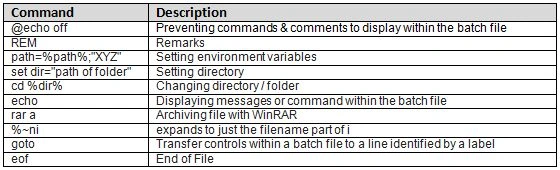
Conclusion
This is all what I did with a given script and sharing my learning and experience with you. Hope it will help someone if this type of requirement ever comes.
References:
Santhakumar MunuswamyPosted Aug 8, 2015, 2:10 AM
Thanks for sharing