

Binding DataGrid In Windows Form Without Database
In one of my articles I have explained how to bind a gridview in web form without database. Here I am now going to explain how to bind datagrid in a windows form without database.
This requirement is very useful when we are working in windows form or webform. Here my requirement here is very simple, when we enter all the fields and click on Book button it will temporarily bind the data to the datagrid shown below. Here I have shown the screen shot as follows.
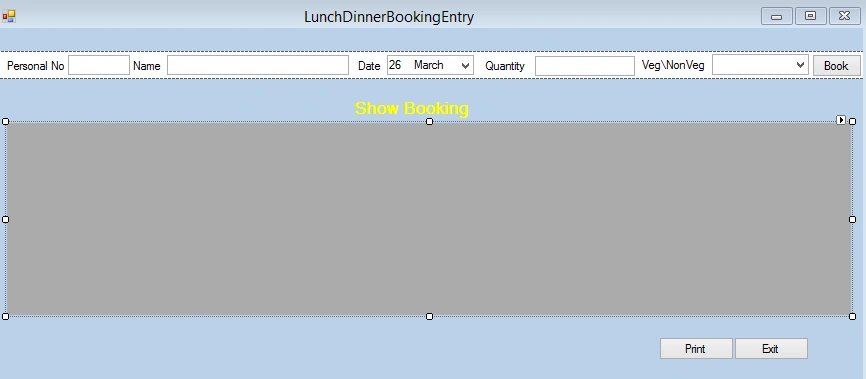
This requirement is very useful when we are working in windows form or webform. Here my requirement here is very simple, when we enter all the fields and click on Book button it will temporarily bind the data to the datagrid shown below. Here I have shown the screen shot as follows.
Let us see how to do that; for doing this this you have to follow the following steps.
- Creating a datatable.
- Creating colums name or heading by mentioning the datatype.
- Adding these column to the datatable
- Creating a row that contain all the value from the input controls.
- Binding the datatable to the Datagrid.
Before using this we need a namespace in our form.
- using System.Data;
- DataTable dt = new DataTable();
Step 2: Creating colums name or heading by mentioning the datatype.
Step 3: Adding these Columns to the DataTable,
Step 4: Creating a row that contail all value from the input elements.- DataColumn dc1 = new DataColumn("PERSONAL NO", typeof(int));
- DataColumn dc2 = new DataColumn("NAME", typeof(string));
- DataColumn dc3 = new DataColumn("DATE", typeof(string));
- DataColumn dc4 = new DataColumn("QUANTITY", typeof(int));
- DataColumn dc5 = new DataColumn("TYPE", typeof(string));
- dt.Columns.Add(dc1);
- dt.Columns.Add(dc2);
- dt.Columns.Add(dc3);
- dt.Columns.Add(dc4);
- dt.Columns.Add(dc5);
- dt.Rows.Add(txt_personalNo.Text,txt_name.Text,txt_date.Text,Convert.ToInt32(txt_quantity.Text),cmb_type.SelectedItem.ToString());
- dataGridView1.DataSource = dt;
- public void createnewrow()
- {
- DataTable dt = new DataTable();
- DataColumn dc1 = new DataColumn("PERSONAL NO", typeof(int));
- DataColumn dc2 = new DataColumn("NAME", typeof(string));
- DataColumn dc3 = new DataColumn("DATE", typeof(string));
- DataColumn dc4 = new DataColumn("QUANTITY", typeof(int));
- DataColumn dc5 = new DataColumn("TYPE", typeof(string));
- dt.Columns.Add(dc1);
- dt.Columns.Add(dc2);
- dt.Columns.Add(dc3);
- dt.Columns.Add(dc4);
- dt.Columns.Add(dc5);
- dt.Rows.Add(txt_personalNo.Text, txt_name.Text, txt_date.Text, Convert.ToInt32(txt_quantity.Text), cmb_type.SelectedItem.ToString());
- dataGridView1.DataSource = dt;
- }
- private void btn_book_Click(object sender, EventArgs e)
- {
- createnewrow();
- }
It will be like this.
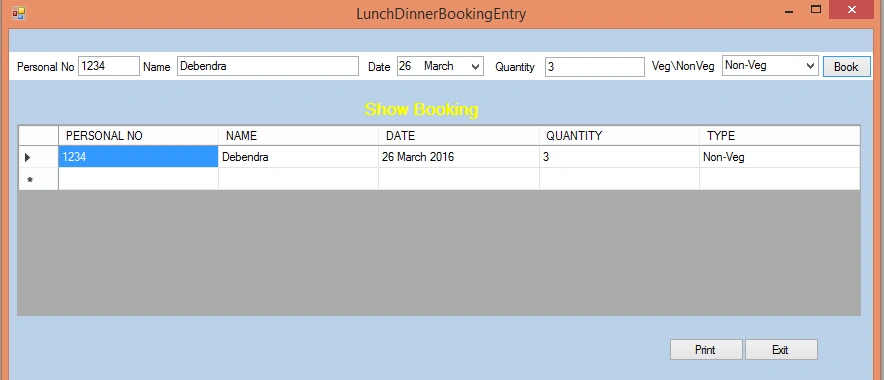
So in this way we can bind a Datagrid without database in windows form Application.
Here i am updating my blog as per i got a Question about maintaining state of this datagrid.Now what is the problem the user are facing.
After Enterning the details of first my first Booking,when i am doing my Second Booking tha first boooking details are lost,so to prevent this you have to change your code a little bit. Here i have explained how to do that.
- Declare the Datatable globally.
- Put a condition while you are binding rows to the datagrid.First check if there is data in tha datatable or not if there is no data bind the columns header in datagrid else bind only the row without datacolumn header.
So here is the First change,Declare the datatable globally.Now the second change as per condition.- public partial class LunchDinnerBookingEntry : Form
- {
- CanteenBAL obj = new CanteenBAL();
- DataTable dt = new DataTable();
- public LunchDinnerBookingEntry()
- {
- InitializeComponent();
- }
Now here i have attached the Screen shot demonstrating how it start works by maintaining state.- public void createnewrow()
- {
- if(dt.Rows.Count<=0)
- {
- DataColumn dc1 = new DataColumn("PERSONAL NO", typeof(int));
- DataColumn dc2 = new DataColumn("NAME", typeof(string));
- DataColumn dc3 = new DataColumn("DATE", typeof(string));
- DataColumn dc4 = new DataColumn("QUANTITY", typeof(int));
- DataColumn dc5 = new DataColumn("TYPE", typeof(string));
- dt.Columns.Add(dc1);
- dt.Columns.Add(dc2);
- dt.Columns.Add(dc3);
- dt.Columns.Add(dc4);
- dt.Columns.Add(dc5);
- dt.Rows.Add(txt_personalNo.Text, txt_name.Text, txt_date.Text, Convert.ToInt32(txt_quantity.Text), cmb_type.SelectedItem.ToString());
- dataGridView1.DataSource = dt;
- }
- else
- {
- dt.Rows.Add(txt_personalNo.Text, txt_name.Text, txt_date.Text, Convert.ToInt32(txt_quantity.Text), cmb_type.SelectedItem.ToString());
- dataGridView1.DataSource = dt;
- }
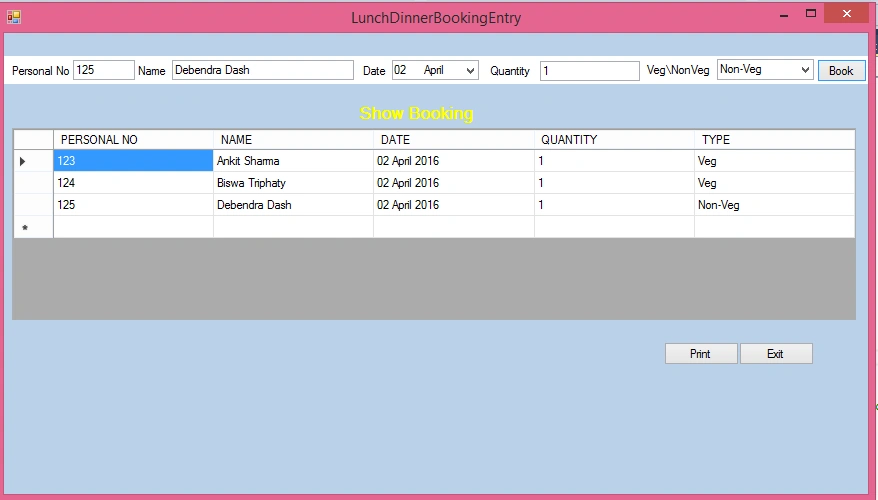
Thus in this way we can also maintaining state in windows application.
Urvashi GuptaPosted Oct 20, 2019, 3:09 AM
What coding is done for print button and to enter this data into database
Vinay KrishnaPosted Mar 14, 2018, 9:03 PM
Great as the second update by you been working fine. My view while programming is when I keep on inserting new records all those will be saved and displayed in datagridview which is fine. Once after i close that loaded windows Form1 where I actually insert values and run it for the second time data's saved earlier will be lost from datagridview. (Here i did not try using database). My overall question is how to save or retrieve the lost entries of previous windows form loads ? Thank you.
chetan thummarPosted Dec 18, 2017, 1:01 AM
This article header is for datagrid and sample is for datagridview. its confusing. can you provide same thing for datagrid?
Manish PandeyPosted Mar 29, 2016, 10:04 AM
Sorry for confused text.. Just hope @eithe phyu u have got little bit idea.
Manish PandeyPosted Mar 29, 2016, 10:01 AM
Add this line dt = dataGridView1.DataSource Just below the DataTable?dt?=?new?DataTable();? And check a condition. ? If dt is nothing then only define the columns Otherwise Use??dt.Rows.Add() function. It will maintain ur old data.
Eithe PhyuPosted Mar 29, 2016, 2:47 AM
When I add data for the first time, it is OK. But I add data the second time, it is overwrited the first data. How can I store both data? Thanks!