Introduction
In this blog, you will learn, how to cancel Workflows of List Item/Document in List/Library, using CSOM with PowerShell Script for any SharePoint platform site.
Pre-process
Following prerequisites are required to create Workflow in SharePoint lists/libraries before cancelling Workflow:
- Install SharePoint Designer 2013.
- Open SharePoint Designer 2013 and connect to a SharePoint 2013 site.
- Create a new List workflow based on the SharePoint 2013 Workflow platform.
- Click Workflows node in the Navigation pane.
- Click the List Workflow drop-down in the New section of the ribbon.
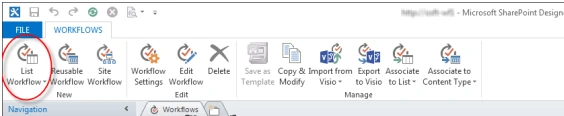
- Select the list you want to associate with the new Workflow.
- On the Create List Workflow dialog box, enter a name and description for Workflow and make sure, the Platform Type is set to SharePoint 2013 Workflow.
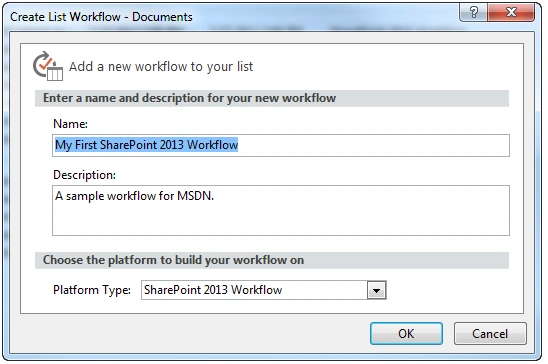
- Click OK to create Workflow.
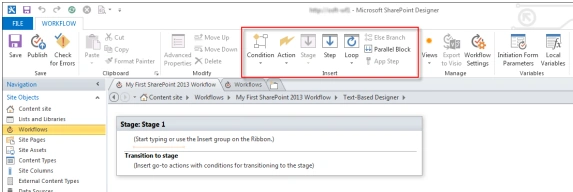
- Now, Workflow is created. You can add Actions, Conditions, Stages, Steps and Loops to build your Workflow. These Workflow components are available in the ribbon of SharePoint Designer 2013.
Steps Involved to Cancel the Workflow
The following section explains the flow to cancel Workflow.
- Add the references, using the Add-Type command with the necessary reference paths. The necessary references are Microsoft.SharePoint.Client.dll and Microsoft.SharePoint.Client.Runtime.dll.
- Add-Type -Path "C:\Program Files\Common Files\microsoft shared\Web Server Extensions\15\ISAPI\Microsoft.SharePoint.Client.dll"
- Add-Type -Path "C:\Program Files\Common Files\microsoft shared\Web Server Extensions\15\ISAPI\Microsoft.SharePoint.Client.Runtime.dll"
- Initialize the client context object with the site URL.
- $siteURL = "http://siteURL.com/"
- $ctx = New-Object Microsoft.SharePoint.Client.ClientContext($siteURL)
- If you are trying to access SharePoint Online site, you need to setup the site credentials with the credentials parameter and set it to the client context.
- $userId = "ID12345"
- $pwd = Read-Host -Prompt "Enter password" -AsSecureString
- $creds = New-Object Microsoft.SharePoint.Client.SharePointOnlineCredentials($userId, $pwd)
- $ctx.credentials = $creds
- $web= $ctx.web
- If you are trying to access SharePoint On premise site, the credentials parameter is not required to be set to the context. You need to run the code on the respective SharePoint Server.
- Cancel Workflow of the list/library items, using the code, given below:
- Get the List by using GetByTitle.
- Loop through all the Items in List/Library.
- Loop through all Workflows on each List Items/Documents.
- Completed Workflows have to be ignored
- Cancel Workflow, using CancelWorkflow method.
- try
- {
- #Provide the List or Library name which contains Workflow
- $list = $ctx.web.Lists.GetByTitle("TestListWorkFlow")
- $web.AllowUnsafeUpdates = $true
- foreach($listItem in $list.Items) {
- foreach($workflow in $listItem.Workflows)
- {
- #Completed Workflows has to be ignored
- if (($listItem.Workflows | where {
- $_.InternalState - ne "Completed"
- }) - ne $null)
- {
- #Stop / Cancel the Workflows[Microsoft.SharePoint.Workflow.SPWorkflowManager]::CancelWorkflow($workflow) write - output $listItem.Title "Workflow has been stopped” -foregroundcolor green
- }
- }
- }
- $web.AllowUnsafeUpdates = $false
- } catch {
- write - host "$($_.Exception.Message)" - foregroundcolor red
- }
Thus, the Item Workflow has been cancelled for all the list items/document librarys.

Summary
Thus, you have learned, how to cancel SharePoint Online Workflows of List Item/Document in List/Library, using CSOM with PowerShell Script.


Tarun DPosted Aug 9, 2016, 10:44 AM
Thanks for sharing..