
Introduction
Python 3.5 is a very powerful programming language. We can connect it with MSSQL Server and fetch records from Tables to display the client-side.
I will explain step by step how to connect Python with the MSSQL Server 2012.
Basic Configuration Required
- Python 3.5.2 should be installed and set the global environment variable.
- Login to MS SQL Server with SQL Server Authentication
Python Code Development
- Open Sublime Text.
- Create one file with the name of "test" and Save it to E:\ drive.
- open Command Prompt
- Install the MSSQL Server package for Python by using the below command.
- pip install pymssql
- Also, don't forget to upgrade MS SQL Server Driver for Python like below.
- Upgrade Ms SQL Server Driver
- It will install a package for MS SQL so you can import it into a class file like below.
- import pymssql
Complete Code for Database connection from Python with MS SQL Server
The below code will do MS SQL Server database connection with Python.
- import pymssql
- class PythonDbConnect:
- def __init__(self, name):
- self.name = name
- def PrintRecordsFromDatabase(self):
- conn = pymssql.connect(host=r"DELL", user='gul', password='test', database='test')
- print("Connected from DB")
- cursor = conn.cursor()
- cursor.execute('SELECT * FROM mmt;')
- row = cursor.fetchone()
- while row:
- print (str(row[0]) + " " + str(row[1]) + " " + str(row[2]) + " " + str(row[3]) + " " + str(row[4]))
- row = cursor.fetchone()
- dbObj = PythonDbConnect("Connect MS SQL")
- dbObj.PrintRecordsFromDatabase()
- conn = pymssql.connect(host=r"DELL", user='gul', password='test', database='test')

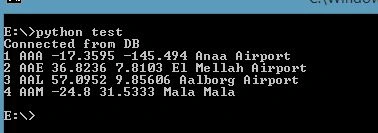
Example
- python test
Tracy suPosted Sep 20, 2021, 9:11 AM
I can't do Upgrade Ms SQL Server Driver. output can't come out.
usharani saribalaPosted Feb 17, 2020, 3:56 AM
Thanks a lot this code is working fine
Mahesh ChandPosted Oct 15, 2016, 4:53 AM
In the Introduction area, you have mentioned SQL Server 2013, which is incorrect. Please fix it.