

Recently, while working on a SharePoint Online project, the requirement came to show only the root items of a document library; i.e., only the root folders or files. By default, Content Search Web Part was showing all the items; i.e., recursively all the files inside the folders were also shown. We need to restrict this functionality in Content Search Web Part.
By using Server side or client side code, we can get all the items across all the folders in a list/library, using the code given below.
CSOM Caml-Query
- <QueryOptions>
- <ViewAttributes Scope="RecursiveAll" />
- </QueryOptions>
- SPQuery query = new SPQuery(view);
- query.ViewAttributes = "Scope=\"Recursive\"";
- SPListItemCollection myItems = list.GetItems(query);
The screenshot is given below of the Document Library, which has folders and Content Search Web Part, which shows the folders/files from inside folders also.
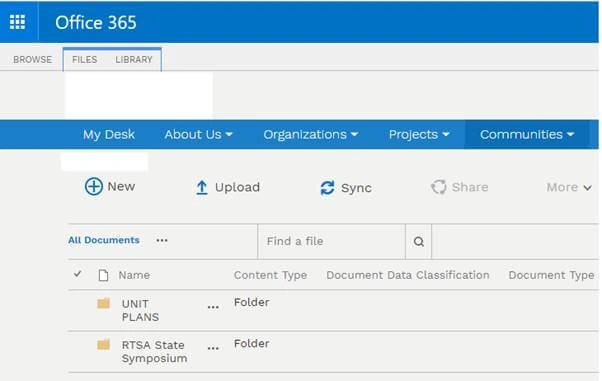
Fig 1: Document Library showing folders

Fig 2: Content Search Web Part Query showing 5 Results – these results include the results from inside folders also, which is not required.
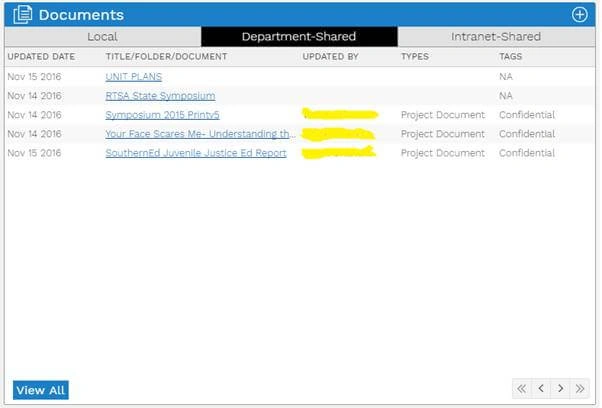
Fig 3: Content Search Web Part on a page showing all items of a document library
After
Thus, I changed the query in Content Search Web Part and added ContentTypeId:0x0120*, so that only root items can be displayed. Below are the screenshots of the updated query in Content Search Web Part and what is shown is in the front-end.
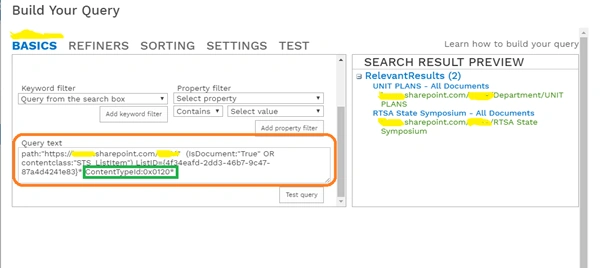
Fig 4: Updated Content Search Web Part query showing only 2 required results

Fig 5: Content Search Web Part showing only root items; i.e., folders present in the document library.
Kirill KarmiPosted Jun 8, 2018, 8:12 PM
Hi Vipul, this is great, thank you so much. I need to show a rollup of a content of specific folder within a library. Would you be able to advise on the approach. Kirill