JSON is a faster and more lightweight data exchange pattern between servers and the clients.
Let us see in a demo how to convert an object to JSON and JSON Text into a C# object.
Nuget provides a plug-in called JSON.NET which provides the facility to convert this.
 Let us say we have a employee class as below:
- public class Employee
- {
- public int EmployeeID
- {
- get;
- set;
- }
- public string EmployeeName
- {
- get;
- set;
- }
- public string DeptWorking
- {
- get;
- set;
- }
- public int Salary
- {
- get;
- set;
- }
- }
And we have a list of employee data; we will convert this into JSON text.
- using System;
- using System.Collections.Generic;
- using Newtonsoft.Json;
- namespace JSON
- {
- class Program
- {
- static void Main(string[] args)
- {
- List < Employee > lstemployee = new List < Employee > ();
- lstemployee.Add(new Employee()
- {
- EmployeeID = 100, EmployeeName = "Pradeep", DeptWorking = "OnLineBanking", Salary = 10000
- });
- lstemployee.Add(new Employee()
- {
- EmployeeID = 101, EmployeeName = "Mark", DeptWorking = "OnLineBanking", Salary = 20000
- });
- lstemployee.Add(new Employee()
- {
- EmployeeID = 102, EmployeeName = "Smith", DeptWorking = "Mobile banking", Salary = 10000
- });
- lstemployee.Add(new Employee()
- {
- EmployeeID = 103, EmployeeName = "John", DeptWorking = "Testing", Salary = 7000
- });
- string output = JsonConvert.SerializeObject(lstemployee);
- Console.WriteLine(output);
- Console.ReadLine();
- List < Employee > deserializedProduct = JsonConvert.DeserializeObject < List < Employee >> (output);
- }
- }
- }
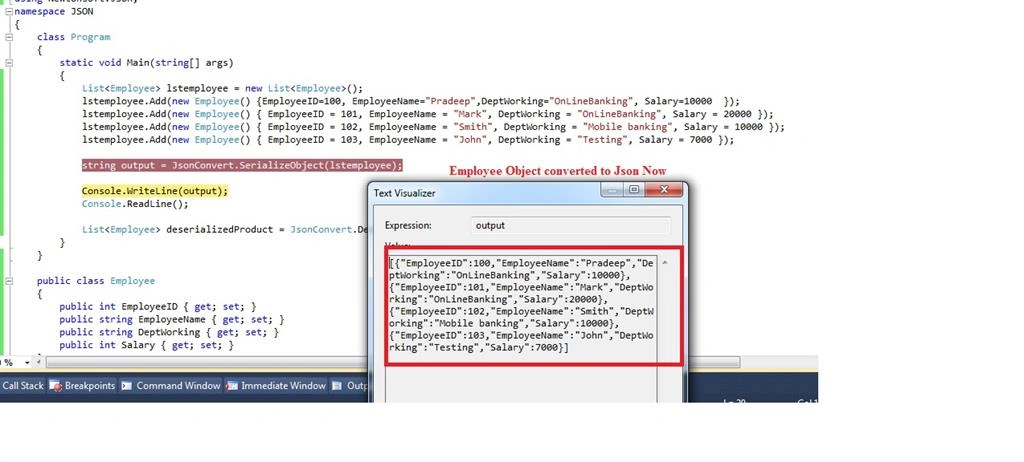 We saw how we converted an object to JSON and JSON to objects. Thanks for reading.

manoj joonPosted Jun 19, 2021, 2:35 AM
How to get json of selected keys in the above scenario