

Introduction
Software requirement
Python 3.5 and IDLE (Python 3.5)
Programming code
- #Create Menubar in Python GUI Application
- import tkinter as tk
- from tkinter import ttk
- from tkinter import Menu
- win = tk.Tk()
- win.title("Python GUI App")
- #Exit action
- def _quit():
- win.quit()
- win.destroy()
- exit()
- #Create Menu Bar
- menuBar=Menu(win)
- win.config(menu=menuBar)
- #File Menu
- fileMenu= Menu(menuBar, tearoff=0)
- fileMenu.add_command(label="New")
- fileMenu.add_separator()
- fileMenu.add_command(label="Exit", command=_quit)
- menuBar.add_cascade(label="File", menu=fileMenu)
- #Help Menu
- helpMenu= Menu(menuBar, tearoff=0)
- helpMenu.add_command(label="About")
- menuBar.add_cascade(label="Help", menu=helpMenu)
- #Calling Main()
- win.mainloop()
About the code
- First, I am importing the tkinter modules.
- Next, I assign a class and variables and give the application title.
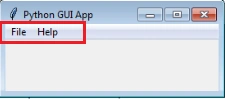
- Next, I create a Menu bar and adding menus into the menu bar like file, help.
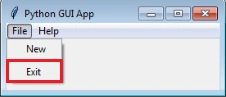
- Next, I create menu items and items event into the menus like new, exit
- Finally, I have started the Windows event loop by calling the mainloop method.
- And, I execute the code.
Output
Koshila SenadhiraPosted Dec 1, 2022, 11:16 AM
Interesting Article!