

Introduction
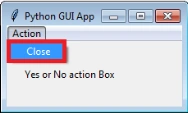
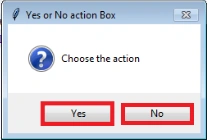
In this blog, I am going to create an ask yes or no message box in Python GUI application, when a user clicks "Close" from the Action menu, it will ask for the user's choice as - yes or no - in the application screen.
Software requirement
Python 3.5 and IDLE (Python 3.5)
Programming code
- #Create ask yes or no message Box in Python GUI Application
- import tkinter as tk
- from tkinter import ttk
- from tkinter import Menu
- from tkinter import messagebox as mbox
- yes_or_no = tk.Tk()
- #Add a Title
- yes_or_no.title("Python GUI App")
- #Label
- ttk.Label(yes_or_no, text="Yes or No action Box").grid(column=0,row=0,padx=20,pady=30)
- #Create a Menu Bar
- menuBar=Menu(yes_or_no)
- yes_or_no.config(menu=menuBar)
- #Display a yes or no Message Box
- def _msgBox():
- mbox.askyesno('Yes or No action Box','Choose the action')
- #Create Message Menu
- infoMenu=Menu(menuBar, tearoff=0)
- infoMenu.add_command(label="Close", command=_msgBox)
- menuBar.add_cascade(label="Message", menu=infoMenu)
- #Calling Main()
- yes_or_no.mainloop()
About the code
First, I am importing the tkinter modules.
Next, assign a class and variables and give the application a title.
Next, create a menu bar and add a menu item in the menu bar.
Next, create the ask message function and add "yes" and "no" options in displaying command menu.
Finally, I have started the Windows event loop by calling the main loop method.
Then, let's execute the code.
Output
Alex WinterPosted Jan 6, 2018, 3:48 PM
How would I then assign commands to the yes and no buttons?