

Step 1: Open Sqlserver,
a. Create database
create database sample.
b.Create table
- create table tblEmp(Eid int identity(1,1) primary key,Ename nvarchar(50),Designation nvarchar(100),Eimagename varchar(50),Imagedata varbinary(max),Salary nvarchar(50),Email nvarchar(100),Mobileno nvarchar(10),Department nvarchar(100),ManagerPost nvarchar(100),Empno nvarchar(50))
c. Create storedprocedure
- create procedure spInsert_tblEmp(@Ename nvarchar(50), @Designation nvarchar(100), @Eimage varchar(50), @Imagedata varbinary(max), @Salary nvarchar(50), @Email nvarchar(100), @MobileNo nvarchar(10), @Department nvarchar(100), @ManagerPost nvarchar(100), @Empno nvarchar(50))
- as
- begin
- insert into tblEmp(Ename, Designation, Eimagename, Imagedata, Salary, Email, Mobileno, Department, ManagerPost, Empno) values(@Ename, @Designation, @Eimage, @Imagedata, @Salary, @Email, @MobileNo, @Department, @ManagerPost, @Empno)
- end
- create procedure spUpdate_tblEmp(@Eid int, @Ename nvarchar(50), @Designation nvarchar(100), @Eimage varchar(50), @Imagedata varbinary(max), @Salary nvarchar(50), @Email nvarchar(100), @MobileNo nvarchar(10), @Department nvarchar(100), @ManagerPost nvarchar(100), @Empno nvarchar(50))
- as
- begin
- Update tblEmp set Ename = @Ename, Designation = @Designation, Eimagename = @Eimage, Imagedata = @Imagedata, Salary = @Salary, Email = @Email, Mobileno = @MobileNo, Department = @Department, ManagerPost = @ManagerPost, Empno = @Empno where Eid = @Eid
- end
- create procedure spDelete_tblEmp(@Eid int)
- as
- begin
- Delete from tblEmp where Eid = @Eid
- end
- create procedure spdisplay_tblEmp
- as
- begin
- select * from tblemp
- end
- Create procedure spdisplay_tblEmpdata(@Eid int)
- as
- begin
- select * from tblEmp where Eid = @Eid
- end // This is just a sample script. Paste your real code (javascript or HTML) here.
- if ('this_is' == /an_example/)
- {
- of_beautifier();
- } else {
- var a = b ? (c % d) : e[f];
- }
Step 2: Open visual studio->select project->select Visual Studio solutions,
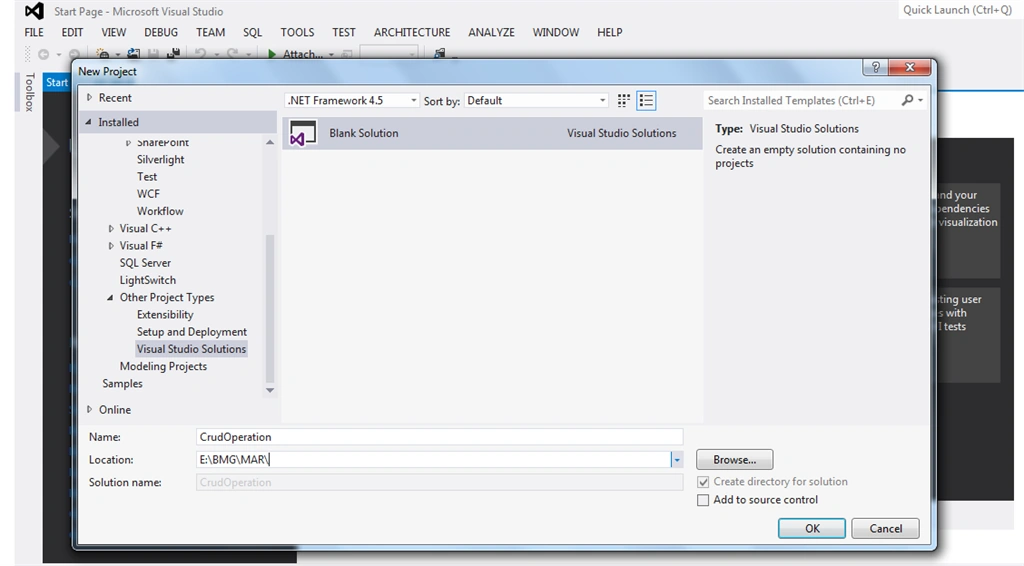
Step 3:
Right click on blank solution ->add->select two class library template ->name it as DAL(data access layer) and BAL(business access layer) ->show below folder structre,
Right click on blank solution ->add->select two class library template ->name it as DAL(data access layer) and BAL(business access layer) ->show below folder structre,
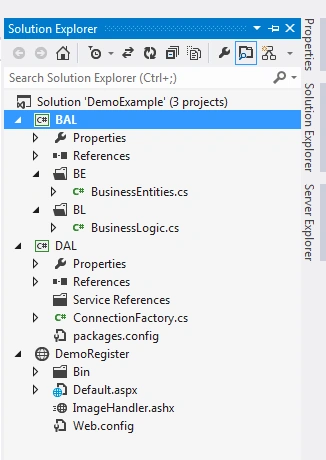
Step 4:
In DAL class1.cs file automatically generates that file; delete and right click on DAL class library select new class file
In DAL class1.cs file automatically generates that file; delete and right click on DAL class library select new class file
name it as ConnectionFactory.cs.
- using System;
- using System.Collections.Generic;
- using System.Data;
- using System.Data.SqlClient;
- using System.Linq;
- using System.Text;
- using System.Threading.Tasks;
- using System.Configuration;
- namespace DAL
- {
- public class ConnectionFactory
- {
- // SqlConnection con = new SqlConnection(ConfigurationManager.ConnectionStrings["ConStr"].ConnectionString);
- SqlConnection con = new SqlConnection("Data Source=.;Initial Catalog=Sample;Integrated Security=True");
- public bool InsertEmpInfo(string cmdtext, SqlParameter[] p)
- {
- try
- {
- SqlCommand cmd = new SqlCommand();
- cmd.CommandType = CommandType.StoredProcedure;
- cmd.CommandText = cmdtext;
- cmd.Connection = con;
- foreach(object obj in p)
- {
- cmd.Parameters.Add(obj);
- }
- con.Open();
- int res = cmd.ExecuteNonQuery();
- con.Close();
- if (res != 0)
- {
- return false;
- } else
- return true;
- } catch
- {
- throw;
- }
- }
- public DataSet DisplayEmpData(string cmdtext)
- {
- try
- {
- con.Open();
- SqlCommand cmd = new SqlCommand(cmdtext, con);
- SqlDataAdapter da = new SqlDataAdapter(cmd);
- cmd.CommandType = CommandType.StoredProcedure;
- DataSet ds = new DataSet();
- da.Fill(ds);
- return ds;
- } catch
- {
- throw;
- }
- }
- public DataSet DisplayEmpData1(string cmdtext, SqlParameter[] p)
- {
- try
- {
- con.Open();
- SqlCommand cmd = new SqlCommand(cmdtext, con);
- SqlDataAdapter da = new SqlDataAdapter(cmd);
- cmd.CommandType = CommandType.StoredProcedure;
- foreach(object obj in p)
- {
- cmd.Parameters.Add(obj);
- }
- DataSet ds = new DataSet();
- da.Fill(ds);
- return ds;
- } catch
- {
- throw;
- }
- }
- }
- }
- Build DAL library.
Step 5:
In BAL class1.cs file automatically generates that file; delete and right click on BAL class library select new class file
name it as BusinessEntities.cs and BusinessLogic.cs.
BusinessEntities.cs
- using System;
- using System.Collections.Generic;
- using System.Linq;
- using System.Text;
- using System.Threading.Tasks;
- namespace BAL.BE
- {
- public class BusinessEntities
- {
- public int Eid
- {
- get;
- set;
- }
- public string Ename
- {
- get;
- set;
- }
- public string Designation
- {
- get;
- set;
- }
- public string Eimagename
- {
- get;
- set;
- }
- public byte[] Imagedata
- {
- get;
- set;
- }
- public string Salary
- {
- get;
- set;
- }
- public string Email
- {
- get;
- set;
- }
- public string MobileNo
- {
- get;
- set;
- }
- public string Department
- {
- get;
- set;
- }
- public string ManagerPost
- {
- get;
- set;
- }
- public string Empno
- {
- get;
- set;
- }
- }
- }
BusinessLogic.cs
- using System;
- using System.Collections.Generic;
- using System.Linq;
- using System.Text;
- using System.Threading.Tasks;
- using DAL;
- using System.Data.SqlClient;
- using BAL.BE;
- using System.Data;
- namespace BAL.BL
- {
- public class BusinessLogic
- {
- public bool EmpInfoinsert(BusinessEntities becat)
- {
- try
- {
- ConnectionFactory cf = new ConnectionFactory();
- SqlParameter[] sp = new SqlParameter[10];
- sp[0] = new SqlParameter("@Ename", becat.Ename);
- sp[1] = new SqlParameter("@Designation", becat.Designation);
- sp[2] = new SqlParameter("@Eimage", becat.Eimagename);
- sp[3] = new SqlParameter("@Imagedata", becat.Imagedata);
- sp[4] = new SqlParameter("@Salary", becat.Salary);
- sp[5] = new SqlParameter("@Email", becat.Email);
- sp[6] = new SqlParameter("@MobileNo", becat.MobileNo);
- sp[7] = new SqlParameter("@Department", becat.Department);
- sp[8] = new SqlParameter("@ManagerPost", becat.ManagerPost);
- sp[9] = new SqlParameter("@Empno", becat.Empno);
- return cf.InsertEmpInfo("spInsert_tblEmp", sp);
- } catch
- {
- throw;
- }
- }
- public bool EmpInfoupdate(BusinessEntities becat)
- {
- try {
- ConnectionFactory cf = new ConnectionFactory();
- SqlParameter[] sp = new SqlParameter[11];
- sp[0] = new SqlParameter("@Eid", becat.Eid);
- sp[1] = new SqlParameter("@Ename", becat.Ename);
- sp[2] = new SqlParameter("@Designation", becat.Designation);
- sp[3] = new SqlParameter("@Eimage", becat.Eimagename);
- sp[4] = new SqlParameter("@Imagedata", becat.Imagedata);
- sp[5] = new SqlParameter("@Salary", becat.Salary);
- sp[6] = new SqlParameter("@Email", becat.Email);
- sp[7] = new SqlParameter("@MobileNo", becat.MobileNo);
- sp[8] = new SqlParameter("@Department", becat.Department);
- sp[9] = new SqlParameter("@ManagerPost", becat.ManagerPost);
- sp[10] = new SqlParameter("@Empno", becat.Empno);
- return cf.InsertEmpInfo("spUpdate_tblEmp", sp);
- } catch
- {
- throw;
- }
- }
- public bool EmpInfoDelete(int Eid)
- {
- try
- {
- ConnectionFactory cf = new ConnectionFactory();
- SqlParameter[] sp = new SqlParameter[1];
- sp[0] = new SqlParameter("@Eid", Eid);
- return cf.InsertEmpInfo("spDelete_tblEmp", sp);
- } catch
- {
- throw;
- }
- }
- public DataSet DisplayEmp()
- {
- ConnectionFactory cf = new ConnectionFactory();
- DataSet ds = cf.DisplayEmpData("spdisplay_tblEmp");
- return ds;
- }
- public DataSet DisplayEmpInfo(int Eid)
- {
- try
- {
- ConnectionFactory cf = new ConnectionFactory();
- SqlParameter[] sp = new SqlParameter[1];
- sp[0] = new SqlParameter("@Eid", Eid);
- DataSet ds = cf.DisplayEmpData1("spdisplay_tblEmpdata", sp);
- return ds;
- } catch
- {
- throw;
- }
- }
- }
- }
Build the BAL library.
Step 6: Right click on blank solution select website name it as "DemoRegister ".
select default page layout is shown below,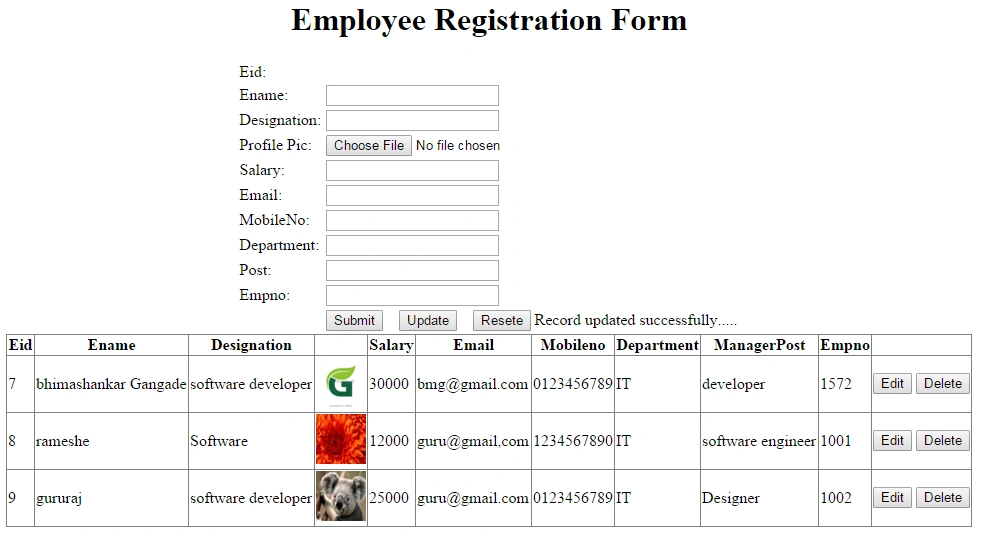
Source code for default.aspx.cs
- using System;
- using System.Collections.Generic;
- using System.Linq;
- using System.Web;
- using System.Web.UI;
- using System.Web.UI.WebControls;
- using DAL;
- using BAL.BE;
- using BAL.BL;
- using System.Data;
- using System.IO;
- public partial class _Default: System.Web.UI.Page
- {
- protected void Page_Load(object sender, EventArgs e)
- {
- BindGridViewData();
- txteid.Visible = false;
- }
- public void BindGridViewData()
- {
- BusinessLogic beobj = new BusinessLogic();
- DataSet ds = beobj.DisplayEmp();
- GridView1.DataSource = ds;
- GridView1.DataBind();
- }
- //insert button code
- protected void btnsubmit_Click(object sender, EventArgs e)
- {
- if (fileUpload1.HasFile)
- {
- int length = fileUpload1.PostedFile.ContentLength;
- byte[] imgbyte = new byte[length];
- HttpPostedFile img = fileUpload1.PostedFile;
- //set the binary data
- img.InputStream.Read(imgbyte, 0, length);
- string filename = Path.GetFileName(fileUpload1.PostedFile.FileName);
- BusinessEntities be = new BusinessEntities();
- BusinessLogic bl = new BusinessLogic();
- be.Ename = txtename.Text;
- be.Designation = txtdesg.Text;
- //be.Eimage=txtimage.
- be.Eimagename = filename;
- be.Imagedata = imgbyte;
- be.Salary = txtsalary.Text;
- be.Email = txtEmail.Text;
- be.MobileNo = txtmob.Text;
- be.Department = txtdept.Text;
- be.ManagerPost = txtpost.Text;
- be.Empno = txtempno.Text;
- bool result = bl.EmpInfoinsert(be);
- lblmsg.Text = "Record saved successfully.....";
- BindGridViewData();
- txteid.Text = txtename.Text = txtdept.Text = txtdesg.Text = txtempno.Text = txtsalary.Text = txtpost.Text = txtmob.Text = txtEmail.Text = "";
- }
- }
- //update button code
- protected void btnupdate_Click(object sender, EventArgs e)
- {
- txteid.Visible = true;
- //BindGridViewData1();
- if (fileUpload1.HasFile)
- {
- int length = fileUpload1.PostedFile.ContentLength;
- byte[] imgbyte = new byte[length];
- HttpPostedFile img = fileUpload1.PostedFile;
- //set the binary data
- img.InputStream.Read(imgbyte, 0, length);
- string filename = Path.GetFileName(fileUpload1.PostedFile.FileName);
- BusinessEntities be = new BusinessEntities();
- BusinessLogic bl = new BusinessLogic();
- be.Eid = int.Parse(txteid.Text);
- be.Ename = txtename.Text;
- be.Designation = txtdesg.Text;
- //be.Eimage=txtimage.
- be.Eimagename = filename;
- be.Imagedata = imgbyte;
- be.Salary = txtsalary.Text;
- be.Email = txtEmail.Text;
- be.MobileNo = txtmob.Text;
- be.Department = txtdept.Text;
- be.ManagerPost = txtpost.Text;
- be.Empno = txtempno.Text;
- bool result = bl.EmpInfoupdate(be);
- lblmsg.Text = "Record updated successfully.....";
- BindGridViewData();
- txteid.Text = txtename.Text = txtdept.Text = txtdesg.Text = txtempno.Text = txtsalary.Text = txtpost.Text = txtmob.Text = txtEmail.Text = "";
- txteid.Visible = false;
- }
- }
- //resete button code
- protected void btnresete_Click(object sender, EventArgs e)
- {
- txteid.Text = txtename.Text = txtdept.Text = txtdesg.Text = txtempno.Text = txtsalary.Text = txtpost.Text = txtmob.Text = txtEmail.Text = "";
- }
- //display on particular record in textbox code
- protected void Button1_Click(object sender, EventArgs e)
- {
- txteid.Visible = true;
- Button btn = (Button) sender;
- string CommandName = btn.CommandName;
- string CommandArgument = btn.CommandArgument;
- int abcd = int.Parse(CommandArgument);
- BindGridViewData1(abcd);
- }
- //display record code
- private void BindGridViewData1(int abcd)
- {
- BusinessLogic beobj = new BusinessLogic();
- DataSet ds = beobj.DisplayEmpInfo(abcd);
- int emid = (int) ds.Tables[0].Rows[0][0];
- txteid.Text = emid.ToString();
- txtename.Text = ds.Tables[0].Rows[0][1].ToString();
- txtdesg.Text = ds.Tables[0].Rows[0][2].ToString();
- txtsalary.Text = ds.Tables[0].Rows[0][5].ToString();
- txtEmail.Text = ds.Tables[0].Rows[0][6].ToString();
- txtmob.Text = ds.Tables[0].Rows[0][7].ToString();
- txtdept.Text = ds.Tables[0].Rows[0][8].ToString();
- txtpost.Text = ds.Tables[0].Rows[0][9].ToString();
- txtempno.Text = ds.Tables[0].Rows[0][10].ToString();
- }
- //In gridview delete button code
- protected void Button2_Click(object sender, EventArgs e)
- {
- txteid.Visible = true;
- Button btn = (Button) sender;
- string CommandName = btn.CommandName;
- string CommandArgument = btn.CommandArgument;
- int xyz = int.Parse(CommandArgument);
- BusinessEntities be = new BusinessEntities();
- BusinessLogic bl = new BusinessLogic();
- bool res = bl.EmpInfoDelete(xyz);
- }
- }
Build project and Run.
Ramendra kumar vermaPosted Apr 3, 2018, 1:28 PM
Not use sealed keyword
Ramendra kumar vermaPosted Apr 3, 2018, 1:28 PM
Can you tell me other way to prevent inherit class
Gururaj JewargiPosted Mar 11, 2016, 12:39 AM
Nice article sir it's helpful for us thanku for sharing ur knowledge.