

Before reading this blog I expect you are familiar with creating Database and Tables.
STEPS
- Suppose we have a Film Database with two table as TblMovie and TblActor.
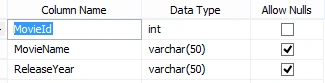
- Table structure of TblMovie is
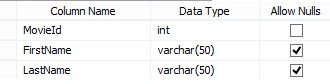
- Table structure of TblActor is
- Lets we have datas in our Table like
- USE [Film]
- GO
- /****** Object: Table [dbo].[TblMovie] Script Date: 05/06/2015 10:21:01 ******/
- SET ANSI_NULLS ON
- GO
- SET QUOTED_IDENTIFIER ON
- GO
- SET ANSI_PADDING ON
- GO
- CREATE TABLE [dbo].[TblMovie](
- [MovieId] [int] IDENTITY(1,1) NOT NULL,
- [MovieName] [varchar](50) NULL,
- [ReleaseYear] [varchar](50) NULL
- ) ON [PRIMARY]
- GO
- SET ANSI_PADDING OFF
- GO
- SET IDENTITY_INSERT [dbo].[TblMovie] ON
- INSERT [dbo].[TblMovie] ([MovieId], [MovieName], [ReleaseYear]) VALUES (1, N'My Fair Lady', N'1964')
- INSERT [dbo].[TblMovie] ([MovieId], [MovieName], [ReleaseYear]) VALUES (2, N'Unforgiven', N'1992')
- INSERT [dbo].[TblMovie] ([MovieId], [MovieName], [ReleaseYear]) VALUES (3, N'Time Machine', N'1997')
- SET IDENTITY_INSERT [dbo].[TblMovie] OFF
- /****** Object: Table [dbo].[TblActor] Script Date: 05/06/2015 10:21:01 ******/
- SET ANSI_NULLS ON
- GO
- SET QUOTED_IDENTIFIER ON
- GO
- SET ANSI_PADDING ON
- GO
- CREATE TABLE [dbo].[TblActor](
- [MovieId] [int] NOT NULL,
- [FirstName] [varchar](50) NULL,
- [LastName] [varchar](50) NULL
- ) ON [PRIMARY]
- GO
- SET ANSI_PADDING OFF
- GO
- INSERT [dbo].[TblActor] ([MovieId], [FirstName], [LastName]) VALUES (1, N'Rex', N'Harrison')
- INSERT [dbo].[TblActor] ([MovieId], [FirstName], [LastName]) VALUES (1, N'Audrey', N'Hepburn')
- INSERT [dbo].[TblActor] ([MovieId], [FirstName], [LastName]) VALUES (2, N'Clint', N'Eastwood')
- INSERT [dbo].[TblActor] ([MovieId], [FirstName], [LastName]) VALUES (5, N'Humphery', N'Bogart')
- Now we have to join the two tables TblMovie and TblActor on the basis of MovieId
Write SQL Select Statement in the Query Editor
- select * from dbo.TblMovie
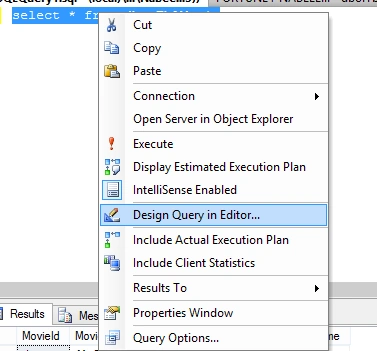
Then select the query right click on it and Click Design Query in Editor like the below Image
- The upcoming window after clicking Design Query in Editor is:
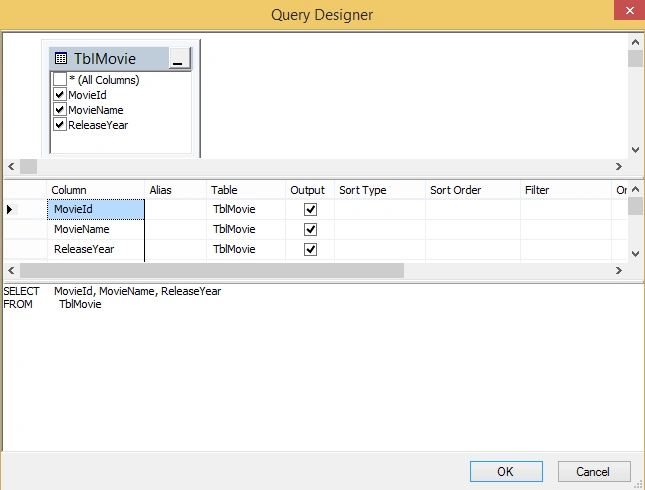
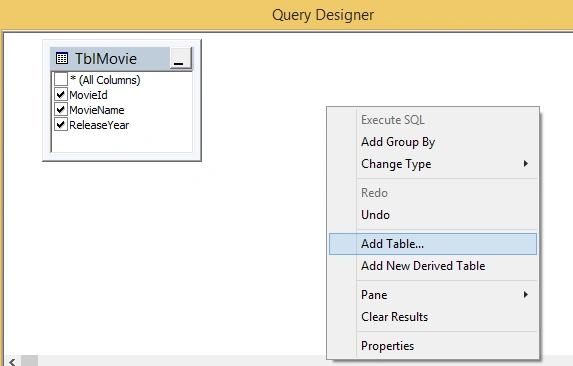
- Now right click on it select Add Table and then select Tables or Views you want to Join:
- The next Pop up window will come like:
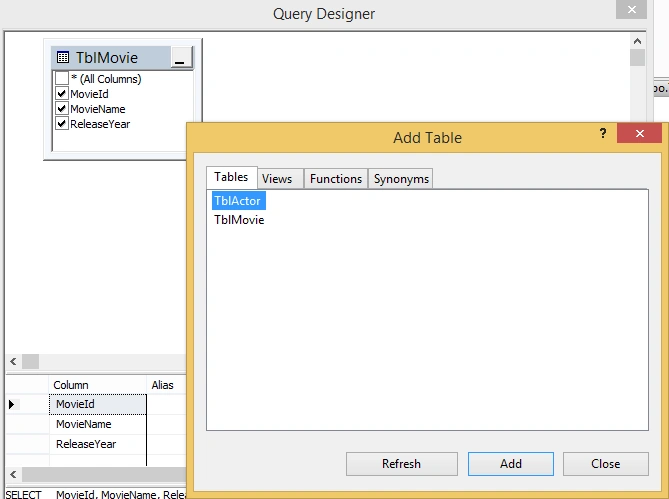
- Now click add and close the window.
- Drag MovieId from TblMovie and put it in MovieId of TblActor and check FirstName and LastName like below image.
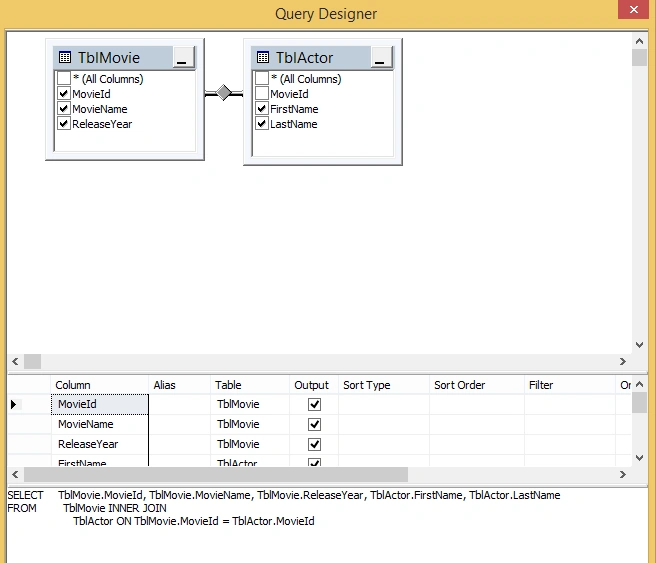
- Now you can click ok and execute the query you will get the desired result or else you can do Filter to get your desired result.
I hope you liked it and in the same process you can join multiple tables by adding another Table and View.
SubashPosted Aug 1, 2016, 5:14 AM
Nice
Sabyasachi MishraPosted May 11, 2015, 3:03 AM
pertti jarva It was just a dummy example that's why taken varchar(50). Anyway thanks for notifying.
Sabyasachi MishraPosted May 11, 2015, 3:02 AM
pertti jarva Yes ,but its another process to do JOIN. As we can see the the table structure I think its easier if we are joining more than two tables.
pertti jarvaPosted May 10, 2015, 3:45 PM
Wouldn't it be a LOT easier just to learn the join syntax and write it yourself instead of using the GUI? Also, defining year as varchar(50) is a really bad habit.