

This article focuses on the actual content migration effort which is seperate from planning, redesign, fixes, deployment, and configuration.
It's a very common question during the analysis phase of a SharePoint migration project. - How much time a "Tool or Migration API" will take to migrate the actual content from the source to the destination?
I found a couple proposals where people simply say 5GB per hour but it's not really practical.
It depends on multiple factors. I am not going to dive deep into how the below factors impact this. Just take the estimation based on content.
It's a very common question during the analysis phase of a SharePoint migration project. - How much time a "Tool or Migration API" will take to migrate the actual content from the source to the destination?
I found a couple proposals where people simply say 5GB per hour but it's not really practical.
It depends on multiple factors. I am not going to dive deep into how the below factors impact this. Just take the estimation based on content.
- Network bandwidth
- Type of content & file format i.e. List Item, Document, and Video etc.
- Check In / out files & Versions
- User base, Custom Permission & Groups
- Workflow (OOTB, Design. Custom, Nintex)
- Customization
- Asp.Net Forms, InfoPath Forms
- Threshold limit (Items, Lookup, Unique permission)
High-level content migration estimation view
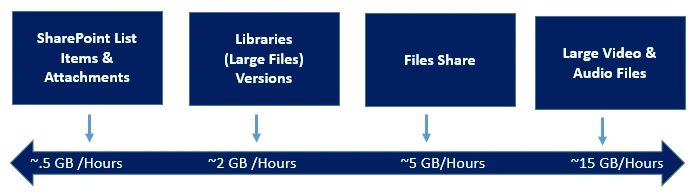
List Item size is very low and associates with the large metadata, Workflows, Events etc.
- Library item size quite big (files size like MBs) associated with versioning, large metadata, workflow, events etc.
- File Share – No metadata, No Versioning
- Video – Big size files.
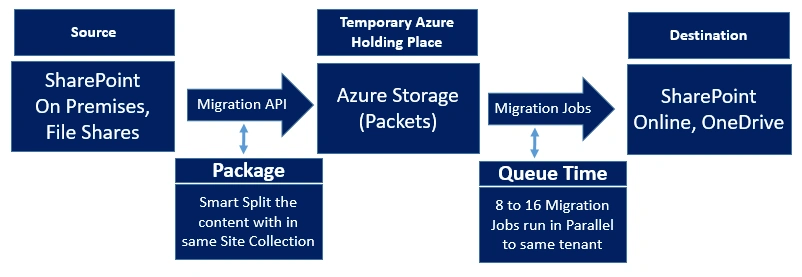
How Migration API (Most of the tools use) works
How does version impact the estimation (which we usually miss)
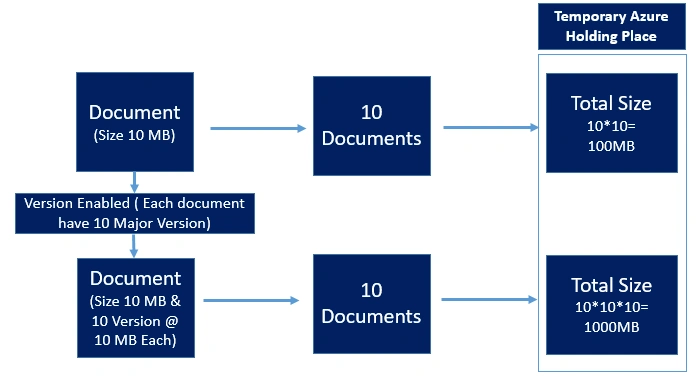
How does version impact the estimation (which we usually miss)
Join the conversation! Your thoughts help the community grow.