

Introduction
This article describes how to export a GridView data to excel, word, pdf, text, csv format and print in ASP.Net.
Description
Since there is no support for pdf conversion, we require a third-party DLL to be referenced by our application that will use for convert the grid to pdf.
- itextsharp.dll
You can download it from the source code
attached to this article.
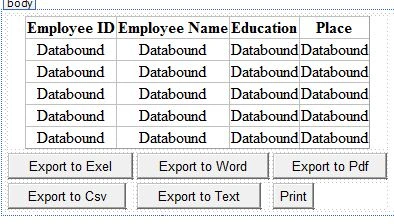
Design
Now add GridvView, six Button for export.
Design your screen as in the following screen.
Or you can copy the following source code:
<body>
<form
id="form1"
runat="server">
<div>
<table>
<tr>
<td
colspan="3"
align="center">
<asp:GridView
ID="gvDetails"
runat="server"
AutoGenerateColumns="false">
<Columns>
<asp:BoundField
DataField="EmpId"
HeaderText="Employee ID"
/>
<asp:BoundField
DataField="EmpName"
HeaderText="Employee
Name" />
<asp:BoundField
DataField="Education"
HeaderText="Education"
/>
<asp:BoundField
DataField="Place"
HeaderText="Place"
/>
</Columns>
</asp:GridView>
</td>
</tr>
<tr>
<td>
<asp:Button
ID="btnExel"
runat="server"
Text="Export to Exel"
OnClick="btnExel_Click" />
</td>
<td>
<asp:Button
ID="btnWord"
runat="server"
Text="Export to Word"
OnClick="btnWord_Click" />
</td>
<td>
<asp:Button
ID="btnPdf"
runat="server"
Text="Export to Pdf"
OnClick="btnPdf_Click"
/>
</td>
</tr>
<tr>
<td>
<asp:Button
ID="btnCsv"
runat="server"
Text="Export to Csv"
OnClick="btnCsv_Click"
/>
</td>
<td>
<asp:Button
ID="btnText"
runat="server"
Text="Export to Text"
OnClick="btnText_Click" />
</td>
<td>
<asp:Button
ID="btnPrint"
runat="server"
Text="Print"
OnClientClick="PrintGridData();"
/>
</td>
</tr>
</table>
</div>
</form>
</body>
</html>
Now go to the code view.
Here I use a static datatable data to bind it
to grid. but you can use database data to bind.
Import the reference of
using System.Data;
following is the code to bind data to grid method and call this method in :
protected
void Page_Load(object
sender, EventArgs e)
{
if (!IsPostBack)
{
BindGridDetails();
}
}
protected void
BindGridDetails()
{
DataTable dt =
new DataTable();
dt.Columns.Add("EmpId",
typeof(Int32));
dt.Columns.Add("EmpName",
typeof(string));
dt.Columns.Add("Education",
typeof(string));
dt.Columns.Add("Place",
typeof(string));
DataRow dtrow = dt.NewRow();
dtrow["EmpId"] = 1;
dtrow["EmpName"] =
"Sanjeeb";
dtrow["Education"] =
"MCA";
dtrow["Place"] =
"Hyderabad";
dt.Rows.Add(dtrow);
dtrow = dt.NewRow();
dtrow["EmpId"] = 2;
dtrow["EmpName"] =
"Laku";
dtrow["Education"] =
"MBA";
dtrow["Place"] =
"Hyderabad";
dt.Rows.Add(dtrow);
dtrow = dt.NewRow();
dtrow["EmpId"] = 3;
dtrow["EmpName"] =
"Pankaj";
dtrow["Education"] =
"B.Tech";
dtrow["Place"] =
"Bihar";
dt.Rows.Add(dtrow);
dtrow = dt.NewRow();
dtrow["EmpId"] = 4;
dtrow["EmpName"] =
"Srikanth";
dtrow["Education"] =
"B.Tech";
dtrow["Place"] =
"Hyderabad";
dt.Rows.Add(dtrow);
gvDetails.DataSource = dt;
gvDetails.DataBind();
}
Now run the application you will see the gridview with data.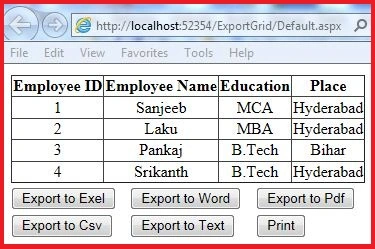
GridView with data is ready for export.
Import the reference of
using System.IO;
Now write this code under button click event of Exel.
//This code
is for export grid to exel
protected void
btnExel_Click(object sender,
EventArgs e)
{
BindGridDetails();
Response.ClearContent();
Response.Buffer = true;
Response.AddHeader("content-disposition",
string.Format("attachment;
filename={0}", "Details.xls"));
Response.ContentType =
"application/ms-excel";
StringWriter sw =
new StringWriter();
HtmlTextWriter ht =
new HtmlTextWriter(sw);
gvDetails.RenderControl(ht);
Response.Write(sw.ToString());
Response.End();
}
write this code under button click event of Word:
//This
code is for export grid to word
protected void
btnWord_Click(object sender,
EventArgs e)
{
BindGridDetails();
Response.ClearContent();
Response.Buffer = true;
Response.AddHeader("content-disposition",
string.Format("attachment;
filename={0}", "Details.doc"));
Response.ContentType = "application/ms-word";
StringWriter sw =
new StringWriter();
HtmlTextWriter ht =
new HtmlTextWriter(sw);
gvDetails.RenderControl(ht);
Response.Write(sw.ToString());
Response.End();
}
Import the reference of
using System.Text;
write this code under button click event of Text:
//This
code is for export grid to text
protected void
btnText_Click(object sender,
EventArgs e)
{
BindGridDetails();
Response.ClearContent();
Response.AddHeader("content-disposition",
string.Format("attachment;
filename={0}", "Details.txt"));
Response.ContentType = "application/text";
StringBuilder str =
new StringBuilder();
for (int
i = 0; i < gvDetails.Columns.Count; i++)
{
str.Append(gvDetails.Columns[i].HeaderText +
',');
}
str.Append("\n");
for (int
j = 0; j < gvDetails.Rows.Count; j++)
{
for (int
k = 0; k < gvDetails.Columns.Count; k++)
{
str.Append(gvDetails.Rows[j].Cells[k].Text +
',');
}
str.Append("\n");
}
Response.Write(str.ToString());
Response.End();
}
write this code under button click event of
Csv:
//This
code is for export grid to text
protected void
btnText_Click(object sender,
EventArgs e)
{
BindGridDetails();
Response.ClearContent();
Response.AddHeader("content-disposition",
string.Format("attachment;
filename={0}", "Details.txt"));
Response.ContentType = "application/text";
StringBuilder str =
new StringBuilder();
for (int
i = 0; i < gvDetails.Columns.Count; i++)
{
str.Append(gvDetails.Columns[i].HeaderText +
',');
}
str.Append("\n");
for (int
j = 0; j < gvDetails.Rows.Count; j++)
{
for (int
k = 0; k < gvDetails.Columns.Count; k++)
{
str.Append(gvDetails.Rows[j].Cells[k].Text +
',');
}
str.Append("\n");
}
Response.Write(str.ToString());
Response.End();
}
Before write the code for pdf 1st add the reference of itextsharp.dll.
Import these namspaces.
using
iTextSharp;
using
iTextSharp.text;
using
iTextSharp.text.html.simpleparser;
using
iTextSharp.text.pdf;
write this code under button click event of Pdf:
//This
code is for export grid to pdf
protected void
btnPdf_Click(object sender,
EventArgs e)
{
BindGridDetails();
Response.ContentType = "application/pdf";
Response.AddHeader("content-disposition",
"attachment;filename=Details.pdf");
Response.Cache.SetCacheability(HttpCacheability.NoCache);
StringWriter sw =
new StringWriter();
HtmlTextWriter hw =
new HtmlTextWriter(sw);
gvDetails.RenderControl(hw);
StringReader sr =
new StringReader(sw.ToString());
Document pdfDoc =
new Document(PageSize.A4,
10f, 10f, 10f, 0f);
HTMLWorker htmlparser =
new HTMLWorker(pdfDoc);
PdfWriter.GetInstance(pdfDoc,
Response.OutputStream);
pdfDoc.Open();
htmlparser.Parse(sr);
pdfDoc.Close();
Response.Write(pdfDoc);
Response.End();
}
For print button write this javascript code in head section of aspx page.
<script
type="text/javascript">
function PrintGridData() {
var prtGrid =
document.getElementById('<%=gvDetails.ClientID
%>');
var prtwin = window.open('',
'PrintGridView',
'left=100,top=100,width=400,height=400,tollbar=0,scrollbars=1,status=0,resizable=1');
prtwin.document.write(prtGrid.outerHTML);
prtwin.document.close();
prtwin.focus();
prtwin.print();
prtwin.close();
}
</script>
Call this function in print button OnClientClick.
<asp:Button
ID="btnPrint"
runat="server"
Text="Print"
OnClientClick="PrintGridData();"
/>
Now if you run the application you will got an error like this
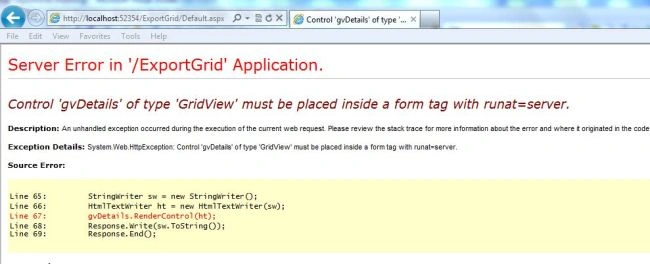
To avoid this error write this code :
//Verifies
the control is rendered
public override
void VerifyRenderingInServerForm(Control
control)
{
}
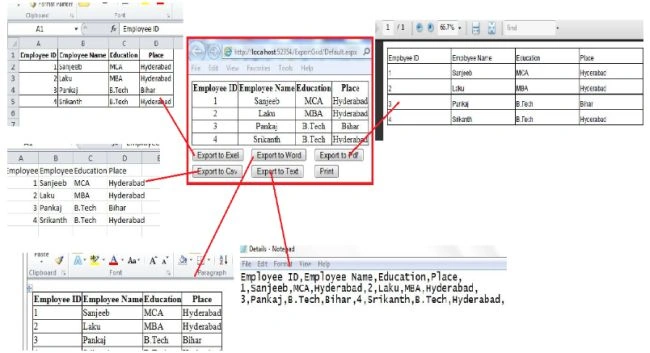
Now run the application and check the app by clicking on export Buttons.
chandru lsPosted Jun 27, 2014, 5:29 AM
not working in chrome and firefox browsers..only works in IE..and i am using master page..
Raghavender ReddyPosted Jun 25, 2014, 12:20 PM
thank you
Raghavender ReddyPosted Jun 25, 2014, 12:20 PM
www
rajay sachdevaPosted Dec 27, 2013, 3:03 AM
third is another NameSpace System.IO is also required...Really thankyou for this code.
rajay sachdevaPosted Dec 27, 2013, 3:02 AM
should be replaced by {{{{{{ StreamReader sa = new StreamReader(sw.ToString());}}}}}}}}}
rajay sachdevaPosted Dec 27, 2013, 3:00 AM
secondly in btn_pdf button this code{{{{{{{StringReader sr = new StringReader(sw.ToString());}}}}}}}}}}}
rajay sachdevaPosted Dec 27, 2013, 2:58 AM
firsly if u are working with user controls u can paste your script tag in user control body,,as user control has no any head section
rajay sachdevaPosted Dec 27, 2013, 2:57 AM
this code has little bit problems.i request to author to improve this