

First, you have to install a package called RazorPDF for MVC through Manage
Nuget Packages.
I have created a class called MarksCard.cs,
- public class MarksCard
- {
- public int RollNo { get; set; }
- public string Subject { get; set; }
- public int FullMarks { get; set; }
- public int Obtained { get; set; }
- }
And add a namespace.
- using RazorPDF;
- public ActionResult Index()
- {
- var studentMarks = new List < MarksCard > ()
- {
- new MarksCard
- {
- RollNo = 101, Subject = "C#", FullMarks = 100, Obtained = 90
- },
- new MarksCard
- {
- RollNo = 102, Subject = "asp.net", FullMarks = 100, Obtained = 80
- },
- new MarksCard
- {
- RollNo = 103, Subject = "MVC", FullMarks = 100, Obtained = 100
- },
- new MarksCard
- {
- RollNo = 104, Subject = "SQL Server", FullMarks = 100, Obtained = 75
- },
- };
- return View("Index", studentMarks);
- }
- public ActionResult DownloadPdf()
- {
- var studentMarks = new List < MarksCard > ()
- {
- new MarksCard
- {
- RollNo = 101, Subject = "C#", FullMarks = 100, Obtained = 90
- },
- new MarksCard
- {
- RollNo = 102, Subject = "asp.net", FullMarks = 100, Obtained = 80
- },
- new MarksCard
- {
- RollNo = 103, Subject = "MVC", FullMarks = 100, Obtained = 100
- },
- new MarksCard
- {
- RollNo = 104, Subject = "SQL Server", FullMarks = 100, Obtained = 75
- },
- };
- return new PdfResult(studentMarks, "Index");
- }
- @model IEnumerable
- <RazorPDFDemo.Models.MarksCard>
- @{
- Layout = null;
- }
- <!DOCTYPE html>
- <html>
- <body>
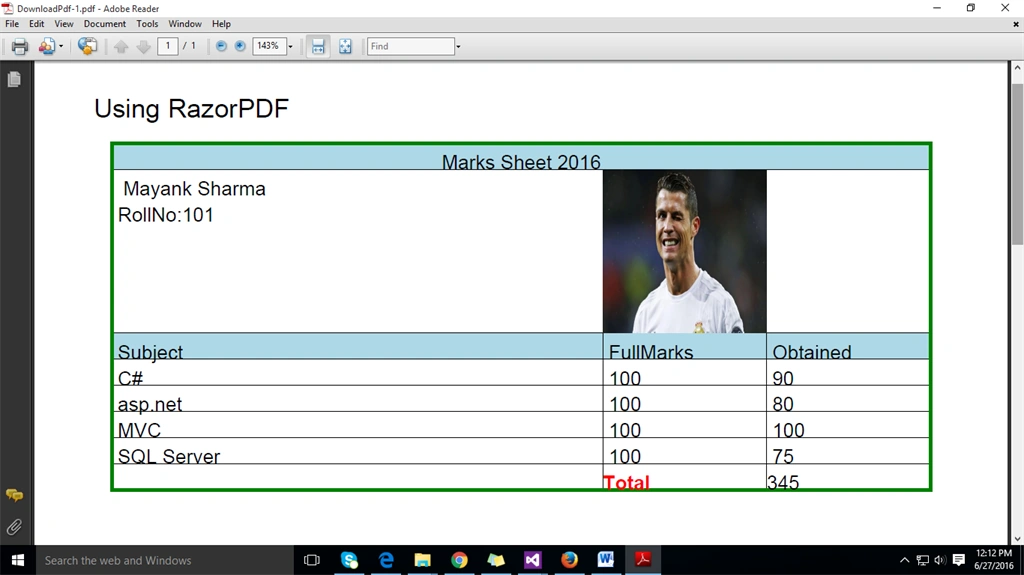
- <h3>Using RazorPDF</h3>
- <table border="2" width='500' bordercolor="Green">
- <tr>
- <td colspan="3" bgcolor="LightBlue" align="center" valign="top">Marks Sheet 2016</td>
- </tr>
- <tr>
- <td>
- @{
- var rollNumber = Model.Select(z => z.RollNo).Take(1).ToArray();
- }
- Mayank Sharma
- <br />
- RollNo:@rollNumber[0]
- </td>
- <td colspan="2" >
- <img src="@Server.MapPath("~/Images/ron.jpg")" width="100" height="100"/>
- </td>
- </tr>
- <tr>
- <td bgcolor="lightblue">
- @Html.DisplayNameFor(model => model.Subject)
- </td>
- <td bgcolor="lightblue">
- @Html.DisplayNameFor(model => model.FullMarks)
- </td>
- <td bgcolor="lightblue">
- @Html.DisplayNameFor(model => model.Obtained)
- </td>
- </tr>
- @{
- int total = 0;
- }
- @foreach (var item in Model)
- {
- <tr>
- <td>
- @Html.DisplayFor(x => item.Subject)
- </td>
- <td>
- @Html.DisplayFor(modelItem => item.FullMarks)
- </td>
- <td>
- @Html.DisplayFor(modelItem => item.Obtained)
- </td>
- </tr>
- total += item.Obtained;
- }
- <tr>
- <td></td>
- <td>
- <strong>
- <font color="RED">Total</font>
- </strong>
- </td>
- <td>@total
- </td>
- </tr>
- </table>
- </body>
- </html>
- <br />
- <br />
- <a href="@Url.Action("DownloadPdf","Home")"> Download PDF</a>
Mahbub AlamPosted Apr 5, 2018, 8:19 AM
How to change the orientation of the pdf?
Mahbub AlamPosted Apr 5, 2018, 7:36 AM
Get System.InvalidOperationException: Stack empty while use the image. But without images it's ok.
Mayank SharmaPosted Jul 31, 2016, 4:14 AM
My pleasure @dhru
Mayank SharmaPosted Jul 31, 2016, 4:13 AM
My pleasure @dhru
Former memberPosted Jul 30, 2016, 3:28 AM
Previous I Use ITextsharper Dll For Generate PDF But Its More Complicated So I use this code as a reference in my project thanks For sharing..
Mayank SharmaPosted Jul 5, 2016, 7:38 AM
Yes, you can use this code as a reference. Thank you.
Ankur MistryPosted Jul 5, 2016, 6:54 AM
Yes, we must have this code for new project
Mayank SharmaPosted Jun 28, 2016, 8:37 AM
Thank You.
Abdulmannan BahelimPosted Jun 28, 2016, 8:27 AM
Nice share