

In this post, we will learn about how to open PDF or other files in a new tab using C#. For this example, first we need to return a file from MVC Controller then open the file in a new tab from view. For this, I will set return type "FileResult" from MVC controller and return "File" with a byte Array of the file and its content type. Let's start coding.
Step 1
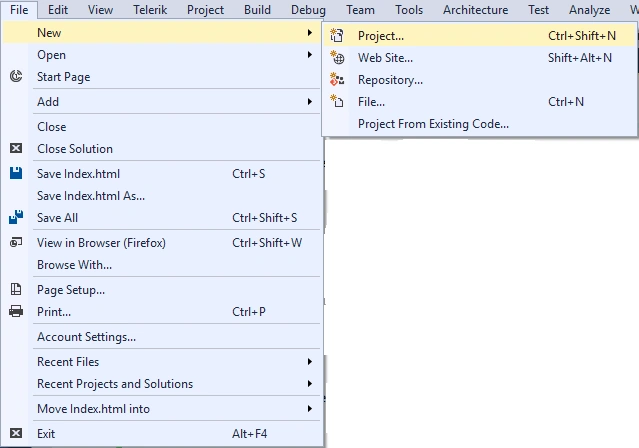
First, create a new project of MVC from File -> New -> Project.
First, create a new project of MVC from File -> New -> Project.
Step 2
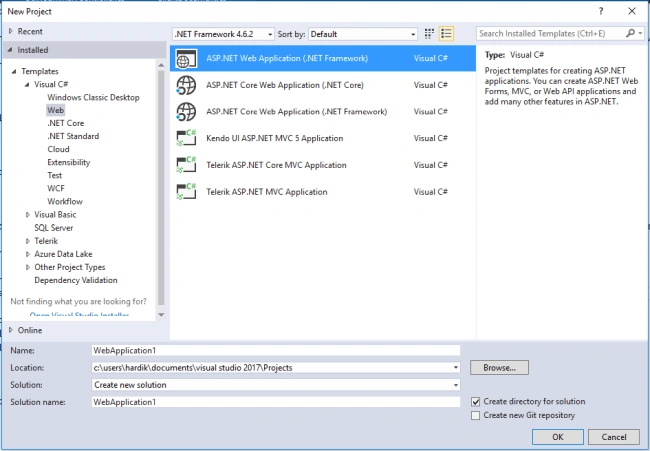
Select ASP.NET Web Application (.Net Framework) for creating an MVC application and set Name and Location of Project.
Select ASP.NET Web Application (.Net Framework) for creating an MVC application and set Name and Location of Project.
Step 3
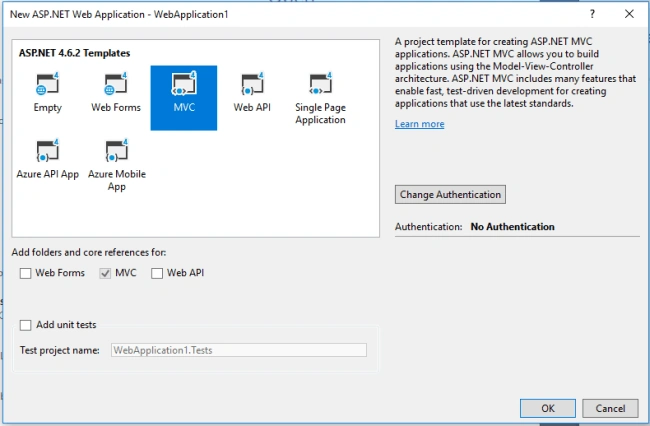
After setting the name and location of the project, open another dialog. From this dialog select MVC project and click OK.
After setting the name and location of the project, open another dialog. From this dialog select MVC project and click OK.
After creating a project create one controller method inside the home controller and name that "GetReport". and write the below code in this method.
Controller
- public FileResult GetReport()
- {
- string ReportURL = "{Your File Path}";
- byte[] FileBytes = System.IO.File.ReadAllBytes(ReportURL);
- return File(FileBytes, "application/pdf");
- }
View
Create one function for an open PDF file in a new tab.
- function GetClientReport() {
- window.open('/{ControllerName}/GetReport, "_blank");
- };
kazungu innocentPosted Mar 2, 2021, 9:55 AM
Thanks it works for me
Anil KumarPosted Jan 25, 2021, 4:26 PM
How to find string ReportURL = "{Your File Path}";
Mason StonePosted Apr 20, 2020, 12:31 AM
Where does this code go: function GetClientReport() { window.open('/{ControllerName}/GetReport, "_blank"); };
Hardik DeshaniPosted Jul 20, 2018, 11:56 PM
Thank you viknaraj
Hardik DeshaniPosted Jul 20, 2018, 11:55 PM
Thank you hadshana
Hadshana KamalanathanPosted Jul 20, 2018, 6:43 PM
Nice one...