Introduction
In this blog we will see how to perform self-join using LINQ.
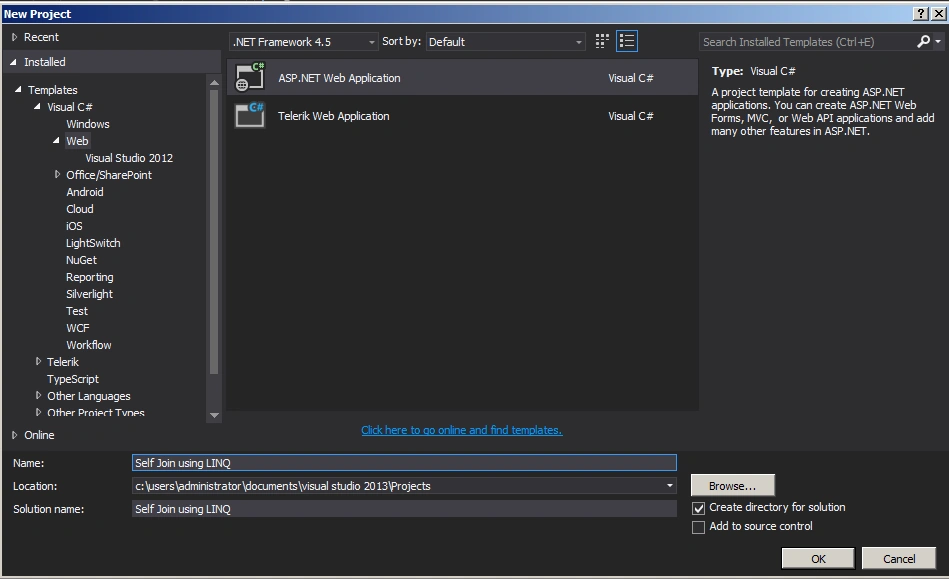
Step 1: Create asp.net web application
SQL Script
- SELECT p.FirstName, q.ManagerName
- FROM Employee p
- INNER JOIN Employee q
- ON p.ManagerID = q.EmpID
Webform1.aspx
- <%@ Page Language="C#" AutoEventWireup="true" CodeBehind="WebForm1.aspx.cs" Inherits="Self_Join_using_LINQ.WebForm1" %>
-
- <!DOCTYPE html>
-
- <html xmlns="http://www.w3.org/1999/xhtml">
- <head runat="server">
- <title></title>
- </head>
- <body>
- <form id="form1" runat="server">
- <div>
- <asp:GridView ID="GridView1" runat="server"></asp:GridView>
- </div>
- </form>
- </body>
- </html>
Webform1.aspx.cs
- using System;
- using System.Collections.Generic;
- using System.Linq;
- using System.Web;
- using System.Web.UI;
- using System.Web.UI.WebControls;
-
- namespace Self_Join_using_LINQ
- {
- public partial class WebForm1 : System.Web.UI.Page
- {
-
- EmployeeDBEntities objEmpEntities = new EmployeeDBEntities();
- protected void Page_Load(object sender, EventArgs e)
- {
- var query = from p in objEmpEntities.Employees
- join q in objEmpEntities.Employees on p.ManagerId equals q.EmpId
- select new { p.FirstName, q.ManagerName };
-
- GridView1.DataSource = query.ToList();
- GridView1.DataBind();
- }
-
- }
- }
Output of the application looks like this
Summary
In this blog we have seen how we can perform self-join using LINQ. Happy coding!



Join the conversation! Your thoughts help the community grow.