

- Create a new SSIS Package.
- Add a Control Flow Task named as "Script Task".
- Double click on Script Task.
- Create 3 variables as given below.

Add the "All User" variable in ReadOnlyVariables and click OK.
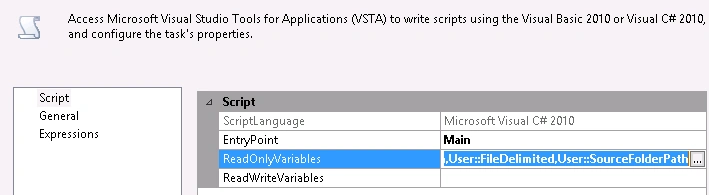
Click "Edit Scripts". It will open the C# code, like given below.
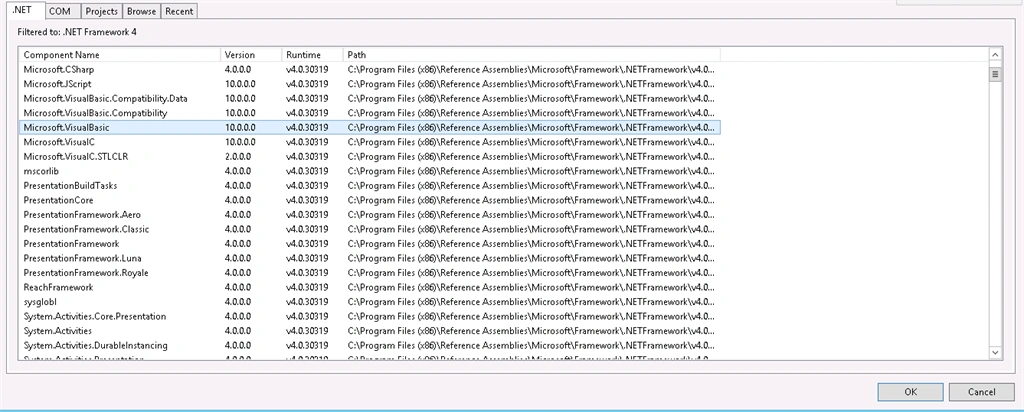
Go to "Add References" folder in Project>>Add References>> Microsoft.VisualBasic>>OK.
Copy and paste the given below code.
- public void Main() {
- // TODO: Add your code here
- string datetime = DateTime.Now.ToString("yyyyMMddHHmmss");
- try {
- string SourceFolderPath = Dts.Variables["User::SourceFolderPath"].Value.ToString();
- string FileExtension = ".csv";
- string FileDelimiter = Dts.Variables["User::DestinationFolderPath"].Value.ToString();
- //string TableName = Dts.Variables["User::DestinationTable"].Value.ToString();
- string ArchiveFolder = Dts.Variables["User::FileDelimited"].Value.ToString();
- //string ColumnList = "";
- //Reading file names one by one
- string SourceDirectory = SourceFolderPath;
- string[] fileEntries = Directory.GetFiles(SourceDirectory, "*" + FileExtension);
- DataSet ds = new DataSet();
- DataTable dt = new DataTable();
- foreach(string fileName in fileEntries) {
- SqlConnection myADONETConnection = new SqlConnection();
- myADONETConnection = (SqlConnection)(Dts.Connections["DBConn"].AcquireConnection(Dts.Transaction) as SqlConnection);
- dt = GetDataTabletFromCSVFile(fileName);
- if (dt.Rows.Count > 0) {
- //Write your business logic here.
- }
- }
- } catch (Exception exception) {
- // Create Log File for Errors
- using(StreamWriter sw = File.CreateText(Dts.Variables["User::LogFolder"].Value.ToString() + "\\" + "ErrorLog_" + datetime + ".log")) {
- sw.WriteLine(exception.ToString());
- Dts.TaskResult = (int) ScriptResults.Failure;
- }
- }
- }
- private DataTable GetDataTabletFromCSVFile(string path) {
- StreamReader MyStreamReader = new StreamReader(path, System.Text.Encoding.Unicode);
- DataTable csvData = new DataTable();
- try {
- using(TextFieldParser csvReader = new TextFieldParser(path)) {
- csvReader.SetDelimiters(new string[] {
- ","
- });
- csvReader.HasFieldsEnclosedInQuotes = true;
- string[] colFields = csvReader.ReadFields();
- foreach(string column in colFields) {
- DataColumn serialno = new DataColumn(column);
- serialno.AllowDBNull = true;
- csvData.Columns.Add(serialno);
- }
- while (!csvReader.EndOfData) {
- string[] fieldData = csvReader.ReadFields();
- DataRow dr = csvData.NewRow();
- //Making empty value as empty
- for (int i = 0; i < fieldData.Length; i++) {
- if (fieldData[i] == null) fieldData[i] = string.Empty;
- dr[i] = fieldData[i];
- }
- csvData.Rows.Add(dr);
- }
- }
- } catch (Exception ex) {}
- return csvData;
- }
shubham chawkePosted Apr 18, 2018, 7:38 AM
How to read below type of csv file and programatically create table in sql and insert data into table
shubham chawkePosted Apr 18, 2018, 7:37 AM
0,Mode,Ucc_Master,Code,Name,Age,PanNo1,A,Ucc_Master,1001,Shubhan,23,hdjdg654781,A,Ucc_Master,1002,Shailendra,24,ljgsf654781,A,Ucc_Master,1003,Kamlesh,32,tgsgg365470,Mode,Ucc_MasterAdd,Code,Name,Age,AadharNo 1,A,Ucc_MasterAdd,2001,Kamlesh,32,123459789112