


Introduction
Logging is the heart of an application. It is very important for debugging and troubleshooting, as well as, for smoothness of the application.
With the help of logging, we can have end-to-end visibility for on-premise systems, to only give a fraction of that visibility for cloud-based systems. You can write your logs to a file on a disk or a database, and send an error email.
With the help of logging, we can have end-to-end visibility for on-premise systems, to only give a fraction of that visibility for cloud-based systems. You can write your logs to a file on a disk or a database, and send an error email.
Install NuGet Package for Log4Net
To use Log4Net logging, first you need to add the Log4Net plugin. For adding the plugin, you can do it in two different ways.
- Manage NuGet Packages.
- NuGet command.
- PM> Install-Package log4net -Version 2.0.8
Or, you can Click Here.
Update Startup file
We need to register Log4Net middleware into the startup configure section as below.
- public void Configure(IApplicationBuilder app,
- IHostingEnvironment env, ILoggerFactory loggerFactory)
- {
- loggerFactory.AddLog4Net();
- }
Add log4net.config file
We need to click on "Add New" to add a file to your project with the name log4net.config.
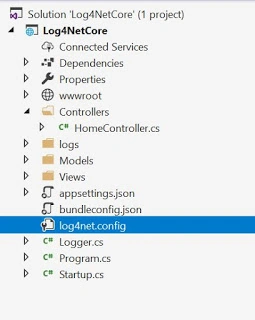
Refer to the below code for log4net.config for logging into the file.
- <log4net>
- <appender name="RollingLogFileAppender" type="log4net.Appender.RollingFileAppender">
- <lockingmodel type="log4net.Appender.FileAppender+MinimalLock">
- <file value="logs/">
- <datepattern value="yyyy-MM-dd hh.'txt'">
- <staticlogfilename value="false">
- <appendtofile value="true">
- <rollingstyle value="Composite">
- <maxsizerollbackups value="2">
- <maximumfilesize value="15MB">
- <layout type="log4net.Layout.PatternLayout">
- <conversionpattern value="%level %message %date">
- </conversionpattern></layout>
- </maximumfilesize></maxsizerollbackups></rollingstyle></appendtofile></staticlogfilename></datepattern></file></lockingmodel></appender>
- <root>
- <level value="ALL">
- <appender-ref ref="RollingLogFileAppender">
- </appender-ref></level></root>
- </log4net>
Sedigheh EfafPosted Aug 19, 2022, 8:27 AM
Hi Ankit, several appenders are defined in log4net.config, each of which contains a series of log files. How can I read all these files in a loop or something?
chinnarasu chinnarasuPosted Jun 28, 2022, 10:29 AM
Email not receive while using log4net in .net core web api
Aafaan JiiPosted Jun 14, 2022, 10:00 AM
Can you help me setup log4net in Winforms (dotnet core) and also making a simple paint like application in Winforms, which should be drawing basic shapes like - rectangle, ellipse, line, select & move shapes , draw text , save , save as, redo, undo
ali jbryPosted Dec 24, 2021, 6:13 PM
Where did u use this logger class exactly ???
gaurav agarwalPosted Apr 17, 2021, 2:52 PM
Can you please guide how to use thig logging in controller? Do I need to register this Logger class somewhere??
Syed KhaleelPosted Aug 4, 2020, 12:49 AM
Good Article..could be provided more information on log manager after the code
colt eavesPosted Jun 24, 2020, 2:13 PM
Could someone please show me how to apply this to the MS SQL Server appender? There is absolutely no place on the internet that shows a step by step of this with Log4Net. They always use the File Appender. Please if someone could help me I would gladly compensate.
pramod SinghPosted Apr 15, 2020, 5:02 AM
Bhai Shabeb,Could you give example of "ADO.NET Appender -This appender will write to a Database.". i think that it is not supported by .net core.Correct me if i am wrong
VISAKH SPosted Oct 10, 2019, 7:04 AM
Try installing this package also Microsoft.Extensions.Logging.Log4Net.AspNetCore. It Worked for me.
Mihai SaceleanPosted Sep 23, 2019, 2:10 AM
What namespace are you using, I do not have this method loggerFactory.AddLog4Net();
Anand MathurPosted Jun 17, 2019, 7:53 AM
Good narration with lucrative approach.
Laxmidhar SahooPosted Apr 27, 2019, 12:35 AM
Thanks for a good naration
Rushi MehtaPosted Apr 27, 2019, 12:31 AM
Thanks for sharing information