

I was working on a web application, and suddenly the application stopped running on the browser and I got this error message,
“Unable to connect to the configured development Web server. Failed to register URL http://localhost :57660/ for site “sandbox” application “/”. Error description: Access is denied. (0x80070005)”
I tried many things like restarting Visual Studio and running Visual Studio as administrator but nothing worked. Finally, after spending a few hours on it I got the solution, so here I am sharing the solution.
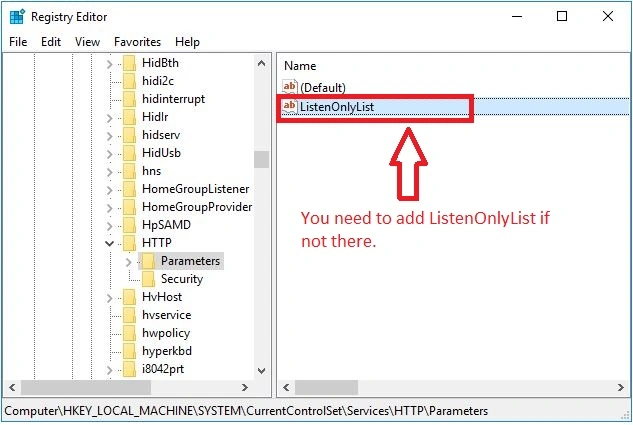
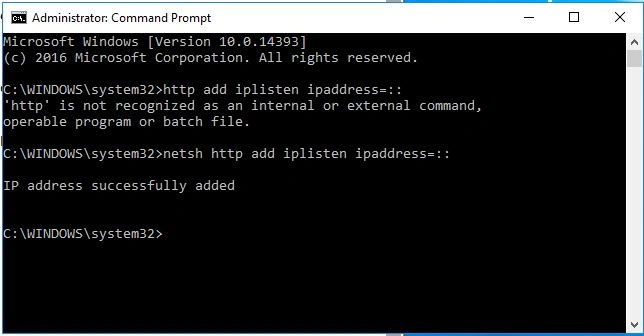
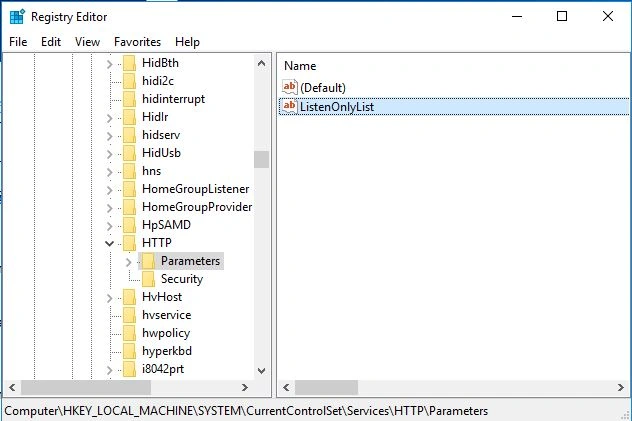
Open windows registry and browse parameters in HTTP where you can see what URLs are allowed to be bound to services without admin privileges. The parameter is called ListenOnlyList and it needs to be set to the address that exists on your machine.
Conclusion
In this blog, I tried to resolve an error in web application using visual studio 2015. If you have any questions or comments, drop me a line in the C# Corner comments section.
Brandon SchenzPosted Dec 27, 2024, 6:55 PM
This got me past the documented error, but now I get 503 Service Unavailable, which means I'm not really any closer to getting this fixed...
U RPosted Jul 21, 2020, 5:16 AM
- Try do Save all in VS and go to that path which appears .....{ C:\Users\source\repos\Source_July_13_2020 } - Their delete { .vs } folder at that path. - Now go to { C:\WINDOWS\Microsoft.NET\Framework\v4.0.30319\Temporary ASP.NET Files } path and delete all the files inside { root } folder. Now restart your VS as administrator.
U RPosted Jul 21, 2020, 5:14 AM
Hi this solution didn't worked for me...Here is another way that solved my issue...
arun sPosted Sep 5, 2019, 12:20 AM
Thank you bro....
Rinsheed HussainPosted Aug 26, 2019, 1:45 AM
Https://saintgimp.org/2012/05/03/fixing-the-error-unable-to-launch-the-iis-express-web-server-failed-to-register-url-access-is-denied/
Tarun BajajPosted May 15, 2019, 6:29 AM
Working . Thanks
Ezequiel JúniorPosted May 14, 2019, 6:45 AM
100% Working Solution. Thanks
Jainendra KumarPosted Jul 25, 2018, 6:21 AM
You deserve a treat man (y)
bilal khattakPosted Mar 18, 2018, 2:53 AM
Thanks man......for me its working
Ravi ShakyaPosted Aug 12, 2017, 10:11 AM
I have completed all steps but still facing the same issue.
Naveen BishtPosted Feb 16, 2017, 8:58 PM
thanks same you can do by run regedit commands and add this
Manav PandyaPosted Feb 14, 2017, 12:54 PM
I am facing problem about "login failed for user" , it shows that you should manually configured login user
Manav PandyaPosted Feb 14, 2017, 12:53 PM
Thnaks for share such information