

Android notifications will be displayed in the notification area and to see the details regarding the notification, the user can expand it by opening the notification drawer.
Note - Inbox style notification is not available on platforms prior to Android 4.1.
When you want to display multiline text detail sections, you can use NotificationCompat.InboxStyle.
- Notification notification = new Notification.InboxStyle(builder)
- .addLine()
- .setBigContentTitle()
- .setSummaryText()
- .build();
- Intent resultIntent = new Intent(context, ResuleActivity.class);
- resultIntent.setFlags(Intent.FLAG_ACTIVITY_NEW_TASK | Intent.FLAG_ACTIVITY_CLEAR_TASK);
- PendingIntent piResult = PendingIntent.getActivity(this, 0, resultIntent, 0);
- Notification.Builder builder=new Notification.Builder(context)
- .setSmallIcon(R.mipmap.ic_launcher)
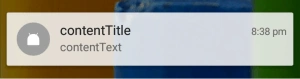
- .setContentTitle("contentTitle")
- .setContentText("contentText")
- .setContentIntent(piResult);
- Notification notification = new Notification.InboxStyle(builder)
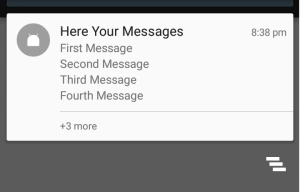
- .addLine("First Message")
- .addLine("Second Message")
- .addLine("Third Message")
- .addLine("Fourth Message")
- .setBigContentTitle("Here Your Messages")
- .setSummaryText("+3 more")
- .build();
Here you can give your messages in addLine(), while setSummaryText() will be used to show a summary of your notifications.
Now the final step is to showthe notification in the notification area.
- NotificationManager notificationManager = (NotificationManager)getSystemService(Context.NOTIFICATION_SERVICE);
- notificationManager.notify(121,notification);
Join the conversation! Your thoughts help the community grow.