


Create two stored procedure as below
ALTER PROCEDURE insert1
(@custid varchar(50),@custname varchar(50),@custaddress
varchar(50),@prodid varchar (50))
AS
insert Customer(custid,custname,custaddress,prodid) values
(@custid,@custname,@custaddress,@prodid)
ALTER PROCEDURE insert2
(@prodid varchar(50),@prodname varchar(50),@price int)
AS
insert Product(prodid,prodname,price) values
(@prodid,@prodname,@price)
Default.aspx code
<%@ Page Language="C#" AutoEventWireup="true" CodeFile="Default.aspx.cs" Inherits="_Default" %>
<!DOCTYPE html PUBLIC "-//W3C//DTD XHTML 1.0 Transitional//EN" "http://www.w3.org/TR/xhtml1/DTD/xhtml1-transitional.dtd">
<html xmlns="http://www.w3.org/1999/xhtml">
<head runat="server">
<title>Untitled Page</title>
</head>
<body>
<form id="form1" runat="server">
<div>
</div>
<asp:Label ID="Label1" runat="server" Text="Customer Id" Width="120px"></asp:Label>
<asp:TextBox ID="TextBox1" runat="server"></asp:TextBox><br />
<asp:Label ID="Label2" runat="server" Text="Customer Name" Width="120px"></asp:Label>
<asp:TextBox ID="TextBox2" runat="server"></asp:TextBox><br />
<asp:Label ID="Label3" runat="server" Text="Customer Address" Width="120px"></asp:Label>
<asp:TextBox ID="TextBox3" runat="server"></asp:TextBox><br />
<asp:Label ID="Label4" runat="server" Text="Product Id" Width="120px"></asp:Label>
<asp:TextBox ID="TextBox4" runat="server"></asp:TextBox><br />
<asp:Label ID="Label5" runat="server" Text="Product Name" Width="120px"></asp:Label>
<asp:TextBox ID="TextBox5" runat="server"></asp:TextBox><br />
<asp:Label ID="Label6" runat="server" Text="Price" Width="120px"></asp:Label>
<asp:TextBox ID="TextBox6" runat="server"></asp:TextBox><br />
<asp:Button ID="btn_insert" runat="server" Text="Insert Data"
onclick="btn_insert_Click" /><br />
<asp:Label ID="Label7" runat="server" Text=""></asp:Label>
</form>
</body>
</html>
Default.aspx.cs code
using System;
using System.Configuration;
using System.Data;
using System.Linq;
using System.Web;
using System.Web.Security;
using System.Web.UI;
using System.Web.UI.HtmlControls;
using System.Web.UI.WebControls;
using System.Web.UI.WebControls.WebParts;
using System.Xml.Linq;
using System.Data.SqlClient;
public partial class _Default : System.Web.UI.Page
{
string strConnString = ConfigurationManager.ConnectionStrings["ConnectionString"].ConnectionString;
SqlCommand com;
protected void btn_insert_Click(object sender, EventArgs e)
{
SqlConnection con = new SqlConnection(strConnString);
com = new SqlCommand("insert1", con);
com.CommandType = CommandType.StoredProcedure;
com.Parameters.Add("@custid", SqlDbType.VarChar).Value = TextBox1.Text;
com.Parameters.Add("@custname", SqlDbType.VarChar).Value = TextBox2.Text;
com.Parameters.Add("@custaddress", SqlDbType.VarChar).Value = TextBox3.Text;
com.Parameters.Add("@prodid", SqlDbType.VarChar).Value = TextBox4.Text;
con.Open();
com.ExecuteNonQuery();
con.Close();
com = new SqlCommand("insert2", con);
com.CommandType = CommandType.StoredProcedure;
com.Parameters.AddWithValue("@prodid", SqlDbType.VarChar).Value = TextBox4.Text;
com.Parameters.Add("@prodname", SqlDbType.VarChar).Value = TextBox5.Text;
com.Parameters.Add("@price", SqlDbType.Int).Value = TextBox6.Text;
con.Open();
com.ExecuteNonQuery();
con.Close();
Label7.Text = "Record Successfully Inserted";
TextBox1.Text="";
TextBox2.Text="";
TextBox3.Text="";
TextBox4.Text="";
TextBox5.Text="";
TextBox6.Text="";
}
}
Output
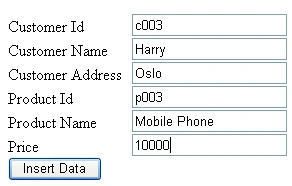
Thanks for reading
Tati OkoPosted Jan 26, 2014, 1:59 PM
Thanks for sharing. How do you implement that when CustommerID and ProductID are Primary Key and ForeignKey and Identity Index?