

Open Visual Studio 2015 -> File-> New -> Web Site.
Now Add jQuery from ManageNuget.
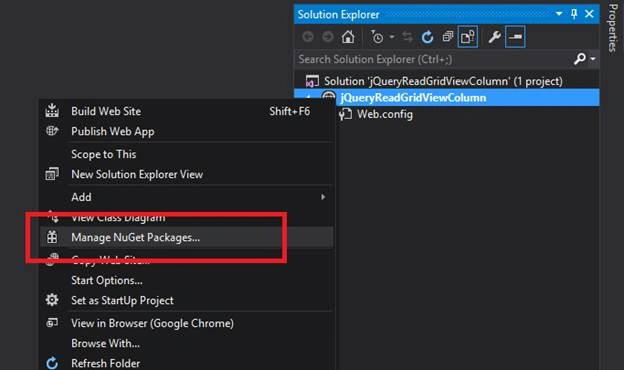
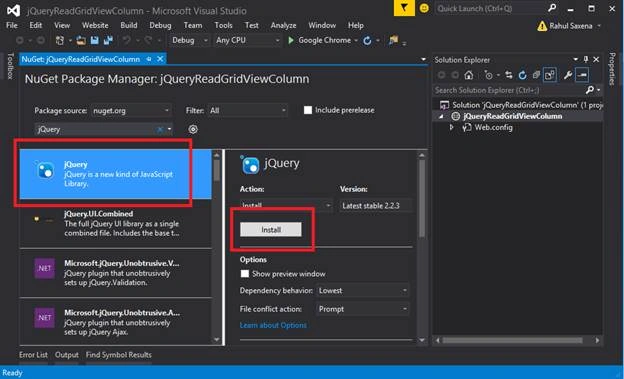
Now Add a new web form.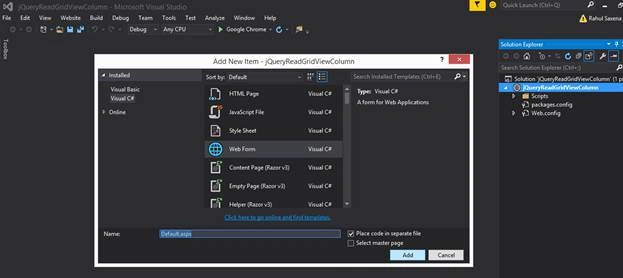
Below is my SQL Server Data Table.
- CREATE TABLE [dbo].[Emp_Information](
- [EMP_ID] [int] IDENTITY(1,1) NOT NULL,
- [Name] [varchar](50) NULL,
- [ProjectName] [varchar](50) NULL,
- [ManagerName] [varchar](50) NULL,
- [City] [varchar](50) NULL,
- [Joining_Date] [datetime] NULL,
- CONSTRAINT [PK_Emp_Information] PRIMARY KEY CLUSTERED
- (
- [EMP_ID] ASC
- )WITH (PAD_INDEX = OFF, STATISTICS_NORECOMPUTE = OFF,
- IGNORE_DUP_KEY = OFF, ALLOW_ROW_LOCKS = ON, ALLOW_PAGE_LOCKS = ON) ON [PRIMARY]
- ) ON [PRIMARY]
- GO
- SET ANSI_PADDING OFF
- GO
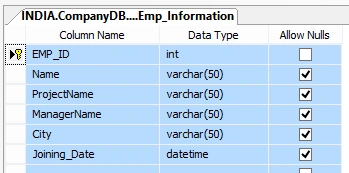
Data in my Table

Now come to your Visual Studio Application. Do below aspx code.
- <%@ Page Language="C#" AutoEventWireup="true" CodeFile="Default.aspx.cs" Inherits="_Default" %>
- <!DOCTYPE html>
- <html xmlns="http://www.w3.org/1999/xhtml">
- <head runat="server">
- <title>jQuery: Read Grid View Column Value</title>
- <script src="Scripts/jquery-2.2.3.min.js"></script>
- <script type="text/javascript">
- $(document).ready(function () {
- $("#dvColumnVal").empty();
- var colVAL = "";
- $("#btnGet").click(function () {
- var ddlSelectedCol = $("#ddlColumn").val();
- $("#<%=GridViewEmployee.ClientID %> tr").each(function () {
- if (!this.rowIndex) return;
- var currVAL = $(this).find("td:eq('" + ddlSelectedCol + "')").html();
- colVAL += currVAL + ", ";
- });
- $("#dvColumnVal").html(colVAL);
- });
- });
- </script>
- </head>
- <body>
- <form id="form1" runat="server">
- <table style="border: 25px solid red; width: 100%; background-color: skyblue;">
- <tr>
- <td align="center" style="height: 30px; background-color: coral; font-size: 15pt; font-weight: bold; color: white;">jQuery: Read Grid View Any Column Value</td>
- </tr>
- <tr>
- <td>
- <asp:GridView ID="GridViewEmployee" runat="server" Width="100%">
- </asp:GridView>
- </td>
- </tr>
- <tr>
- <td height="10px"></td>
- </tr>
- <tr>
- <td style="height: 30px; background-color: coral; font-size: 15pt; font-weight: bold; color: green;">Select Column Name to get Value
- <asp:DropDownList ID="ddlColumn" runat="server">
- <asp:ListItem Text="EMP_ID" Value="0"></asp:ListItem>
- <asp:ListItem Text="Name" Value="1"></asp:ListItem>
- <asp:ListItem Text="Project Name" Value="2"></asp:ListItem>
- <asp:ListItem Text="Manager Name" Value="3"></asp:ListItem>
- <asp:ListItem Text="City" Value="4"></asp:ListItem>
- <asp:ListItem Text="Joining Date" Value="5"></asp:ListItem>
- </asp:DropDownList>
- <input type="button" id="btnGet" value="Get Value" />
- </td>
- </tr>
- <tr>
- <td height="10px"></td>
- </tr>
- <tr>
- <td>
- <div id="dvColumnVal" class="aDiv">
- </div>
- </td>
- </tr>
- </table>
- </form>
- </body>
- </html>
- using System;
- using System.Collections.Generic;
- using System.Data;
- using System.Data.SqlClient;
- using System.Linq;
- using System.Web;
- using System.Web.UI;
- using System.Web.UI.WebControls;
- public partial class _Default : System.Web.UI.Page
- {
- protected void Page_Load(object sender, EventArgs e)
- {
- if (!Page.IsPostBack)
- {
- BindEmployeeData();
- }
- }
- public void BindEmployeeData()
- {
- DataSet ds = new DataSet();
- using (SqlConnection con = new SqlConnection("Data Source=.;Integrated Security=true;Initial Catalog=CompanyDB"))
- {
- con.Open();
- SqlCommand cmd = new SqlCommand("select * from Emp_Information", con);
- SqlDataAdapter da = new SqlDataAdapter(cmd);
- da.Fill(ds);
- con.Close();
- GridViewEmployee.DataSource = ds;
- GridViewEmployee.DataBind();
- }
- }
- }
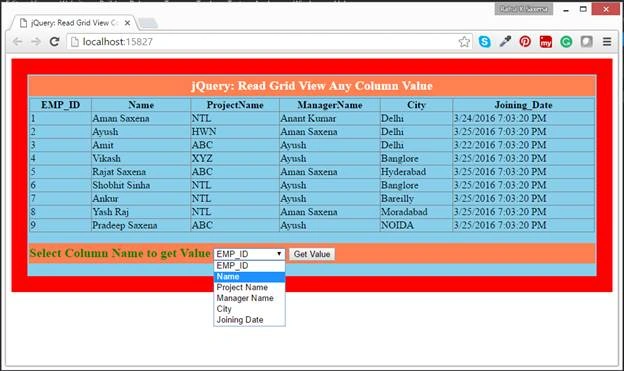
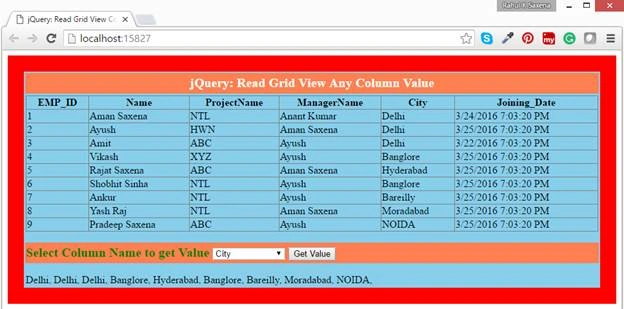
Select column from drop down list

Join the conversation! Your thoughts help the community grow.