

Manage Servers in this Farm (direct Link)
When you click on the Manage Servers in this Farm link, you will land on the Server in the Farm at this Page. This page will give you the information about the Servers in the Farm, Config DB version and SQL Server information.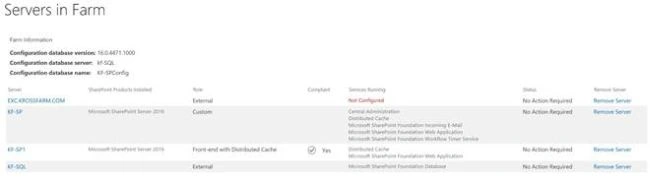
Scenario
This is a multi Server SharePoint Farm, which contains 2 SharePoint Servers (Custom role and Front-End with DC), one Database Server and one Exchange Server.
On this page, you will get the following Information.
- Configuration Database Version (SharePoint Version).
- Configuration Database Server (What the DB server name is on which Config DB provisioned).
- Configuration Database Name (This will tell what the Config db of SharePoint Farm is).
- List of Servers- This list will give you the following information.
- Server Name- It will list all the Servers; i.e., SharePoint Servers, SQL Server, Exchange, SMTP Server.
- SharePoint Product which is installed (what SharePoint version is installed on SharePoint Server).
- Role (What is the role of Server, SharePoint MinRole etc.)
- Compliant (if SharePoint Server is compliant with MinRole).
- Service Running (it will list all the Services running on each Server).
- Status (This column will tell you the status of the Server, whether Update is required or not. If no update is required then status will be “no Action Required”, otherwise it will say Upgrade is available or update is required.).
Remove Server
It is not recommended to remove the Server from this method. If you are unable to remove the Server from other methods, use psconfig wizard on the Server and disconnect it from Farm. This option is usually used to remove the orphan Servers.
On this page, you can also get the option to Remove Server. To remove a Server from Farm, follow the steps given below.
- Make sure your account is Farm admin along with local admin rights on the Server.
- Click on the Remove Server link in front of the Server which you want to remove.
- Click OK on the Warning Pop-Up.
- Once processing completes, then this server will be gone from the Farm.
- Now, uninstall SharePoint from the Server (if it is SharePoint Server).
Note
You can’t remove a database Server from a Farm, if that is the only DB Server attached to the Farm.
Join the conversation! Your thoughts help the community grow.