
Introduction
MongoDB Atlas search Index in C# - Build aggregation pipeline with conditional filters, sort, and projections
In this blog, I will describe how to search the documents in a MongoDB collection by a text or phrase and by the conditional filters, and even how to build or execute an aggregation pipeline with sort and projection for the same.
First, you should know about the Atlas search index and aggregation pipeline in Atlas MongoDB. I will explain how we can build and execute an aggregation pipeline similar to the one below.
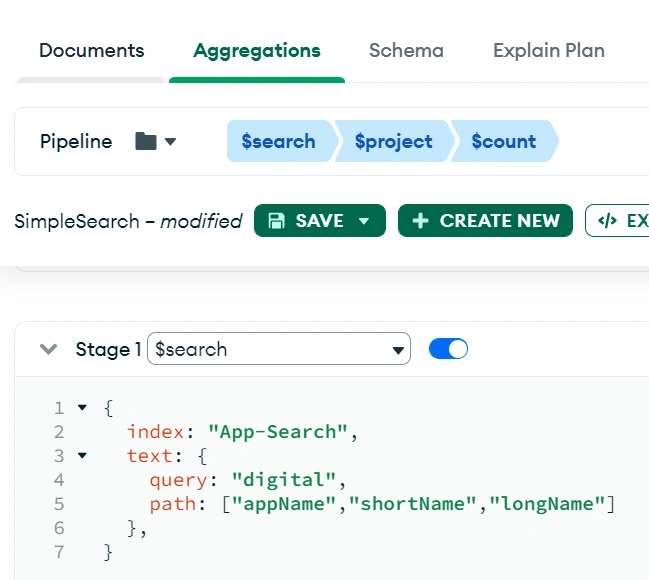
The pipeline definition is very much important. Look at a line of declaration, var searchStage, and how it is defined. I have mentioned the index name, whether to search by text or phrase, the parameters query, and the path. These things have been saved as constants.
public const string SEARCH_INDEX = "App-Search";
public const string SEARCH_PATH = "['appName','shortName','longName']";
public const string SEARCH_BY_TEXT = "text";
public const string SEARCH_BY_PHRASE = "phrase";
I have created a class RandomSearch which inherits the base class BaseSearch. You can skip this and have it all in one class for practice/study purposes.
internal class RandomSearch: BaseSearch {
    public RandomSearch(SearchAppDto dto) {
      SearchKeyword = dto.SearchKeyword.ToLower();
      KeywordFilter = Builders<CollectionRecord>.Filter.Empty;

      if (dto.SearchKeyword.ToUpper().Contains(Constant.APP_ID_PREFIX)) {
        KeywordFilter = Builders<CollectionRecord>.Filter.Where(s => s.AppId.ToLower().Contains(SearchKeyword));
      }
      if (SearchKeyword == Constant.TYPE1_APPS.ToLower()) {
        KeywordFilter = Builders<CollectionRecord>.Filter.Where(s => s.Type1.ToLower().Contains(Constant.TIER1));
      } else if (SearchKeyword == Constant.TYPE2_APPS.ToLower()) {
        KeywordFilter = Builders<CollectionRecord>.Filter.Where(s => s.Type2);
      }

      SortBy(dto);
    }

    public override PipelineDefinition<CollectionRecord, CollectionRecord> Pipline {
      get {
        string searchBy = Constant.SEARCH_BY_PHRASE;
        if (SearchKeyword.Contains(Constant.APP_ID_PREFIX.ToLower())) {
          searchBy = Constant.SEARCH_BY_TEXT;
        }


        //Note - single and double quote issue, backslash issue
        SearchKeyword = SearchKeyword.Replace('"', ' ').Replace("'", "").Replace(@ "\", "
          ");

          var searchStage = @ "{$search: {index:'" + Constant.SEARCH_INDEX + "'," + searchBy + ": {query:'" + SearchKeyword + "', path:" + Constant.SEARCH_PATH + "}}}";
          var pipeline = new EmptyPipelineDefinition < CollectionRecord > ()
            .AppendStage < CollectionRecord, CollectionRecord, CollectionRecord > (searchStage)
            .Match(PanelFilter);

          return pipeline;
        }
      }
      //.....Some code here as well
    }
Join the conversation! Your thoughts help the community grow.