

Namespaces
Namespaces are basically used to organize our code and to differentiate between the classes or methods with the same name. There are three ways to use namespaces.
Namespaces are basically used to organize our code and to differentiate between the classes or methods with the same name. There are three ways to use namespaces.
- Using directives
- Using fully qualified name
- Using alias for namespaces
Using Directives
For invoking the method from class A, we are using directive for declaring the namespace, as shown below.
Fully Qualified name
Let's take an example to understand this.
Namespace Alias
The alternative to the fully qualified name is an alias for namespaces. Let's see how to use alias for namespaces.So, if we need to invoke this print method from "project2", let's see in the below screenshot what happens.
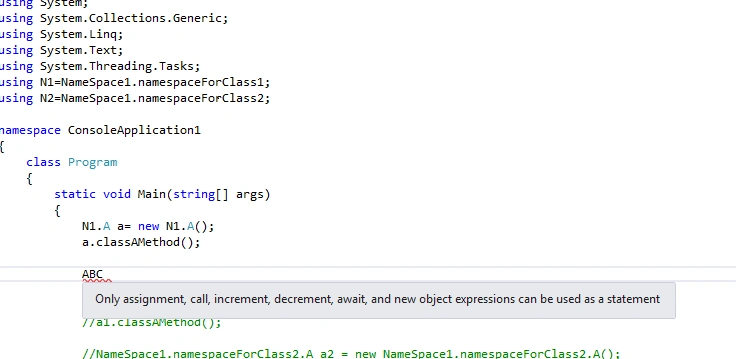
So, we did not find any class with name ABC and no options to add namespace for that. To get namespaces added from project2, we need to add the reference in our current project.
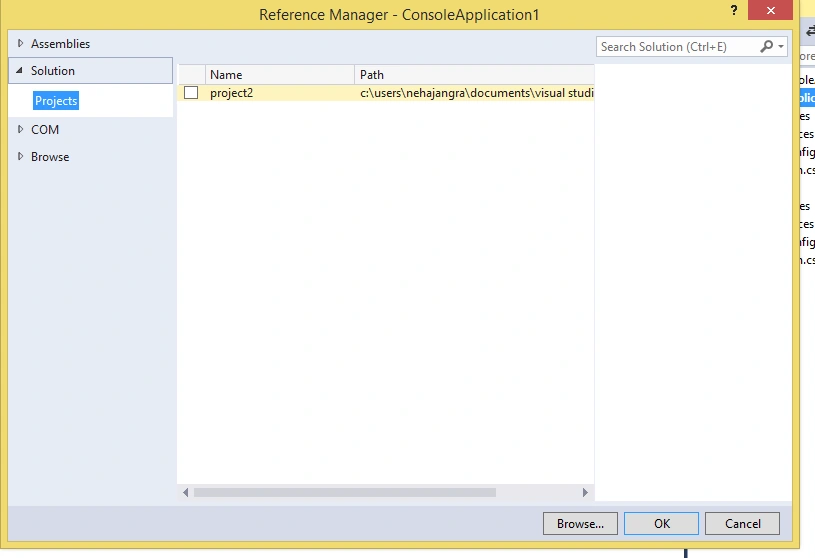
For invoking the method from class A, we are using directive for declaring the namespace, as shown below.
- using project2;
- using System;
- using System.Collections.Generic;
- using System.Linq;
- using System.Text;
- using System.Threading.Tasks;
- using NameSpace1;
- namespace ConsoleApplication1
- {
- class Program
- {
- static void Main(string[] args)
- {
- A a = new A();
- a.classAMethod();
- }
- }
- }
- namespace NameSpace1
- {
- namespace namespaceForClass1
- {
- public class A
- {
- public void classAMethod()
- {
- Console.WriteLine("I am method from Class A present in namespaceForClass1");
- }
- }
- }
- }
Let's take an example to understand this.
- namespace NameSpace1
- {
- namespace namespaceForClass1
- {
- public class A
- {
- public void classAMethod()
- {
- Console.WriteLine("I am method from Class A present in namespaceForClass1");
- }
- }
- }
- namespace namespaceForClass2
- {
- public class A
- {
- public void classAMethod2()
- {
- Console.WriteLine("I am method from Class A present in namespaceForClass2");
- }
- }
- }
- }
As shown in the above example, there are two namespaces "namespaceForClass1" and "namespaceForClass2"
present in NameSpace1 and and these two namespaces contain classes with the same name.
So, if we need to call any of the classes from these two interfaces and we use namespaces by using directive, then we will get the ambiguity error, as shown in the following screenshot.
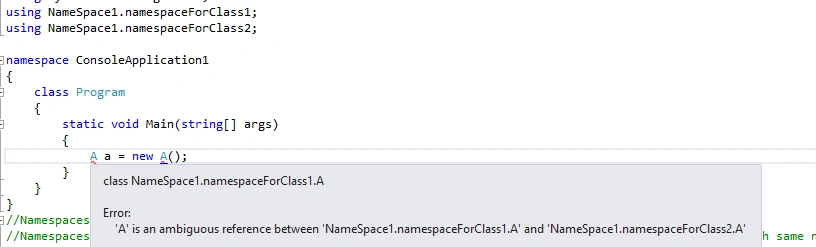
present in NameSpace1 and and these two namespaces contain classes with the same name.
So, if we need to call any of the classes from these two interfaces and we use namespaces by using directive, then we will get the ambiguity error, as shown in the following screenshot.
Then, how to differentiate between the two?
Yes! The answer is - using a namespace fully qualified name.
Yes! The answer is - using a namespace fully qualified name.
As shown in the below example, when we use NameSpace1.namespaceForClass1.A, then we have classAMethod available to invoke but when we use NameSpace1.namespaceForClass2.A, then we get classAMethod2 to invoke.
- namespace ConsoleApplication1
- {
- class Program
- {
- static void Main(string[] args)
- {
- NameSpace1.namespaceForClass1.A a1 = new NameSpace1.namespaceForClass1.A();
- a1.classAMethod();
- NameSpace1.namespaceForClass2.A a2 = new NameSpace1.namespaceForClass2.A();
- a2.classAMethod2();
- }
- }
- }
- namespace NameSpace1
- {
- namespace namespaceForClass1
- {
- public class A
- {
- public void classAMethod()
- {
- Console.WriteLine("I am method from Class A present in namespaceForClass1");
- }
- }
- }
- namespace namespaceForClass2
- {
- public class A
- {
- public void classAMethod2()
- {
- Console.WriteLine("I am method from Class A present in namespaceForClass2");
- }
- }
- }
- }
The alternative to the fully qualified name is an alias for namespaces. Let's see how to use alias for namespaces.
- using project2;
- using System;
- using System.Collections.Generic;
- using System.Linq;
- using System.Text;
- using System.Threading.Tasks;
- using N1 = NameSpace1.namespaceForClass1;
- using N2 = NameSpace1.namespaceForClass2;
- namespace ConsoleApplication1
- {
- class Program
- {
- static void Main(string[] args)
- {
- N1.A a= new N1.A();
- a.classAMethod();
- N2.A a1 = new N2.A();
- a1.classAMethod2();
- }
- }
- }
- namespace NameSpace1
- {
- namespace namespaceForClass1
- {
- public class A
- {
- public void classAMethod()
- {
- Console.WriteLine("I am method from Class A present in namespaceForClass1");
- }
- }
- }
- namespace namespaceForClass2
- {
- public class A
- {
- public void classAMethod2()
- {
- Console.WriteLine("I am method from Class A present in namespaceForClass2");
- }
- }
- }
- }
As in the above example when we used the namespaces from the same project assembly, we can use the namespaces from different project assemblies only by adding the reference dll of that project in our project.
Let's take an example of that as well. We have added a new project "project2" to the same solution and defined a class ABC containing print method.
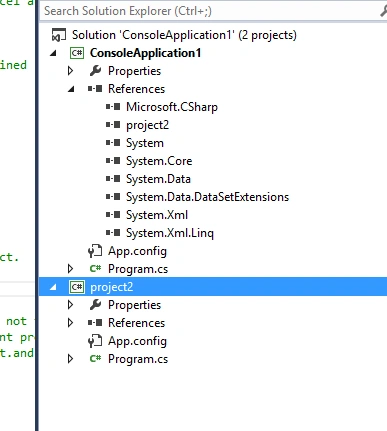
Define a class ABC containing print method,
Let's take an example of that as well. We have added a new project "project2" to the same solution and defined a class ABC containing print method.
Define a class ABC containing print method,
- namespace project2
- {
- class Program
- {
- static void Main(string[] args)
- {
- }
- }
- public class ABC
- {
- public void print()
- {
- Console.WriteLine("I am invoked from project 2.");
- }
- }
- }
So, we did not find any class with name ABC and no options to add namespace for that. To get namespaces added from project2, we need to add the reference in our current project.
After adding the reference, we will have an option for adding the namespace from different projects.
Thank you and feel free to ask questions in case of any doubts.
- using System;
- using System.Collections.Generic;
- using System.Linq;
- using System.Text;
- using System.Threading.Tasks;
- using project2;
- namespace ConsoleApplication1
- {
- class Program
- {
- static void Main(string[] args)
- {
- ABC abc = new ABC();
- abc.print();
- }
- }
- }
NehaPosted Jan 10, 2017, 10:57 PM
Thank you so much Gagan........ :)
gagandeep singhPosted Jan 9, 2017, 8:49 AM
Well explained, i always have confusion with fully qualified namespaces, but now it's quite clear to me.
Jasbeer SinghPosted Jan 3, 2017, 12:44 AM
Good blog Neha... ....................