
I am sure that as a front-end developer, you will have faced many issues with jQuery functions. Sometimes, I used to wonder if there was a way we could change the default behavior of jQuery functions. Many times, in our project, we believe if we can change the default behavior of jQuery function, we can achieve our objective and complete our project easily with a good standard of code.
Well, it's possible.
Let's see how to do that with an example.
Well, it's possible.
Let's see how to do that with an example.
Example
In this example, I will be overriding the default functionality of 2 of the most used functions in jQuery, i.e., Hide and Show.
In this example, I will be overriding the default functionality of 2 of the most used functions in jQuery, i.e., Hide and Show.
As the name suggests, the Hide function by default hides the elements it's applied upon and Show is the function that makes the hidden element visible.
Let's try to modify the default behavior.
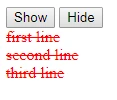
In our current implementation, the Show function will show the element in blue color and the Hide function will show the element in red color with stricken text in it.
Following is the HTML code for the same.
- <input id="show" type="button" value="Show" />
- <input id="hide" type="button" value="Hide" /><br />
- <div class="elems">first line</div>
- <div class="elems">second line</div>
- <div class="elems">third line</div>
The output will be.

Let's modify the JS file to override the jQuery Show and Hide functions.
- $.fn.show = function() {
- this.each(function() {
- $(this).css("color", "blue");
- $(this).css("text-decoration", "none");
- });
- return this;
- };
- $.fn.hide = function() {
- this.each(function() {
- $(this).css("color", "red");
- $(this).css("text-decoration", "line-through");
- });
- return this;
- };
Let me explain the above code.
Here, $ stands for Jquery, fn stands for prototype and show/hide is the function. I am trying to replace the show/hide function in prototype of JQuery with my own function.
Here, $ stands for Jquery, fn stands for prototype and show/hide is the function. I am trying to replace the show/hide function in prototype of JQuery with my own function.
In this way you will be able to add a new function into your JQuery also.(by creating a IIFE while loading), I have made another additional improvement by implementing chaining in these functions,which is not available by default in JQuery.
Let's see how the code behaves. Add the following code to implement onClick for both the buttons.
- $("#show").click(function() {
- $('.elems').show();
- });
- $("#hide").click(function() {
- $('.elems').hide();
- });
After clicking the Show button.

After clicking the Hide button.
I hope it would help you understand the jQuery in a better way and this tip will be helpful in your project. Please feel free to try out the code here.
Please provide your comments/feedback.
Sagar Pandurang KapPosted Jan 30, 2018, 1:24 AM
Great piece of stuff..