

Popover Plugin in Bootstrap
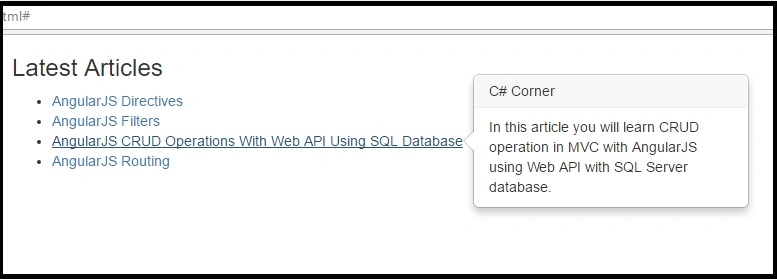
The Popover plugin works the same as tooltips. It opens a popup box when the user clicks on an element. The only difference is that popover can contain more content then tooltip.
There are following popover methods:
- popover(options) – Activates the popover with an option. See options above for valid values
- popover("show") - Shows the popover
- popover("hide") – Hides the popover
- popover("toggle") - Toggles the popover
- popover("destroy") - Hides and destroys the popover
Example:
- <!DOCTYPE html>
- <html>
- <head>
- <title>Popover Plugin Sample</title>
- <meta charset="utf-8">
- <meta name="viewport" content="width=device-width, initial-scale=1">
- <link rel="stylesheet" href="https://maxcdn.bootstrapcdn.com/bootstrap/3.3.7/css/bootstrap.min.css">
- <script src="https://ajax.googleapis.com/ajax/libs/jquery/1.12.4/jquery.min.js"></script>
- <script src="https://maxcdn.bootstrapcdn.com/bootstrap/3.3.7/js/bootstrap.min.js"></script>
- </head>
- <body>
- <div class="container">
- <h3>Latest Articles</h3>
- <ul>
- <li>
- <a href="#" data-toggle="articletitle" data-trigger="focus" data-placement="right" title="C# Corner" data-content="In this article, you will learn about Directives in AngularJS.">AngularJS Directives</a>
- </li>
- <li>
- <a href="#" data-toggle="articletitle" data-trigger="focus" data-placement="right" title="C# Corner" data-content="In this article, we will learn about AngularJS Filters.">AngularJS Filters</a>
- </li>
- <li>
- <a href="#" data-toggle="articletitle" data-trigger="focus" data-placement="right" title="C# Corner" data-content="In this article you will learn CRUD operation in MVC with AngularJS using Web API with SQL Server database.">AngularJS CRUD Operations With Web API Using SQL Database</a>
- </li>
- <li>
- <a href="#" data-toggle="articletitle" data-trigger="focus" data-placement="right" title="C# Corner" data-content="In this article, we will learn how to use Routing in AngularJS.">AngularJS Routing</a>
- </li>
- </ul>
- </div>
- <script>
- $(document).ready(function () {
- $('[data-toggle="articletitle"]').popover();
- });
- </script>
- </body>
- </html>
Output:

Conclusion
This blog shows how to use the Bootstrap Popover plugin in HTML 5. If you have any questions or comments, drop me a comment in the C# Corner comments section.
Hussain PatelPosted Oct 3, 2016, 11:57 PM
Awesome..
Humayun Kabir MamunPosted Oct 3, 2016, 10:42 AM
Nice...