

Example
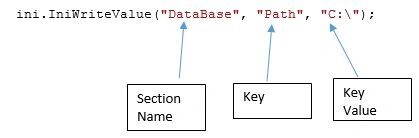
[Data base]-------->Section Value.
Path=""--->value you can write.
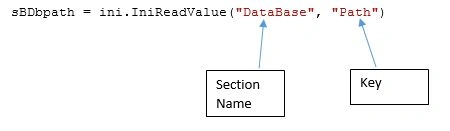
Also u can read data from same way.
Code
First import some dll of the system.
- [DllImport("kernel32")]
- private static extern long WritePrivateProfileString(string section, string key, string val, string filePath);
- [DllImport("kernel32")]
- private static extern int GetPrivateProfileString(string section, string key, string def, StringBuilder retVal, int size, string filePath);
- /// <summary>
- /// this constructor we have to give path of ini file
- /// </summary>
- /// <param name="INIPath">string</param>
- public IniFile(string INIPath)
- {
- path = INIPath;
- }
- /// this constructor will take default spm.ini file
- /// </summary>
- public IniFile()
- {
- path = Application.StartupPath + @ "\Info.ini";
- }
- /// it use to write value in given section and key
- /// </summary>
- /// <param name="Section">string</param>
- /// <param name="Key">string</param>
- /// <param name="Value">string</param>
- public void IniWriteValue(string Section, string Key, string Value)
- {
- WritePrivateProfileString(Section, Key, Value, this.path);
- }
- /// <summary>
- /// read value from given section and key
- /// </summary>
- /// <param name="Section">string</param>
- /// <param name="Key">string</param>
- /// <returns>string</returns>
- public string IniReadValue(string Section, string Key)
- {
- StringBuilder temp = new StringBuilder(255);
- int i = GetPrivateProfileString(Section, Key, "", temp, 255, this.path);
- return temp.ToString();
- }
To Read the Data from the Text Or .ini File:
Join the conversation! Your thoughts help the community grow.