

Reading A CSV File Using HTML5 And jQuery
In this blog, we will learn how to read a CSV file from the client-side and display its contents in an Html table by making use of the FileReader() method in HTML5 & Jquery.
First, we will create a file upload button, HTML table, which is hidden first and an input button, which on clicking calls the function to export CSV data to the table.
- <input type="file" id="csvfile" />
- <input type="button" id="viewfile" value="Export To Table" onclick="ExportToTable()" />
- <br />
- <br />
- <table id="csvtable">
- <thead>
- <tr>
- <th>
- Name
- </th>
- <th>
- Job
- </th>
- <th>
- City
- </th>
- <th>
- State
- </th>
- </tr>
- </thead>
- <tbody></tbody>
- </table>
Now, our JavaScript function ExportToTable() is given below.
- < script type = "text/javascript" >
- function ExportToTable() {
- var regex = /^([a-zA-Z0-9\s_\\.\-:])+(.csv)$/;
- //Checks whether the file is a valid csv file
- if (regex.test($("#csvfile").val().toLowerCase())) {
- //Checks whether the browser supports HTML5
- if (typeof(FileReader) != "undefined") {
- var reader = new FileReader();
- reader.onload = function(e) {
- var table = $("#csvtable > tbody");
- //Splitting of Rows in the csv file
- var csvrows = e.target.result.split("\n");
- for (var i = 0; i < csvrows.length; i++) {
- if (csvrows[i] != "") {
- var row = "<tr>";
- var csvcols = csvrows[i].split(",");
- //Looping through each cell in a csv row
- for (var j = 0; j < csvcols.length; j++) {
- var cols = "<td>" + csvcols[j] + "</td>";
- row += cols;
- }
- row += "</tr>";
- table.append(row);
- }
- }
- $('#csvtable').show();
- }
- reader.readAsText($("#csvfile")[0].files[0]);
- } else {
- alert("Sorry! Your browser does not support HTML5!");
- }
- } else {
- alert("Please upload a valid CSV file!");
- }
- }
- lt;
- /script>
Our sample CSV file contains the data given below.
- Midhun, Developer, Pune, Maharashtra
- Rajeev,Tester,Mumbai,Maharashtra
- Dhanya, Designer, Rajkot, Gujarat
- Preethi, Developer, Bangalore, Karnataka
Now, on selecting this CSV file and clicking on the "Export To Table" button will export the data to the table, as shown below.
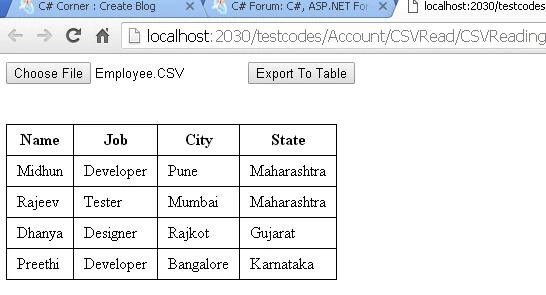 I hope this will be helpful!
Rohit SharmaPosted Sep 23, 2019, 6:00 AM
My csv file size is 111 mb, while I am uploading it, Browser got crashed. Any Lead or suggestion.
Aruljothy SundaramoorthyPosted May 1, 2017, 4:29 AM
Awesome Bro....... and i want to know about how to view the CSV file using XML