

Regular Expression and Require Field Validator in ASP.NET
Hi!
Here i will show you step by step procedure how to use
Regular Expression and Require Field in ASP.NET in visual studio 2005 / 2008
Regular Expression and Require field validator are used to restrict the user to enter wrong email id and web site name and also restrict to leave the text box blank...
__________________________________________________
Here I am using Visual Studio 2008 but there is no condition you can use Visual Studio 2005 also.
So follow these steps to create Regular Expression and Require Field
The Steps are:
1- Start -> All Programs -> Visual Studio 2005 or Visual Studio 2008
2- Now go to File Menu -> New -> Web Site
3- Under Visual Studio Installed Template-> Choose ASP.NET WEB SITE -> Choose File System from the location combo box -> Set the path by the browse button - > Choose the language from the Language ComboBox (Visual C# , Visual Basic , J #)
Choose Visual C#
4 - Click on the OK Button:-
First you have to learn XML and HTML to work with ASP .NET_
I have used <! – –> to make the text as comment this is the way to make comment in this code …
This is the Source Code window and in this page you will se this code…
<%@ Page Language=”C#” AutoEventWireup=”true” CodeFile=”Default.aspx.cs” Inherits=”_Default” %>
<!DOCTYPE html PUBLIC “-//W3C//DTD XHTML 1.0 Transitional//EN” “http://www.w3.org/TR/xhtml1/DTD/xhtml1-transitional.dtd”>
<html xmlns=”http://www.w3.org/1999/xhtml”>
<head runat=”server”>
<title>Type your webpage title here</title>
<!– Here you can specify your page title in
between title tag ->
</head>
<body>
<form id=”form1? runat=”server”>
<div>
<!– In between div tags you can manage your web
controls like buttons, labels, picture
Box, ImageMap etc –>
</div>
</form>
</body>
</html>
See here is a tab named Design in the bottom of this page
5- Click on this tab and you will see a blank web page where you can drag any control from the toolbox (which is in the left side of this window)
Open Web.config file and write true in place of false, See
<compilation
debug="true">
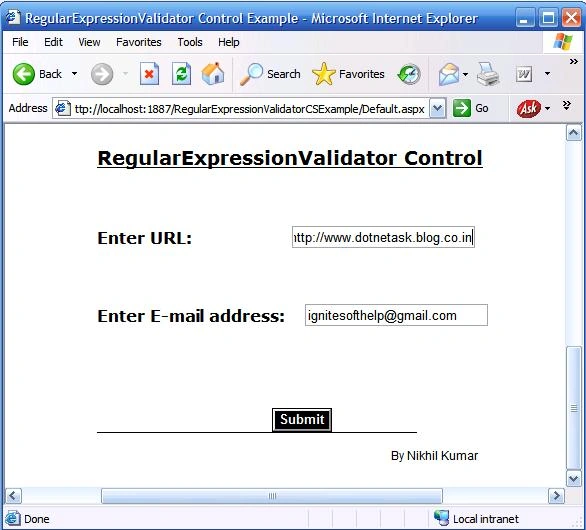
6- Drag Two TextBox, Three Label, and one Button control …
7- Now go in Source code window and set your code like this…Please don’t be frustrate first see and
understand it’s really simple …
asp:Label ID="Label1" runat="server"
Font-Bold="True"
Font-Size="Medium"
Font-Underline="True" Text="RegularExpressionValidator Control"></asp:Label>
<br />
<br />
<br />
<asp:Label ID="Label2" runat="server" Font-Bold="True" Font-Size="Small"
Text="Enter
URL:"></asp:Label>
<asp:TextBox ID="TextBox1"
runat="server"
Width="177px"></asp:TextBox>
Join the conversation! Your thoughts help the community grow.