To demonstrate this scenario, I will retrieve user profiles and store it into GridView.
Here is my .aspx code
- <table style="width: 900px; padding: 20px;">
- <tr>
- <td>Find profiles :</td>
- <td>
- <asp:TextBox runat="server" ID="txtUserID"></asp:TextBox>
- <asp:Button runat="server" ID="btnSearch" Text="Find" OnClick="FindUserProfile" />
- </td>
- </tr>
- </table>
- <div id="divUserProfilesGrid" runat="server">
- <hr />
- <p>Following user profiles are found by this search :</p>
- <br />
- <div style="height: auto;overflow-y: auto;max-height:215px">
- <asp:GridView ID="grdUserProf" runat="server" CellPadding="4" ForeColor="#333333" GridLines="None">
- <AlternatingRowStyle BackColor="White" />
- <EditRowStyle BackColor="#2461BF" />
- <FooterStyle BackColor="#507CD1" Font-Bold="True" ForeColor="White" />
- <HeaderStyle BackColor="#507CD1" Font-Bold="True" ForeColor="White" />
- <PagerStyle BackColor="#2461BF" ForeColor="White" HorizontalAlign="Center" />
- <RowStyle BackColor="#EFF3FB" />
- <SelectedRowStyle BackColor="#D1DDF1" Font-Bold="True" ForeColor="#333333" />
- <SortedAscendingCellStyle BackColor="#F5F7FB" />
- <SortedAscendingHeaderStyle BackColor="#6D95E1" />
- <SortedDescendingCellStyle BackColor="#E9EBEF" />
- <SortedDescendingHeaderStyle BackColor="#4870BE" />
- </asp:GridView>
- </div>
- <hr />
- </div>
For this scenario we need to add references to assembly.
- using Microsoft.SharePoint;
- using Microsoft.Office.Server;
- using Microsoft.Office.Server.UserProfiles;
On the click of Find button we are executing following code.
- SPServiceContext serviceContext1 = SPServiceContext.GetContext(SiteUrl);
- UserProfileManager upm = new UserProfileManager(serviceContext1);
Here in above line we are creating object of SPServiceContext class that takes site collection url as parameter and creating UserProfileManager class to use that service contest.
- string EnterSearchData = _filterName;
- string[] searchPattern = EnterSearchData.Split(',').ToArray<string>();
This is the array of string (i.e. search data)
- ProfileSearchManager sp = ProfileSearchManager.GetProfileSearchManager(serviceContext1);
- ProfileBase[] baseArray = sp.Search(searchPattern, ProfileSearchFlags.User);
ProfileSearchManager class is available in Microsoft.Office.Server.UserProfiles assembly which provides the search method which take string array and ProfileSearchFlags.User this ENUM value.
Now we are taking value from user profile and assigning to data table on row by row basis.
- if (baseArray != null)
- {
- DataTable table = new DataTable();
- table.Columns.Add("AccountName", typeof(string));
- table.Columns.Add("PreferredName", typeof(string));
- table.Columns.Add("Email", typeof(string));
- table.Columns.Add("Title", typeof(string));
- table.Columns.Add("Department", typeof(string));
- foreach(ProfileBase base2 in baseArray)
- {
- DataRow row = table.NewRow();
- UserProfile profile = base2 as UserProfile;
- if (profile["AccountName"] != null)
- {
- row["AccountName"] = profile["AccountName"].Value;
- }
- if (profile["PreferredName"] != null)
- {
- row["PreferredName"] = profile["PreferredName"].Value;
- }
- if (profile["WorkEmail"] != null)
- {
- row["Email"] = profile["WorkEmail"].Value;
- }
- if (profile["Title"] != null)
- {
- row["Title"] = profile["Title"].Value;
- }
- if (profile["Department"] != null)
- {
- row["Department"] = profile["Department"].Value;
- }
- table.Rows.Add(row);
- }
- grdUserProf.DataSource = table;
- grdUserProf.DataBind();
- }
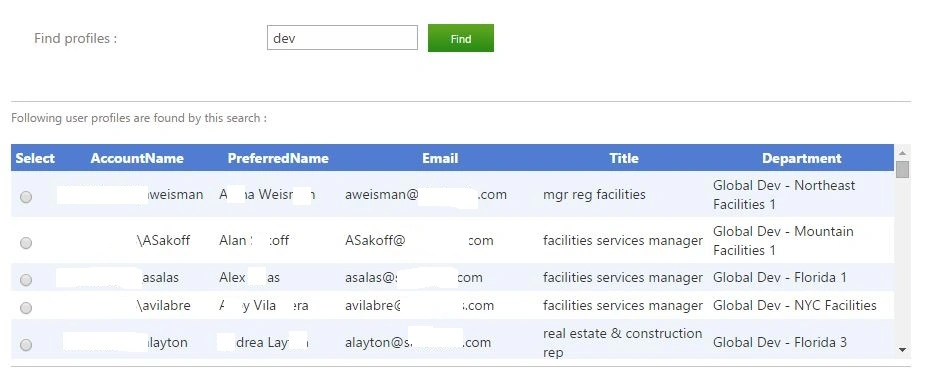
Following is the screenshot for result.


Join the conversation! Your thoughts help the community grow.