

The RowDataBound event
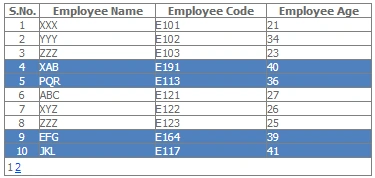
occurs when a data row is bound to data in a GridView control. This event is
raised a data row means GridViewRow object is bound to data in GridView
control.
By help of this event we
can modify row appearance or can modify data in data row at time of GridViewRow
object bounds.
A
RowDataBound event of gridview has two arguments one is object and another is
GridViewRowEventArgs. GridViewRowEvnetArgs object enables us to access the
properties of row that is bounding because
GridViewRowEventArgs object has Row property.
Design Of Gridview and
DataSource
<asp:GridView ID="gvCustomres" runat="server"
DataSourceID="EmployeeDataSource"
AutoGenerateColumns="False"
GridLines="Both"
AllowPaging="true"
PagerStyle-CssClass="pgr"
Width=40%
onrowdatabound="gvCustomres_RowDataBound">
<Columns>
<asp:TemplateField HeaderText="S.No."
ItemStyle-HorizontalAlign="Center">
<ItemTemplate>
<%#Container.DataItemIndex+1%>
</ItemTemplate>
</asp:TemplateField>
Join the conversation! Your thoughts help the community grow.