

Recently, a developer reported that they were not able to open the Visio file in SharePoint site level. They are getting an error like “The server failed to process the request”.

Here are the steps that we need to follow to fix this issue.
This solution will work on SharePoint 2010, 2013 and 2016 as well.
-
Log in to the server and verify that the Visio Service Application is created.
To check the same, go to CA>Click on Manage Service Applications.
Now, navigate the page down and verify Visio Graphics Service Application is created and started
Also, check from Central Administration>System Settings>Manage services on the server and check if the Visio Services were running.
- Now, we will open SharePoint Management Shell with Admin rights and execute the below-given command.
Get-SPServiceApplication -DisplayName "{Visio Graphics Service Application}"

-
Now, execute the following command to find the Service account used for Visio Service Application.
Get-SPServiceApplicationPool -Name "Visio Graphics Service Application"

-
Now, we have Service name and service account name. We need to get Content Db name for Site and assign the SPdataAccess.
-
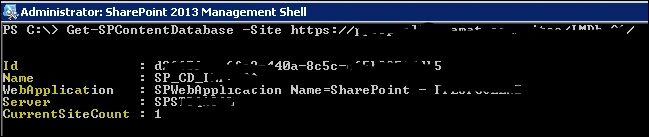
To get the site collection Content DB there are two ways to get the same result, one is from PowerShell command and the other one using GUI mode. Executing the command will be the easiest way to get Content DB name and SQL Server instance name.
Get-SPContentDatabase -site http://contoso.com/sites/test
The result would be like the below screenshot.
-
Now, login to the SQL server with the above server instance name and verify the above-given service account is added under SQL security group or not, if it’s not added, add this user.
-
Right-click on the Added user and click on User Mapping option, there will be many dB names available identify the Content DB which you got from site collection URL.
-
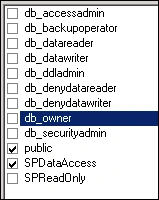
Now, select that DB and assign SPDataAccess permission to the same and click on OK.
-
Now, go back to the site and open the Visio file and you will get the vision opened on the page.
Join the conversation! Your thoughts help the community grow.